
Tag Archives: PHP

Ubuntu – Install APC with PHP-FPM and Nginx
Next: Ubuntu – Install Memcached with PHP-FPM and Nginx

APC stands for Alternative PHP Cache is a opcode which also known as machine code. The opcode is cached such that every time a request is sent to server, the same opcode is used until it detects a change in the PHP file.

Installation is easy and straight forward.

1. Install using apt-get.

  • apt-get install php-apc

Continue reading Ubuntu – Install APC with PHP-FPM and Nginx
Nginx + PHP-FPM on Ubuntu Precise

Previous post: Nginx – Installation on Ubuntu Precise

Most of the time we would like to run PHP on our web server. After you have installed Nginx following the post above. We can now enable PHP.

1. Install the PHP packages.

apt-get install php5-fpm
apt-get install php5-cli
apt-get install php5-gd
apt-get install php-pear

Continue reading Nginx + PHP-FPM on Ubuntu Precise

PHP – Get the next month by strtotime

I am working on a Hotel Booking website. The booking feature is provided by Hotel Booking System for Ubercart. But this module is not actively maintained so there are some bugs which i have to fix it for myself.

One of the bug is about strtotime(‘+1 month’). Intuitively, you may think you could get a date of next month. But here comes the problem. Assume you are now on 31st Jan. Since February only has 28 days (sometimes 29), strtotime(‘+1 month’) will return 3rd Mar.
Continue reading PHP – Get the next month by strtotime

Drupal 7 – Core drag and drop not working

One day after i migrated a Drupal 7 website to a client’s server, the core drag and drop feature did not work. In addition, i could not edit the Context because nothing was shown when i select the condition. The Show row weights link was also missing.

Finally i found that i was not the only one who came across this problem. The following post is a similar scenario and probably the failure was caused by the PHP 5.3 on the client’s server.
Drupal Core – Drag and drop not working
 

Anyway, after i have enabled the Aggregate JavaScript files in Administration » Configuration » Development » Performance, the problem was gone.

Done =)

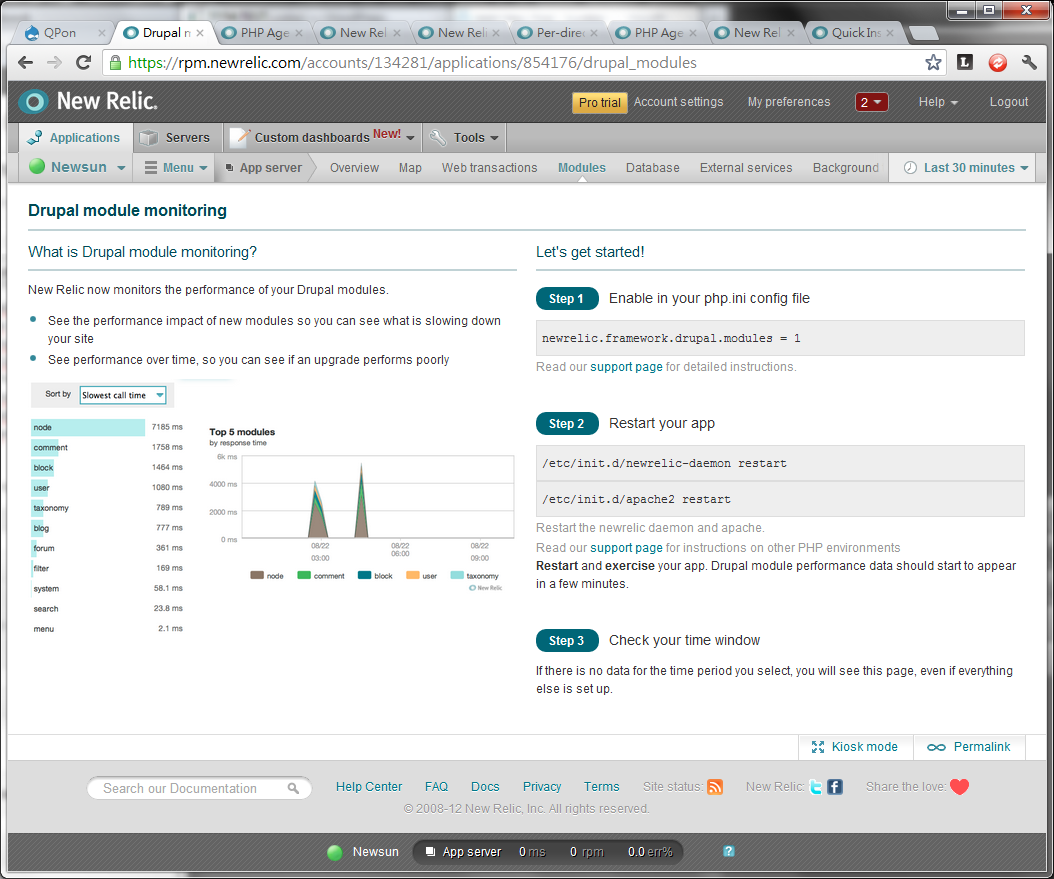
New Relic – Enable Drupal module monitoring

New Relic supports the following list of PHP frameworks.

  • Drupal 6 and 7
  • WordPress
  • CakePHP 1.2, 1.3 and 2.*
  • CodeIgniter 2
  • QDrupal
  • Joomla 1.5 and 1.6
  • Symfony 1
  • Yii
  • Zend Framework 1
  • Magento 1.5 and 1.6
  • MediaWiki
  • Kohana

If you are monitoring a Drupal website, you will find the module tab on the Application menu.

Continue reading New Relic – Enable Drupal module monitoring

New Relic – Monitor multiple web applications or virtual hosts

If you follow the New Relic instruction to setup the daemon. You will get all web applications as a single New Relic App named as PHP Application in the New Relic application console.

So how could we setup multiple New Relic Apps for different virtual hosts in Apache? Here you are.

1. Make sure you have enabled the Apache php5 module. If it is not enabled, enable it by the following command with root privilege.

a2enmod php5

Continue reading New Relic – Monitor multiple web applications or virtual hosts

PHP – Add text on an image with background color and save it on the server

About one and a half year ago, i published a blog post about adding text to image in PHP.
PHP – Add Text on an Image

The above example only display the image in browser, but it would not save the image on the server. Today i would like to show you another example which could save the image with text added on server.

What you need is 3 files.

  • index.php
  • kenshin.jpg (The image which you wanna add text on it)
  • arial.ttf (Or any other .ttf font file)

Continue reading PHP – Add text on an image with background color and save it on the server

DumpCamp – Introduction to New Relic


In the 2nd DumpCamp meeting, Ronnie showed us a SAAS service called New Relic which provides Application Performance Management solution mainly for web applications and servers. It’s capabilities include but not limit to:
 

  • Performance analytics on Ruby, Rails, PHP, Java, .Net, Python applications
  • Real User Monitoring
  • Server Monitoring
  • SQL/NoSQL Performance Monitoring
  • Web Application Transaction Tracing

The Lite account is free and i tried it today. The setup is easy and straight forward. Just register an account online with some configurations on your web server through SSH. Then you could views your server and web application performance online.
Continue reading DumpCamp – Introduction to New Relic