In Drupal, you can add your Javascript to module or theme. If the javascript is related to the module logic and independent of the theme, we should add the .js file in the module. Moreover, Drupal already includes the JQuery library. So we can use the JQuery functions in the .js file.
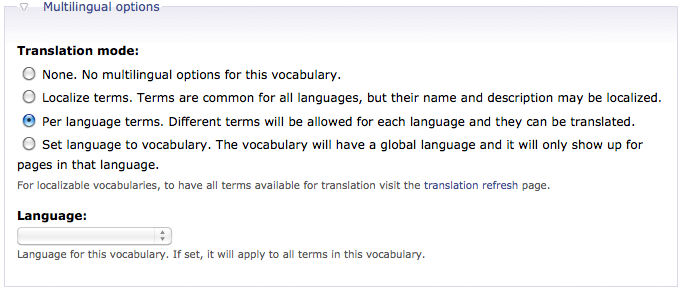
The i18n module provides the Taxonomy Translation feature. After you have enabled it, edit the vocabulary which you want to localize and set the Multilingual options to Per language terms. Continue reading Drupal – Taxonomy Translation→
You can make some JQuery UI function with the help of the JQuery UI module. For example, the Date module of CCK allows the Date Popup feature which required JQuery UI. The current support version for JQuery UI is 1.6.
I want to create a taxonomy view which shows the term name and the term image. For those terms without term image, i want to filter out them. Unfortunately there is no term image filter in the view setting. One work around is overriding the view query by implementing the hook_views_pre_execute(&$view) in a custom module. Before you construct the new SQL, you should set all your desire settings in the view editing page first. Then you can create a new SQL base on that view query.
All Drupal contents are base on node. Whatever contents you create, it has a url http://<drupal_root>/node/<node_id>. For each content, you can customized the URL alias but think about if you have 100 nodes, you will not enjoy setting the each alias manually. It’s better to pass the job to PathAuto.
Localization with Ubercart is somehow a bit difficult. Assume we have 2 languages, English and Traditional Chinese, installed. For a particular product, there will be one node representing the English one and the other node representing the Traditional Chinese one. If you add the English node into the cart, it will not be translated in the cart and checkout page. In other words, they are treated as 2 different products.
The Ubercart module is a complete E-Commerce suite which turn your Drupal website into an online store. It is a very big module which contains a lot of features. In this article, i will try to show you those basics but actually i am not intimate with it very well.
Before you start, it is recommended that Imagecache, CCK Image field and Views are installed. This allows our store product image showing to the customers.
The translated node itself has not relation with the original node except their node ids are mapped. So I can have a price $10 in the English item but $1000 in the Traditional Chinese item. It will be quite difficult to manage when the amount of content is getting more and more. Therefore, i18n provides another feature called Synchronize Translations. Whenever a node is updated, the synchronized fields of all other corresponding nodes are also updated. Continue reading Drupal – Synchronize Translation→
The i18n module not only helps translating the Drupal website, it also helps user to manage the translations of the contents/nodes. Once you have enabled the Internationalization in the i18n module, the Content Translation is also activated.

 Eureka!