
Taxonomy Menu helps you create menus for Vocabulary. First, install the Taxonomy Menu.
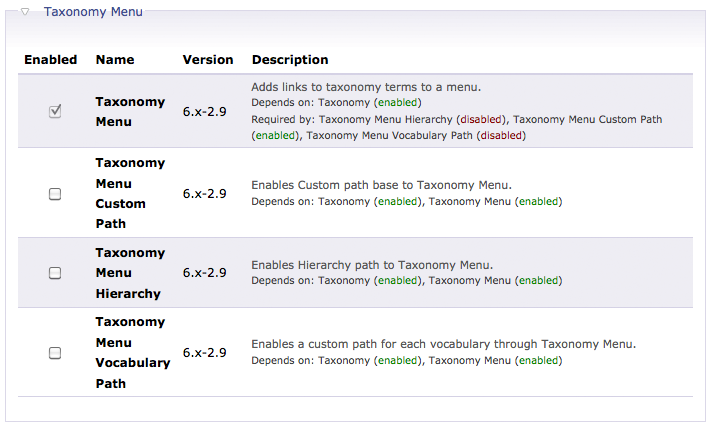 Continue reading Drupal – Create a Taxonomy Menu
吳志森 – 無良偽君子 奸商真小人
究竟香港的空氣和土壤有甚麼問題,培植出大家樂這種無良僱主?
如果大家樂對即將公佈的最低工資時薪廿八大元提出異議,表示太高無法接受,老闆陳裕光憤而辭去「臨時最低工資委員會」委員之職以示抗議,像張廿蚊一樣厚着臉皮硬着頭皮堅持到底,擺明車馬要做無商不奸的真小人,相信港人還會對你保留三分尊敬。但大家樂卻用「配合最低工資政策實施」為藉口,名義加薪實質減糧,但做了又不敢承認,諸多理由,死不認錯,做偽君子也做得鬼鬼祟祟,除了使人不屑之外,剩下的,甚麼都沒有了,就只有公眾的涎沫。
大家樂管理層要求屬下員工簽署「僱聘資料變動確認書」,時薪增加兩元至三元半,但清楚寫明「用膳時間不計算在有薪工作時數內」。連小學程度的算術都能準確無誤的計出來:加薪兩元,由二十二元增至二十四元,八小時工作,扣減四十五分鐘飯鐘錢,每日減薪兩元。由二十五元增至二十七元,每日減薪四元二角五分。如果加薪兩元五角,由二十五元增至二十七元五角,每日減薪六角二分五。要加薪至三元,才有機會出現正數,每日增薪三大元 Continue reading 吳志森 – 無良偽君子 奸商真小人
Drupal – Add Image for Taxonomy
Taxonomy allows you to add Categories and Tags to node. Previously i have created some terms/tags for the Stories vocabulary/category.
Drupal – Manage Categories and Tags by Taxonomy
So now i want to add an image for each of the terms under the Stories. So what you need is a Drupal module called Taxonomy Image.
Enable the Taxonomy Image in Drupal. Continue reading Drupal – Add Image for Taxonomy
陶傑 – 仇富解剖
香港明明在鬧「仇富」,特府師爺班子急忙否認,指「仇富」只是「誇大其辭」,市民只是對政府「扶貧政策力度不足」覺得不滿。
扶貧力度不足,那就「加大扶貧力度」好了,但「扶貧」加大到什麼力度?增加綜援?增加老人金?還是像法國政府那樣,為全民確立「退休保障」,六十歲之後,可終身領取薪金的八成?
「扶貧」再「加大力度」下去,必違反基本法第五條:「香港特區不實行社會主義制度和政策。」事實上,特府的最低工資,在技術上,已經違反了基本法第五條。
哪些政策是社會主義,哪些不是,由誰來詮釋?「人大常委」、北歐的挪威和芬蘭政府、倫敦大學社會系教授,還是叫問米婆請來馬克思?難怪城中有富豪公然抗命,聲言「錢是我的」,就是不捧場。因為「關愛行動」明顯「政治化」,扯上特首寶座之戰,政府製造政治紛爭,無端生事,又何其假?
香港上一代富豪多白手起家,他們是香港人的一份子,而不是剝削者。那時的地產商不賺盡,市價每呎一千,只收七百,讓接貨的人有水位可撈。今日的富商,其中三兩個巧取豪奪,毫無底線,結果是民憤直指全香港的富人。 Continue reading 陶傑 – 仇富解剖
名言二十五
Nobody can be successful if he doesn’t love his work, love his job.
David Sarnoff
Drupal – Manage Categories and Tags by Taxonomy
Taxonomy is one of the Drupal Core Modules. Before you can apply categories and tags on node. You have to define them @ Administer –>> Content management –> Taxonomy.
In this example, i would like to specific some Tags for Stories node type. So i create a Vocabulary called Stories. You can allow user to enter his/her own Terms/Tags or multiple selection in the Settings tab. Continue reading Drupal – Manage Categories and Tags by Taxonomy
Rails – Installation on Ubuntu Lucid
Last time we complete the Ruby 1.9.2 installation on Ubuntu Lucid.
Ruby – Installation on Ubuntu Lucid
Similar to the above post, run the following commands in your own account but not root account. Let’s proceed to the Rails 3.0 installation now.
1. Install Rails 3.0
- gem install i18n tzinfo builder memcache-client rack rack-test rack-mount erubis mail text-format thor bundler
- gem install rails
Drupal – Show Content in Tab
The Quick Tabs module allows you to show data in tab form. The newly created tab is actually a Block which can also be shown in Panel.
After you have installed a Quick Tabs, you can find it @ Adminster –> Site building –> QuickTabsM.
I have created a Stories Tab with Arrows style. Continue reading Drupal – Show Content in Tab
Drupal – Image and Image Gallery
The Image module allows you to add new node with a new content type called Image. The uploaded image could be viewed in original size, thumbnail size and previews size. This can be configure @ Administer –> Site configuration –> Images.
I would like to share two more features in this module.
- Image Attached – Allow you to add images in other content types
- Image Gallery – Group the Image nodes into Image Gallery by Taxonomy (include Views support if you have Views 6.x-2.6 or later)
After you have enabled the Image Attached features in your Drupal. you can now allow image upload in content types. Just go to a particular content type edit page and you will find the Image Attached settings. Continue reading Drupal – Image and Image Gallery
Ruby – Installation on Ubuntu Lucid
I always wants to try Ruby but i didn’t determine to make it. Now i decide to create an Ruby on Rails web application as a learning goal.
So the first thing is to setup the development environment. As stated in the Rails documentation, there maybe some problems when running on Windows. so i created a virtual machine which is a Ubuntu Lucid and get everything ready there. Moreover, Rails 3.0 requires Ruby 1.9.2. So let’s start install the ruby first.
Please note that the following steps does not require root account. Just login with your own account with sudo enabled. Continue reading Ruby – Installation on Ubuntu Lucid
 Eureka!