In VBA, there is 3 types of Newline characters.
- vbCr – Carriage Return CR
- vbLf – Line Feed LF
- vbCrLf – Carriage Return CR + Line Feed LF

In VBA, there is 3 types of Newline characters.
If you get the following message when you connecting to a server through SSH, most likely the server side has changed authorization key.
@@@@@@@@@@@@@@@@@@@@@@@@@@@@@@@@@@@@
@ WARNING: REMOTE HOST IDENTIFICATION HAS CHANGED! @
@@@@@@@@@@@@@@@@@@@@@@@@@@@@@@@@@@@@ Continue reading Mac/Linux – SSH Host Key Verification Failed
Last time we talked about how to clear DNS Cache in Mac.
Mac – Clear DNS Cache
How about flushing DNS Cache in Windows? The following command will do. Open command prompt and enter it. Continue reading Windows – Clear DNS Cache
Enter following command in Terminal to flush the DNS cache.
Done =)
Reference: How to Clear DNS Cache in Mac OSX Leopard
In Mac Terminal:
I would like to set the action of the fn + left arrow as to be Home of Line as well as End of Line for fn + right arrow. So you can open the Terminal Preference –> Settings –> Keyboard Widget. Continue reading Mac – Setting Home and End of Line in Terminal
Usually, people got more than one website in the Apache web server and sometimes they want to separate them into different domain names. This can be done by the Apache VirtualHost.
The following example is done in Mac MAMP, i guess the configuration on Linux and Windows should be similar. Let’s start now.
1. I have 2 folders in the Apache webroot folder
The following command could show you the character encoding set of a specific file.
file -I <filename>
Possible output:
<filename>: text/plain; charset=us-ascii
Please note that the paraemeter -I is the capital letter of i but NOT smaller letter of L.
Reference: StackOverflow – How do I determine file encoding in OSX?
Done =)
MAMP is Apache, MySQL and PHP runs on Mac. For Mac users, it is very convenient to use the MAMP package such that they don’t need to install the those application one by one. Moreover, MAMP package also bundled with some other useful programs as well as libraries such as phpMyAdmin and the PHP GD library. For more information, you can refer to the MAMP website.
During the installation, you can include the MAMP control panel into you Mac Dashboard. This is quite helpful for you to start and stop the server. you can also pick either PHP4 or PHP5 by switching to the back panel by clicking the i button which is located under the Apache label on the front panel.
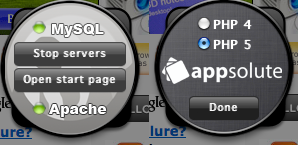
Continue reading MAMP – Introduction
When you have modified the database during the iPhone Application Development, you have to remove the application in the iPhone Simulator so as to remove the outdated database. Then build and run you latest code and that will apply the new database to the iPhone Simulator.
Continue reading iPhone – Delete Database Cache in iPhone Simulator
Xcode is the IDE for developing iPhone and Mac Program. It would be much more convenient for developers if the IDE is integrated with version control tools like Subversion.
Xcode is installed with the SCM tool. The following steps show you how to checkout a project from a SVN repository in Xcode.
Continue reading Xcode and Subversion
 Eureka!