To check your file encoding/charset. Use the following command.
file --mime-encoding <filename>
Possible output:
<filename>: utf-8

To check your file encoding/charset. Use the following command.
file --mime-encoding <filename>
Possible output:
<filename>: utf-8
Previously i have setup a server with Nginx and MariaDB.
Run Drupal 7 in Nginx
But there is one problem in this setup. I cannot restart the MariaDB service. Whenever it is down, i have to restart the server instance.
At first, i thought the failure is caused by the modification of the /etc/mysql/my.cnf. So i try to restore the original my.cnf. The following solution helps you to restore the default package configuration file.
Continue reading Ubuntu – Recover package configuration file using apt-get
Haven’t worked with CentOS for a long time. Miss the time and the teammates in HKU CECID.
Here are the steps to install Alternative PHP Cache (APC) on CentOS.
1. Install the following packages.
yum install php-pear php-devel httpd-devel pcre-devel gcc make
Continue reading CentOS – Install Alternative PHP Cache (APC)
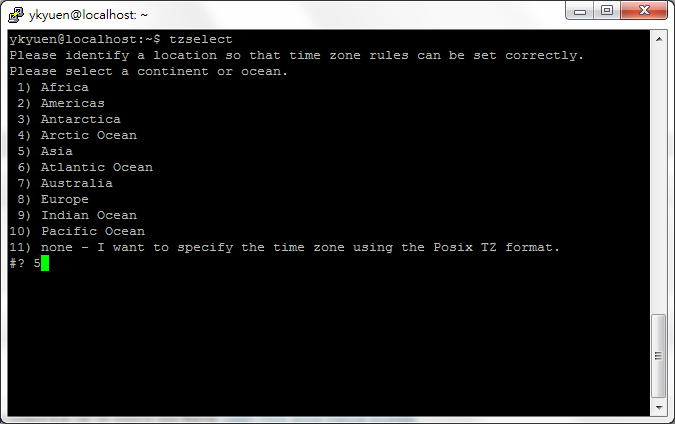
Each Linux user may want to have timezone different from the server. In Ubuntu, you can set it using the tzselect command.
1. Run the tzselect command and select the continent or ocean.
Continue reading Ubuntu – Set Timezone on user level
A file system check in Linux is equivalent to chkdsk in Windows. It can only run on unmounted drive so if you want to run it on the next reboot, you can use the following command.
shutdown -rF now
Continue reading Linux – Schedule file system check on next reboot
If you like to have more customization options on the display of your Ubuntu, MyUnity will be one of you favourite application.
Browse the following link to install MyUnity.
apt://myunity
With MyUnity, you can customize the launcher which is located on the left hand side. You can even configure the settings of the Dash Home as well as the fonts.
Continue reading MyUnity – Extra theme settings for Ubuntu
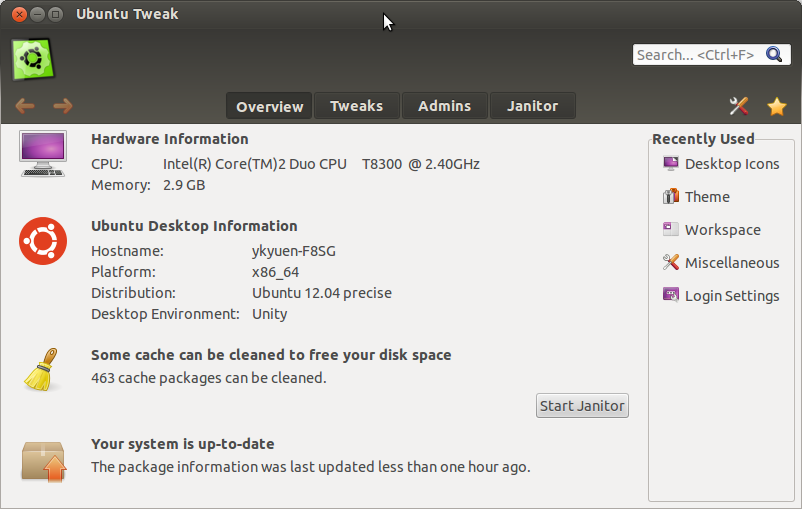
The Ubuntu Tweak provides some desktop and systems configuration options which the default Ubuntu settings does not provide.
Continue reading Ubuntu Tweak – The must have configuration tools for Ubuntu
If you are a long time Windows user, the Ubuntu default graphical user interface which has the launcher on the left hand side may be a bit unfamiliar to you.

Continue reading Cinnamon – Windows-like start menu on Ubuntu
My server was hacked. ToT
One day i found that i couldn’t login the server thru SSH and the CPU usage jumped to 100% for more than 12 hours. Finally i could login as root and found that a new user R00T was created and the SSH service was restarted with all settings in the sshd config file commented out. =.=
So from now on i will use Key Authentication instead of simple Password Authentication. Here is a very useful guide on Linode.com which shows you how to secure your server.
Linode Library – Securing Your Server
In order to use the Key Authentication, you need to generate the private key and public key on your desktop/labtop computers. This is straight forward if you are a Mac or Linux user who could use the ssh-keygen command. But for Windows user, you have to use 3rd party program like PuTTYgen. I suggest using WinSCP + PuTTY.
Continue reading Secure the SSH protocol by Key Authentication
When i am trying to setup a new server, most of the time i just used the default settings of Apache. But sometimes if the server is not equipped with enough RAM, the Apache service may consume all the server resources causing server failure. Here is an example for limited the resource comsumption by Apache.
Continue reading Ubuntu – Limit the RAM consumption by Apache
 Eureka!