
Sometimes we need to change the view template file (.tpl.php) in order to customized the layout of the specific view. Before you start editing, you have to find out the corresponding .tpl.php for your view. This can be found in the Views setting page as shown below. Continue reading Drupal – Customize a Specific View Layout by Views Template
Rails – Running RSpec with Spork Test Server
I am still continuing the tutorial @ Ruby on Rails Tutorial by Michael Hartl
Last time we have integrated the RSpec and Autotest in Rails 3.
Rails – Integrate Autotest and RSpec in Linux
But it seems that it takes quite long for RSpec to complete the tests. This is because RSpec reloads the entire Rails environment for each run. Spork Test Server helps you preloading the Rails environment which greatly reduces the time for running the test suite.
1. Add the spork gem in the Gemfile Continue reading Rails – Running RSpec with Spork Test Server
名言二十七
The more I see of the world, the more am I dissatisfied with it; and everyday confirms my belief of the inconsistency of all human characters, and of the little dependence than can be placed on the appearance of either merit or sense.
Elizabeth Bennet
Drupal – Theme the Breadcrumb
If you want to override the default breadcrumb HTML output, you can add the following theme_breadcrumb() function in the template.php under your current theme folder.
The following piece of code is an example which add a class for the current breadcrumb. Continue reading Drupal – Theme the Breadcrumb
Samba – Share Linux Folder to Windows
I want to share a folder in my Ubuntu virtual machine to my Windows host. That folder contains the Rails applications such that i can edit them on the Windows host.
1. Install the Samba server
- sudo apt-get install samba
jQuery – Select Box and Change Event
I found a very good article which shows how to manipulate the change event in select box using jQuery.
JETLOGS.ORG – jQuery: Select Boxes and change() events
Create the following .html and try it. Continue reading jQuery – Select Box and Change Event
Drupal – Add Javascript in Theme
As discussed before, we can add Javascript/JQuery in Drupal modules.
Drupal – Create Javascript for Module
So if the Javascript/JQuery is related to the layout and independent of the module, we should add it in the theme instead. For example, i want to have a alert box whenever a page is loaded, i should then add it to my current Drupal theme. The steps are listed below.
1. Open you current theme folder and add the following line in the theme.info.
- scripts[] = js/theme.js
Drupal – Add Javascript in Module
In Drupal, you can add your Javascript to module or theme. If the javascript is related to the module logic and independent of the theme, we should add the .js file in the module. Moreover, Drupal already includes the JQuery library. So we can use the JQuery functions in the .js file.
Let’s recall the custom module we have created in previously.
Drupal – Create a Block
i want to show an Javascript alert box whenever the block is shown. Let’s create a custom.js in <drupal_root>/sites/all/custom.
jQuery(document).ready(function() {
	alert("Hello World");
});
Apache – .htaccess VS httpd.conf
So if both .htaccess and httpd.conf can serve the same purpose (Apache – Disable Directory Listing), which one should we pick?
On performance point of view, .htaccess is read every time when the directory is loaded. and each directory can have it own .htaccess. so this may cause a performance hit but seems that it is not very significant.
The Fubra Blog – .htaccess vs httpd.conf
On the other hand, the situation may bother your choice. Not every user got the permission on writing the httpd.conf file and they may even do not have the right to restart the Apache Server. In this case, you have to use .htaccess to restrict the access right.
Here is a summary comparing .htaccess and httpd.conf. Continue reading Apache – .htaccess VS httpd.conf
Apache – Disable Directory Listing
Usually, the web root directory has folders containing the some files and images. When user browse the directory url in the browser, he/she could access those files and images as shown in the following picture.
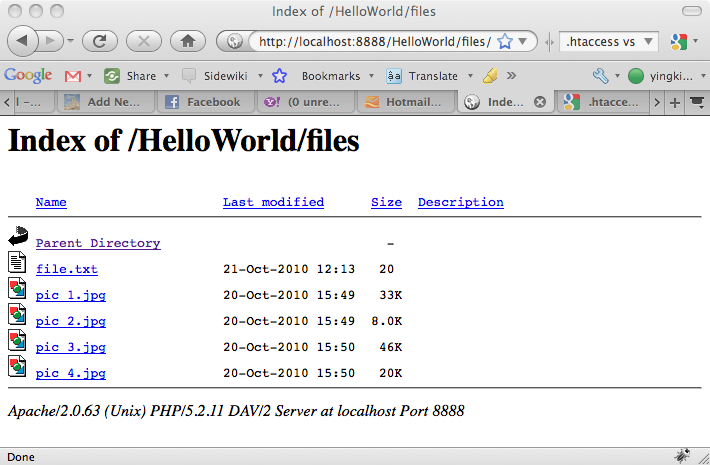 Continue reading Apache – Disable Directory Listing
 Eureka!