We can easily get the image style file path by image_style_url(). What you need is the image style name and the image uri.
image_style_url('<image-style>', <image-uri>);
Done =)
Reference:

We can easily get the image style file path by image_style_url(). What you need is the image style name and the image uri.
image_style_url('<image-style>', <image-uri>);
Done =)
Reference:
Sometimes we may want to update multiple nodes at once. Views Bulk Operations may help if you want to set the same value for a field of multiple nodes. But if you want to set different values among a set of nodes, then Views Bulk Operations could not help.
In Drupal 6, the Editview module may help but unfortunately there is no Drupal 7 version. An alternative solution could be done by editablefields module.
1. Download and enable the module. (I used the 7.x-1.x-dev version)
2. Create a view with table format. (This is not necessary but better user interface)
Continue reading Drupal 7 – Update multiple nodes at once in a Views
The last example is a pressed button effect. This time we don’t need the transition attribute. Instead, we need to make changes on the CSS attributes such as text-shadow and the background-image gradient on mouse hover. For more information, please refer to the original post by Joshua Johnson.
Joshua Johnson – Four Simple and Fun CSS Button Hover Effects for Beginners
Here comes the complete source code. Continue reading CSS3 – 3D pressed button
The 3rd example by is a background shift effect. This effect manipulate the background-position attribute.
Again, thanks Joshua Johnson for his great examples.
Joshua Johnson – Four Simple and Fun CSS Button Hover Effects for Beginners
You can use the following image bkg-1.jpg as the button background.

Continue reading CSS3 – Background shift button
Let’s continue the tutorial written by Joshua Johnson.
Joshua Johnson – Four Simple and Fun CSS Button Hover Effects for Beginners
The 2nd example is a button which has color shift when mouse hover. Continue reading CSS3 – Color shift button
「港人治港」是行不通的,尤其當前這一種──中國指定一兩「候選人」,由一千二百個「選委」看眼色裝模作樣「投票」。「候選人」又模仿着人家美國總統大選的電視辯論,裝模作樣的互相舌戰。一時之間,香港忽然有了像美國大選時的「民主氣氛」。
明明一切是假的,但香港這種戲,有趣的地方,是連操控着的幕後人,玩着一場集體催眠的遊戲,玩着玩着,人人Feel-good,當做了真。
但你看,人家美國的奧巴馬、羅姆尼,這樣選舉,如此辯論,人家才是來真的,香港這種,是一場最終自設自欺的騙局──不要以為愚弄了香港人,天理循環,愚弄了自己。
Continue reading 陶傑 – 昨天的成功
There is a few modules which could turn the Drupal login form in a popup.
Drupal Forum – how to display user login in a popup?
Among those suggestions, i would prefer using the Modal forms module.
1. Download and enable the module.
Continue reading Drupal 7 – Popup login from
We could implement some fancy effects by CSS3. There is a very good tutorial written by Joshua Johnson about some mouse hover effects in CSS3.
Joshua Johnson – Four Simple and Fun CSS Button Hover Effects for Beginners
The following example is a growing button which will elongate in width when mouse hover. Continue reading CSS3 – Elongate a button on mouse hover
The HTML5 Canvas let you draw graphics on the fly. So if you want to collect drawing in Drupal, the Canvas Field could help.
1. Download and enable the module.
2. Add an image field to any content type and select Canvas Widget as shown below.
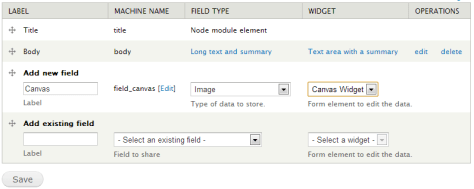
Continue reading Drupal 7 – Add HTML5 Canvas to content type
There is a default user login block in every Drupal instance. If you want to customize it layout, you could create your own user-login-block.tpl.php.
1. Edit your theme template.php and implement the following 2 functions. Continue reading Drupal 7 – Customize the login block
 Eureka!