If you want to use the <sshexec> or <scp> tasks in the maven-antrun-plugin , you may find the following error .
[ERROR] Failed to execute goal org.apache.maven.plugins:maven-antrun-plugin:1.3:run (default-cli) on project fraudcheck: An Ant BuildException has occured…
Just like what we have discussed in Apache Ant – Using scp and sshexec tasks in build.xml , you need to define the <sshexec> or <scp> tasks in the Ant script . Try to configure your pom.xml as follow.
...
<!-- Deployment using Ant -->
<plugin>
  <groupId>org.apache.maven.plugins</groupId>
  <artifactId>maven-antrun-plugin</artifactId>
  <version>1.7</version>
  <dependencies>
    <!-- Include Ant-Contrib tasks -->
    <dependency>
      <groupId>ant-contrib</groupId>
      <artifactId>ant-contrib</artifactId>
      <version>20020829</version>
    </dependency>
    <!-- Include sshexec task -->
    <dependency>
      <groupId>org.apache.ant</groupId>
      <artifactId>ant-jsch</artifactId>
      <version>1.9.2</version>
    </dependency>
    <dependency>
      <groupId>com.jcraft</groupId>
      <artifactId>jsch</artifactId>
      <version>0.1.50</version>
    </dependency>
  </dependencies>
  <configuration>
    <tasks>
      <!-- Add the sshexec and scp task -->
      <taskdef name="sshexec"
        classname="org.apache.tools.ant.taskdefs.optional.ssh.SSHExec"
        classpathref="maven.plugin.classpath" />
      <taskdef name="scp"
        classname="org.apache.tools.ant.taskdefs.optional.ssh.Scp"
        classpathref="maven.plugin.classpath" />

      <!-- Rest of the Ant script -->
    </tasks>
  </configuration>
  <goals>
    <goal>run</goal>
  </goals>
</plugin>
...
Done =)
Reference:
The svn-revision-number-maven-plugin could help you adding the SVN revision number to your built artifact. Configure your pom.xml as follow.
...
<build>
  <finalName>${project.artifactId}-r${svn.revision}</finalName>
  <plugins>
    <!-- Use the svn revision number for the built artifact -->
    <plugin>
      <groupId>com.google.code.maven-svn-revision-number-plugin</groupId>
      <artifactId>svn-revision-number-maven-plugin</artifactId>
      <version>1.13</version>
      <executions>
        <execution>
          <goals>
            <goal>revision</goal>
          </goals>
        </execution>
      </executions>
      <configuration>
        <entries>
          <entry>
            <prefix>svn</prefix> <!-- create the ${svn.revision} -->
          </entry>
        </entries>
      </configuration>
    </plugin>
  </plugins>
</build>
...
Continue reading Maven – Add SVN revision number to the name of your built artifact →
When you open your AspectJ project in Eclipse with the m2eclipse , the following error may appear.
Plugin execution not covered by lifecycle configuration: org.codehaus.mojo:aspectj-maven-plugin…
This is because m2e doesn’t provide lifecycle mapping for aspectj-maven-plugin . A work around is to add the following <pluginManagement> setting in the pom.xml .Continue reading AspectJ – Plugin execution not covered by lifecycle configuration error in Eclipse →
Long time ago, i had a post about running Ant in Maven using the maven-antrun-plugin but the Ant script would be attached to the Maven lifecycle phase .
Sometimes you may just want to run a standalone Ant task in Maven without being involved in any lifecycle phase . In that case, you can try configure the maven-antrun-plugin as follow.
<plugin>
  <groupId>org.apache.maven.plugins</groupId>
  <artifactId>maven-antrun-plugin</artifactId>
  <version>1.7</version>
  <configuration>
    <tasks>
      <echo message="Hello world"/>
    </tasks>
  </configuration>
  <goals>
    <goal>run</goal>
  </goals>
</plugin>
You can run it directly by
Done =)
Reference: StackOverflow – How to call maven-antrun-plugin target without attach execution to a maven phase ?
Since version 4.1, CKEditor introduced the Advanced Content Filter (ACF ) which limits some HTML tags so as to match the editor configuration in the best possible way. But that’s really annoying to me.
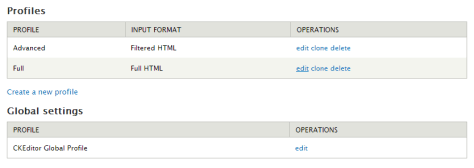
In order to disable the ACF , goes to @admin/config/content/ckeditor .
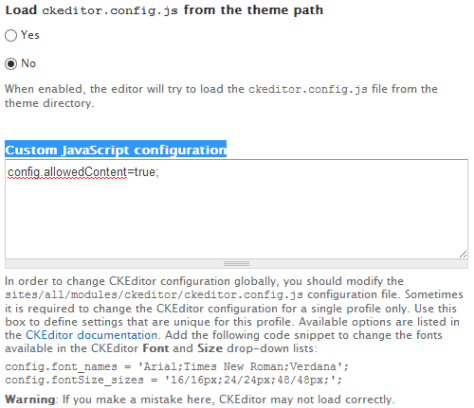
Select the profile and goes to Advanced Options . Add the following Custom JavaScript configuration .
config.allowedContent=true;
Continue reading Drupal 7 – Avoid HTML tags stripped by CKEditor →
說了兩天韓戰,一位人士傳短訊來問:你說美國代表了正義,你為什麼這樣「親美」?
這兩天我有餘暇,看見口訊,回個電話給他,予以免費教育。
「你覺得我親美嗎?」我問:「那麼,閣下身為一個中國人,你覺得親美應不應該?」
「當然不應該。」對方答:「美國正在亞洲圍堵中國,美國不想我們強大,美國是中國的對手。」
我聽了,笑:「Oh really?真的?那麼你記不記得上個月,中國副總理汪洋先生,訪問美國,發表講話,說美中關係,就像一對夫妻,而且,汪先生說,不希望這對夫妻,像梅鐸(大陸叫默爾多克)跟鄧文迪一樣離婚?」
對方聽了一楞。我說:「既然美中是一對夫妻,夫妻恩愛,相敬如賓,夫妻還該共用一個銀行戶口,所以中國的貪官將財產轉移美國,由老公來代管。既是恩愛夫妻,哪有老公『圍堵』老婆的道理?」Continue reading 陶傑 – 親美 →
陶傑寫曼德拉抗爭的白人,「作惡也有一條底線」。我想起大陸海歸學者劉瑜多年前寫過這條底線。她在「底線時分」的文章中,說她讀了700多頁的曼德拉自傳,驚奇發現,這個反政府50年、坐牢近30年的「亂匪」,落到白人種族主義統治者手裏之後,竟從沒挨過打。 1963年他剛進羅本島監獄,獄警要求新來的犯人跑步前進,曼德拉抗命反而放慢腳步,獄警威脅可以殺了他,曼德拉說,你們有你們的職責,我們也有我們的。獄警奈何他不得。
另一次更奇怪的是,監獄長Prins對他來訪的妻子雲妮出言不遜,曼德拉給惹火了。「我從座位上站起來,繞過桌子向他走去。Prins向後退去,但我及時控制住了自己,忍住了沒有用拳頭而只用言辭教訓了他,我是個反感說髒話的人,但是那天我違背了自己的準則。」想動手並說髒話的是曼德拉,向後退的是監獄長。
這些南非種族主義者當然不是什麼好人,但劉瑜認為這些壞人「還有底線,這個底線就是不隨便打人。……曼德拉就是在種族主義者的道德之下、底線之上的這塊空地上施展身手,領導南非人民『站起來了』。」
劉瑜寫這篇文章,是因為中國連續發生在獄中被打致死的事件,這些事情讓她意識到,「有些人是沒有底線的。所有蔑視自由的制度都盛產混蛋,但是一些制度比另一些產出的混蛋成色更高一些 」。 Continue reading 李怡 – 作惡的底線時分 →
This example make use of jquery.hammer.js for implementing delegated events for inner elements. Just like what we did in the TouchSwipe Example.
Continue reading jquery.hammer.js – Implement delegated swipe event for inner elements →
We have talked about TouchSwipe in previously.
Unlike TouchSwipe which is a jQuery plugin , hammer.js is independent of jQuery . It supports tap, swipe, drag and other mobile touch events . Here is an simple example.Continue reading Javascript – Implement touch and gesture based interaction using hammer.js →
In the previous post, we attach the swipe event listener directly on the #box element.
How about if your target elements is dynamically added to the DOM ? In that case, the event listener would not work for the newly inserted inner elements . A work around is attached the event listener to the parent element instead. Here is another example for the delegated event implementation of TouchSwipe .Continue reading TouchSwipe – Implement delegated swipe event for inner elements →
Posts navigation
Dream BIG and go for it =)

 Eureka!