1. Install the grunt-contrib-yuidoc as one of your your project dev dependency.
- npm install grunt-contrib-yuidoc –save-dev
2. To illustrate the example, i created /app/scriptes/human.js as follow.
Continue reading Grunt – Setup YUIDoc

1. Install the grunt-contrib-yuidoc as one of your your project dev dependency.
2. To illustrate the example, i created /app/scriptes/human.js as follow.
Continue reading Grunt – Setup YUIDoc
Here is an simple project which demonstrate how to read a JSON file in jQuery and Javascript.
Project structure
- (webroot folder)
  - data
    - file-1.json
    - file-2.json
  - js
    - script.js
  - index.html
Continue reading jQuery & Javascript – Read JSON files on server
Here is a simple way to copy an array, which contains primitive data types like string and integer, by value in Javascript.
var myArray = ['eureka', 30, true];
var clone = myArray.slice(0);

myArray[1] = 100;
console.log(myArray[1]); // output: 100
console.log(clone[1]);   // output: 30
// Checkin date
var checkin = '2013-04-04';
var checkin_date = new Date();
checkin_date.setYear(parseInt(checkin.substr(0, 4), 10));
checkin_date.setMonth(parseInt(checkin.substr(5, 2), 10) - 1);
checkin_date.setDate(parseInt(checkin.substr(8, 2), 10));

// Checkout date
var checkout = '2013-04-10';
var checkout_date = new Date();
checkout_date.setYear(parseInt(checkout.substr(0, 4), 10));
checkout_date.setMonth(parseInt(checkout.substr(5, 2), 10) - 1);
checkout_date.setDate(parseInt(checkout.substr(8, 2), 10));

// Calculate the difference
var days = (checkout_date - checkin_date)/1000/60/60/24;

// Output the result
console.log(Math.floor(days));
Done =)
Reference: StackOverflow – jquery datepicker + date diff calculation
Previously, we talked about how to convert a date object into string.
Javascript – Get YYYY-MM-DD string from a Date object
This time, we will do the opposite which parses a date string and create a date object.
// Assume we have the date string in YYYY-MM-DD formate
var datestring = '2013-05-03';

var date_obj = new Date();
date_obj.setYear(parseInt(datestring.substr(0, 4), 10));
date_obj.setMonth(parseInt(datestring.substr(5, 2), 10) - 1);
date_obj.setDate(parseInt(datestring.substr(8, 2), 10));

// Verify the date object
console.log(date_obj);
Done =)
Reference: StackOverflow – javascript: how to parse a date string
We have talked about the jqBarGraph a few days ago.
jqBarGraph – jQuery Bar Chart Plugin
Here are other free libraries where you can create more fancy charts such as pie chart with really cool features.
1. RGraph
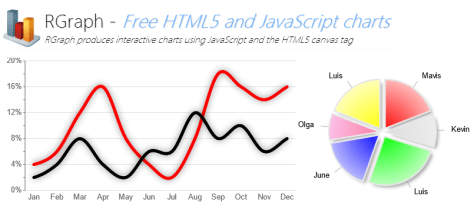
Continue reading Free HTML and Javascript Chart Libraries
One way to break a forEach loop in Javascript is to make use of the try and catch.
var BreakException= {};

try {
  [1,2,3,4,5].forEach(function(val) {
    if (val == 3) {
      throw BreakException;
    } else {
      console.log(val);
    }
  });
} catch(e) {
  if (e !== BreakException) {
    throw e;
  }
}

// Result: only print 1 and 2.
The following piece of code shows you how to get the YYYY-MM-DD formatted string from a Javascript Date Object.
// GET CURRENT DATE
var date = new Date();

// GET YYYY, MM AND DD FROM THE DATE OBJECT
var yyyy = date.getFullYear().toString();
var mm = (date.getMonth()+1).toString();
var dd  = date.getDate().toString();

// CONVERT mm AND dd INTO chars
var mmChars = mm.split('');
var ddChars = dd.split('');

// CONCAT THE STRINGS IN YYYY-MM-DD FORMAT
var datestring = yyyy + '-' + (mmChars[1]?mm:"0"+mmChars[0]) + '-' + (ddChars[1]?dd:"0"+ddChars[0]);
Done =)
Reference: StackOverflow – Get String in YYYYMMDD format from JS date object?
You can use the following function to shuffle a Javascript array. Kudos to Ashley Pond V. The author applies the Fisher-Yates shuffle algorithm which is also known as the Knuth shuffle in Javascript.
function fisherYates(myArray) {
  var i = myArray.length;
  if (i == 0) return false;
  while(--i) {
    var j = Math.floor(Math.random()*(i+1));
    var tempi = myArray[i];
    var tempj = myArray[j];
    myArray[i] = tempj;
    myArray[j] = tempi;
  }
}
Done =)
Reference: Randomize arrays in JavaScript with the Fisher-Yates shuffle algorithm
We have Modernizr to handle the HTML5 and CSS3 problem in old browsers.
Modernizr – Tackle the HTML5 and CSS3 problems in old browsers for frontend programming
Today, i would like to introduce another tool which could help you aligning the CSS styles for different browsers as well as OS. This tool is called CSS Browser Selector. Although it is not updated for more than a year, it is still very useful if you need to deal with Internet Explorer 7 & 8.
Similar to Modernizr, what u need to do is just included the library in the <head> tag.
Continue reading CSS Browser Selector – Align the CSS styles for different browsers and OS
 Eureka!