
By default, the panes in the checkout form are collapsible. if you want to remove the collapsible features, you could customize the theme_uc_cart_checkout_form($form) function in your theme template.php. Continue reading Drupal – Disable the Collapsible in Ubercart Checkout Panes
Category Archives: CMS
WordPress – Enable PHP Session
Add the following code under the top PHP opening tag of wp-config.php.
<?php
  if (!session_id()) {
    session_start();
  }
...
We can now make use of the $_SESSION[] in WordPress. The reason of putting the session_start() in wp-config.php is because this configuration file will not be overwritten during a WordPress update.
Thanks Frank Verhoeven.
Done =)
Reference: Frank Verhoeven – Using Sessions in WordPress
Updated @ 2012-08-02: Please note that their maybe security issue of using the PHP session. For more information, please refer to the following link.
PHP $_SESSION variables
Drupal – Fix Ubercart Error Messages
If you get a bunch of error messages after installing Ubercart as follow
- # Notice: Undefined index: #element_validate in summarize_form() (line 27 of /var/www/pressflow-6.20/sites/all/modules/ubercart/uc_store/includes/summaries.inc).
- # Notice: Undefined index: #type in summarize_element() (line 84 of /var/www/pressflow-6.20/sites/all/modules/ubercart/uc_store/includes/summaries.inc).
- # Notice: Undefined index: #type in summarize_element() (line 124 of /var/www/pressflow-6.20/sites/all/modules/ubercart/uc_store/includes/summaries.inc).
- …
No worry, these messages could be removed after modifying the error reporting setting in the php.ini. Continue reading Drupal – Fix Ubercart Error Messages
Drupal – Customized the User Registration Form
For the Drupal registration form, there is no .tpl.php template file for editing the registration form layout. So if you want to add more HTML code around the form, you have to do it on code level.
I found a useful post about modifying the registration form. It make use of the template.php in the theme folder to theme the form. For more information. Please visit Drupal – Custom registration page theme.
In this post, i will modify the registration form by creating a custom module. Continue reading Drupal – Customized the User Registration Form
Drupal – Auto Assign Roles to Newly Registered User
The Auto Assign Role module serves 4 purposes:
- Automatic role assignment for user registration
- Automatic role assignment for admin created accounts
- Assign role by path for user registration
- Allow user to choose the roles in the user registration form
After the module installation, you could configure the Auto Assign Role setting @ Administer –> User management –> Auto assign role. Now, i would show you how to assign the role to user by the registration path. i am not going to demonstrate the others as they are quite straight forward. Continue reading Drupal – Auto Assign Roles to Newly Registered User
Drupal – Remove the Tabs in User Registration Form
By default, there are some tabs in the user registration form as depicted in the following picture.
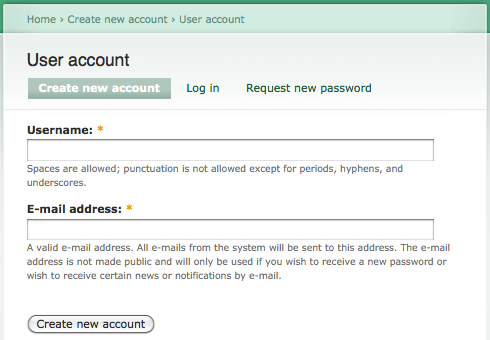 Continue reading Drupal – Remove the Tabs in User Registration Form
Drupal – Create a Simple Form
Drupal provides a powerful form API for form generation. In this post, i will show you how to create a simple form and log it in watchdog whenever the form button is clicked.
First of all, let’s create a new module, name it as custommod and implement the following 2 functions. Continue reading Drupal – Create a Simple Form
Drupal – Redirect when Missing Node Translation
The following code help displaying a warning message and redirect to the site home page if a node translation does not exist. Create a custom module and implement the hook_init() method as follow. Continue reading Drupal – Redirect when Missing Node Translation
Drupal – Define Your Own Cron Job
How does the cron job in Drupal work? Let’s take a look.
cron.php
<?php
// $Id: cron.php,v 1.36 2006/08/09 07:42:55 dries Exp $

/**
 * @file
 * Handles incoming requests to fire off regularly-scheduled tasks (cron jobs).
 */

include_once './includes/bootstrap.inc';
drupal_bootstrap(DRUPAL_BOOTSTRAP_FULL);
drupal_cron_run();
Looks simple, right? the drupal_cron_run() function will run the default Drupal cron tasks as well as invoking the hook_cron() in all modules. Continue reading Drupal – Define Your Own Cron Job
Drupal – Add Task to the Drupal Cron Job
Drupal has a cron.php at the root directory. you can run the this cron job by either entering the http://<drupal_root>/cron.php in browser or running it directly in the Drupal status report.
The default Drupal cron job cleans up log files and checks for Drupal and modules updates. If you want this cron job to be run at a regular interval, just edit the crontab by the following command.
- crontab -e
and add one of the following lines with you desired interval. (45 mins in the following example) Continue reading Drupal – Add Task to the Drupal Cron Job
 Eureka!