
I want to style the form elements such as radio button, checkbox or selection list. Google shows me a very good tutorial written by Ryan Fait.
Las Vegas Web Design – Checkboxes, Radio Buttons, Select Lists, Custom HTML Form Elements
In the above tutorial, those form elements will be replaced by a span element. It works great. Only 1 minor problem which is those span elements could not align well. So i made some change on the CSS. Here is my example.
1. Download the custom-form-elements.js file @ Las Vegas Web Design (Click the Download the full script link)
2. Download the radio.png, checkbox.png and select.png



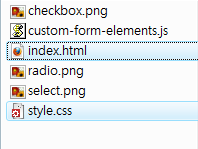
4. Edit the index.html as follow
<html>
  <head>
    <script type="text/javascript" src="custom-form-elements.js"></script>
    <link rel="stylesheet" type="text/css" href="style.css" />
  </head>
  <body>
    <h3>Raio buttons</h3>
    <input type="radio" name="radios" class="styled" value="yes" />Yes
    <input type="radio" name="radios" class="styled" value="no" />No
    <h3>Checkboxes</h3>
    <input type="checkbox" class="styled" /><label>Yes</label>
    <input type="checkbox" class="styled" /><label>No</label>
    <h3>Selection list</h3>
    <select class="styled">
      <option value="yes">Yes</option>
      <option value="no">No</option>
    </select>
  </body>
</html>
5. Edit the style.css as follow
.checkbox, .radio {
  width: 19px;
  height: 25px;
  padding: 1px 20px 0 0; /* modify this value for different width of radio.png/checkbox.png */
  background: url(checkbox.png) no-repeat;
  /* Remove the float: left style
  display: block;
  clear: left;
  float: left;
  */
}
.radio {
  background: url(radio.png) no-repeat;
}
.select {
  position: absolute;
  width: 158px;
  height: 21px;
  padding: 0 24px 0 8px;
  color: #fff;
  font: 12px/21px arial,sans-serif;
  background: url(select.png) no-repeat;
  overflow: hidden;
}
6. Check it out

In order to have your own radio button and checkbox, you can create the radio.png/checkbox.png with fixed height for each buttons states. In this example, the radio.png/checkbox.png has 100px height which means the button height should be 25px. If you have large button size, change the following values in the custom-form-elements.js.
...
var checkboxHeight = "25";
var radioHeight = "25";
var selectWidth = "190";
...
Done =)
Reference: Las Vegas Web Design – Checkboxes, Radio Buttons, Select Lists, Custom HTML Form Elements

 Eureka!
One thought on “Styling checkbox and radio button with CSS and Javascript”