
Starting from Drupal 7, the Views Custom Field module is replaced by Views PHP.
1. Download and enable the module.
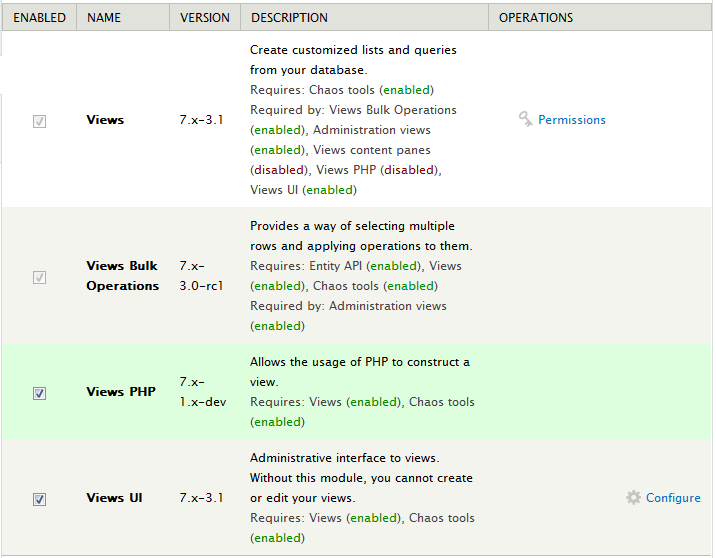
2. Now you could create custom PHP field in view. It is now very convenient to retrieve the values of other fields from the available variables.
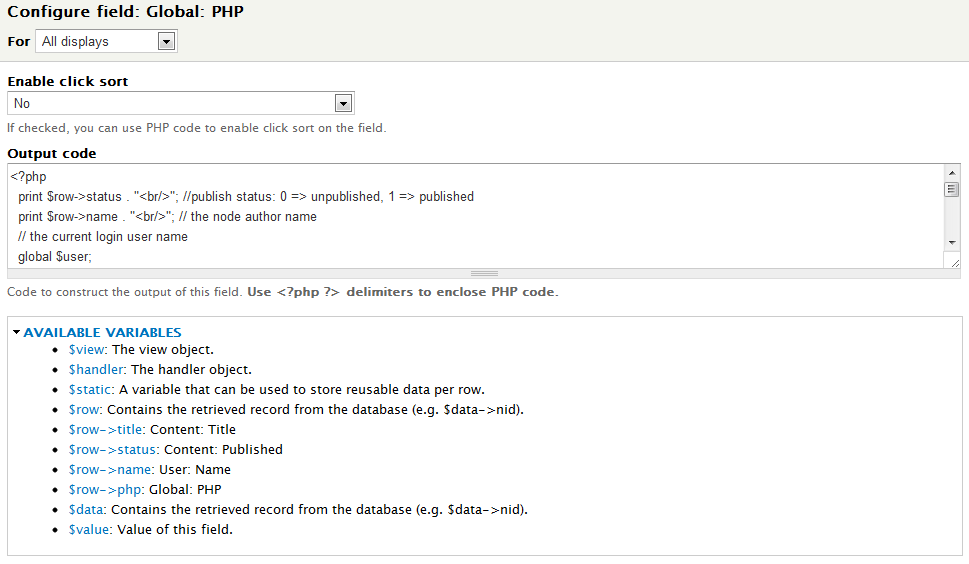
The following example replies the question asked by Patrick.
1. Create the a view as follow.
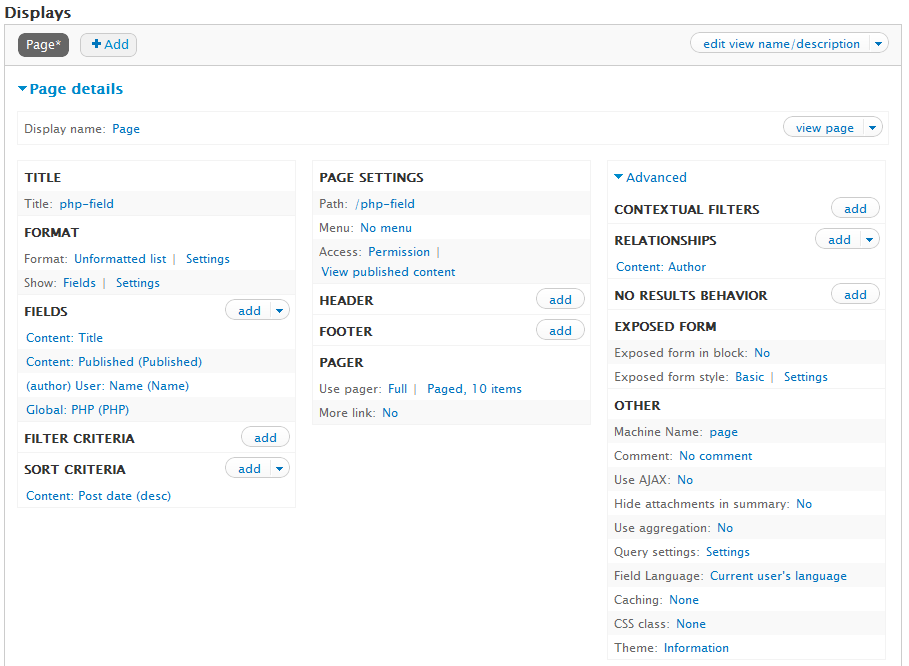
2. Configure the Global:PHP field as follow.
<?php
  print $row->status . "<br/>"; //publish status: 0 => unpublished, 1 => published
  print $row->name . "<br/>"; // the node author name
  // the current login user name
  global $user;
  print $user->name;

  if ($row->status == 1) {
    print "This node is published<br/>";
  } else {
    print "This node is not yet published.<br/>";
  }

  if ($row->name == $user->name) {
    print "The node author is the logged user.<br/>";
  } else {
    print "The node author is not the logged user.<br/>";
  }
?>
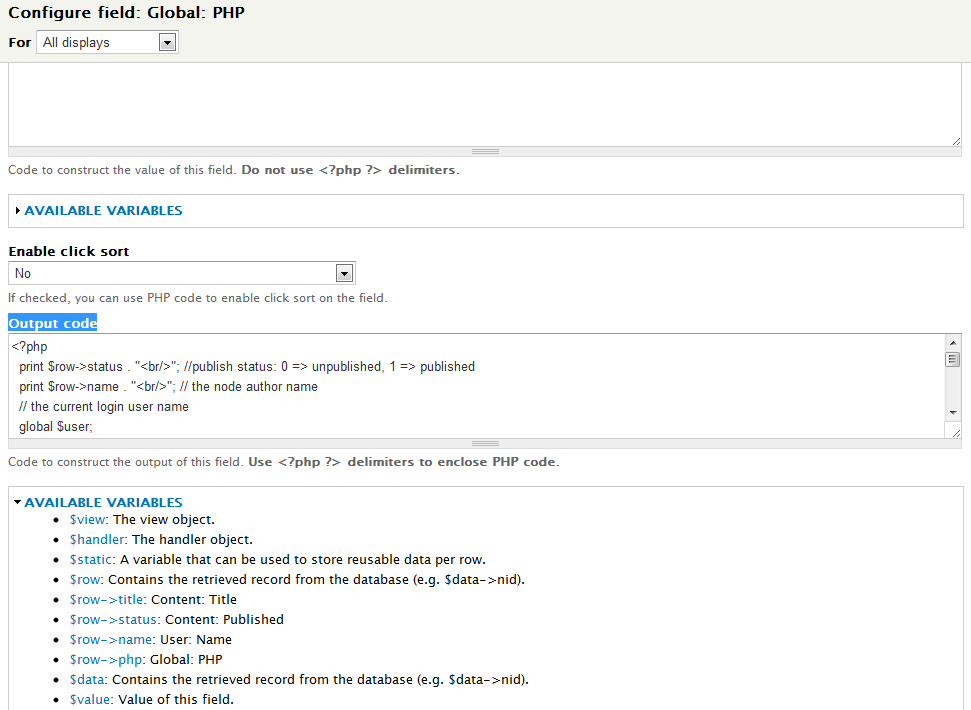
3. Check the view result in preview.
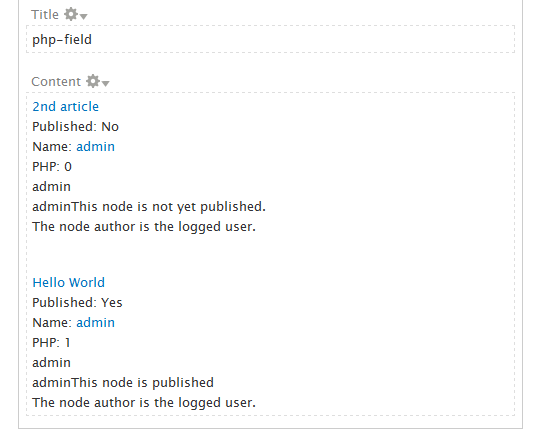
Done =)
Reference: Drupal module – Views PHP

 Eureka!
Hello,
I still have one question!
First: I’m really enthusiastic about using php embedded in different places in Drupal, such as in views. This makes the whole thing much more flexible.
Now my problem: I’m using now also php in Panels, more explicitely, in the Panel used through DisplaySuite to display a node type (I hope this was clear). There, however, the available vars are only related to the node type youwant to display. They are available in the form of %node:nid or %node:author, for instance. But how do I get to other vars, e.g., those of the workflowstate of the node. In views this was simples, since you could import the variable through views, making them available to your Global:PHP field. In Panels this is not possible.
How do I get access to this values/variables?
I case of $user I managed to access them, by writing “global $user;” at the beginning of the PHP code, but I’m not able to do this with vars form other modules, like from the workflow module.
Here my code (PS: please, do consider the fact, that I startet with php 2 days ago ;-):
Maybe you can show me again an example of how to access variables from different modules!
Cheers
Pat
LikeLike
Hi Patrick,
i can’t read your code becoz you didn’t wrap it as stated in Syntax Highlight.
About your question, you want to get other values of the node, you could load the node content by node id as follow.
You can check if the $node object contains the value you need. I haven’t used the workflow module before but i guess you should be able to get those values in $node->workflow as stated @ Drupal module – Workflow
By the way, the Drupal contains a list of global variables you can check the availability @ Drupal – Globals.
Hope the above information could help you. =)
Kit
LikeLike
Hi,
thank you for your quick reply. & sorry for the code syntax thing.
your code is helpful, but you need the “node id” fist to load the node content using “node_load()”.
I have found two ways to do this, but I’m not really sure if they are the most elegant way of getting the nid.
FIRST possibility I found here: http://stackoverflow.com/questions/9081495/getting-node-id-inside-block-template-with-drupal-7
$node = menu_get_object();
if ($node && $node->nid) {
  // You have a valid node to work with.
}
SECOND possibility apparently uses the URL arguments
if ( arg(0) == 'node' && is_numeric(arg(1)) ) {
  $node = node_load(arg(1));
  // Do something with $node
  print $node->nid;
}
I still did not find out how to get to other variables which come from other modules, like from WORKFLOW, but I’ll keep searching. It should be a way there using $node->workflow.
Cheers
LikeLike
HEllo again:
Another – lets say – more generall question.
Lets say there is a function
which is located in some module XYZ.
I’m now writing some php code which would need the value delivers by this function, do I have to use some code line
Or does this completely depend on the module? Where can I find this type of information?
Thanks
LikeLike
Hi Patrick,
There are more than one way to get the node id, i think the simplest way is to retrieve from arg(1) but this is limited to the node view page only which has the url pattern node/<nid>.
Another example is if you using views, you can get the node id just by adding a nid field and you should be able to use it in the Global:PHP field.
and about using some functions of other modules, you can include the source file and those function should be ready to use. but a proper way to include a source file is calling the module_load_include().
module_load_include('inc', 'workflow', 'XYZ');You can find all the available workflow functions @ Drupal API Reference Help – Workflow Functions
hope the about information could help. =)
Kit
LikeLike
PS: How come do you have photos from Lisbon in your blog header? Did you visit the town? (my hometown ;-))
LikeLike
haha~ i haven’t been to Portugal before but i would love to travel there if i have the chance later. =D
But my girl fd did travel to Portugal a few years ago and she always want to visit there again. as i remember, she went to Lisbon and also westernmost point of Europe.
The photos in the header are some default images of the blog theme. =P
LikeLike
hehe, yeah… that’s what I thought: part of the theme… but funny anyhow… 🙂
LikeLike
hello, I want to display a custom view with theme in my site.
Achieve print as you tutorial shows how I can do to print to a themplate?
Example you used to in drupal 6
<a href =? q = node / nid)? >> node_revisions_title)?>
LikeLike
Hi Fabian,
your code could not be read properly. could u please use the Syntax Highlight and post it again?
If you want to edit the view template file (.tpl.php). You can refer to Drupal – Customize a Specific View Layout by Views Template
The above article works the same for Drupal 7.
LikeLike
Great Module! This is just what I’ve been looking everywhere for.
However, I can’t seem to get it to print any of the fields. I started with building a link which included variables and couldn’t get the variable to display, so I simplified everything down to:
body;

?>
And I still can’t get anything to display. Just to confirm, $row->body is a valid variable I grabbed from the “Vailable Variables” area. I also tried echo. When I was trying to get the link working, everything displayed correctly int eh link, except the variable, which was blank.
Am I doing something wrong or is there an option I’m missing in the settings?
LikeLike
Sorry. The code didn’t appear correctly. That’s supposed to read:
print $row->body;
with an opening and closing php tag.
LikeLike
I guess your code is truncated. please follow the Syntax Highlight for code snippet.
Anyway, try this
Can u get the $row array printed?
LikeLike
Thanks for the reply.
I got the following below as a response.
stdClass Object ( [title] => [php] => [price] => [author] => [uc_product_image] => [body] => [taxonomy_catalog] => [field_rating] => [nid] => )LikeLike
As you can see, the $row array doesn’t have any content inside. So it prints nothing.
Do other fields of the same row display probably?
LikeLike
I see.
In the view, I have all of those particular fields listed and they all show up with the appropriate data. Just to be sure, in the Global:PHP field, I also tried printing all of the other fields to, but like you said, they are all showing as empty.
hmm.
Do i maybe need to put something in the Value code before the Output Code?
I’m sorry for all of this, I’m pretty green.
LikeLike
That’s strange.
you dun need to enter anything in the Value field. The $row should contains the data.
Could you create another View which only retrieves the title of all the nodes, and then add the Global PHP field and check if that $row contains any data?
LikeLike
I think you led me to the issue. If I create a new view just based on content from scratch, your Global PHP code works perfect.
I think it’s because I’m using a view based on a Solr API Index.
I may have to find another solution to create my custom link.
Incidentally, people like you that take the time to write modules and create code for others, and then go above and beyond by actually helping individual people like me. I think that’s amazing.
Thanks so much for your help, for me and all of the people out there that modules like this help.
Thanks again for your help and I’ll move on to trying another solution.
LikeLike
You are welcome. =)
I think maybe you can submit an issue to the Views PHP project. Hope they could figure out that.
LikeLike
stdClass Object ( [title] => Test [field_image] => 514 [field_sayed] => 514 [field_tel] => 514 [field_fax] => 514 [field_adress] => 514 [field_email] => 514 [field_website] => 514 [php] => )LikeLike
What does it mean? LoL
LikeLike