
By default, there are some tabs in the user registration form as depicted in the following picture.
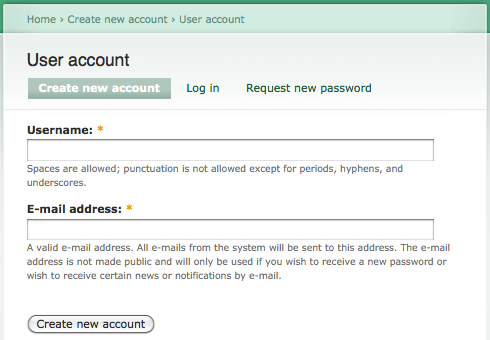
if you want to remove the tabs, you will need to create a custom module and implement the hook_menu_alter.
custom.module
function custom_menu_alter(&$items) {
  $items['user']['type'] = MENU_CALLBACK;
  $items['user/register']['type'] = MENU_CALLBACK;
  $items['user/password']['type'] = MENU_CALLBACK;
}
Install the module and clear the cache. The tabs are removed now.

You can also remove the tabs in the other user registration form generated by the Auto Assign Role module. For example, i have created a new registration path /developer/register in previous post – Drupal – Auto Assign Roles to Newly Registered User. The following hook_menu_alter implementation would remove the tabs in /developer/register too.
function custom_menu_alter(&$items) {
  // Remove tabs in default registration form
  $items['user']['type'] = MENU_CALLBACK;
  $items['user/register']['type'] = MENU_CALLBACK;
  $items['user/password']['type'] = MENU_CALLBACK;

  // Remove the tabs in the new Auto Assign Role registration form
  $items['developer']['type'] = MENU_CALLBACK;
  $items['developer/register/register']['type'] = MENU_CALLBACK;
  $items['developer/register/password']['type'] = MENU_CALLBACK;
}
Done =)
Reference: Drupal API – hook_menu_alter

 Eureka!
how to do this in drupal 7?
LikeLike
Should be the same.
Reference: StackOverflow – removing create new account tab from login page in drupal 7
LikeLike