
Drupal provides a powerful form API for form generation. In this post, i will show you how to create a simple form and log it in watchdog whenever the form button is clicked.
First of all, let’s create a new module, name it as custommod and implement the following 2 functions.
custommod.module
/**
 * A new form called ykyuen_form
 */
function custommod_ykyuen_form($form_state) {
  // A form with a submit button only
  $form['submit'] = array('#type' => 'submit', '#value' => t('Save'));
  return $form;
}

/**
 * The callback after the ykyuen_form is submitted
 */
function custommod_ykyuen_form_submit($form, &$form_state) {
  watchdog('ykyuen-form', 'submitted');
}
Next, we have to show the form in the layout. This can be done by the drupal_get_form() function. In the theme folder, i copy the page.tpl.php and rename the new one as page-front.tpl.php which is the layout template file for the front page.
page-front.tpl.php
...
<div id="center"><div id="squeeze"><div class="right-corner"><div class="left-corner">
  <?php print $breadcrumb; ?>
  <?php if ($mission): print '<div id="mission">'. $mission .'</div>'; endif; ?>
  <?php if ($tabs): print '<div id="tabs-wrapper" class="clear-block">'; endif; ?>
  <?php if ($title): print '<h2'. ($tabs ? ' class="with-tabs"' : '') .'>'. $title .'</h2>'; endif; ?>
  <?php if ($tabs): print '<ul class="tabs primary">'. $tabs .'</ul></div>'; endif; ?>
  <?php if ($tabs2): print '<ul class="tabs secondary">'. $tabs2 .'</ul>'; endif; ?>
  <?php if ($show_messages && $messages): print $messages; endif; ?>
  <?php print $help; ?>
  <!-- show the custommod_ykyuen_form -->
  <div id="ykyuen-form">
    <?php print drupal_get_form('custommod_ykyuen_form'); ?>
  </div>
  <div class="clear-block">
  <?php print $content ?>
  </div>
...
Save the new template file and we should find a submit button at our Drupal homepage.
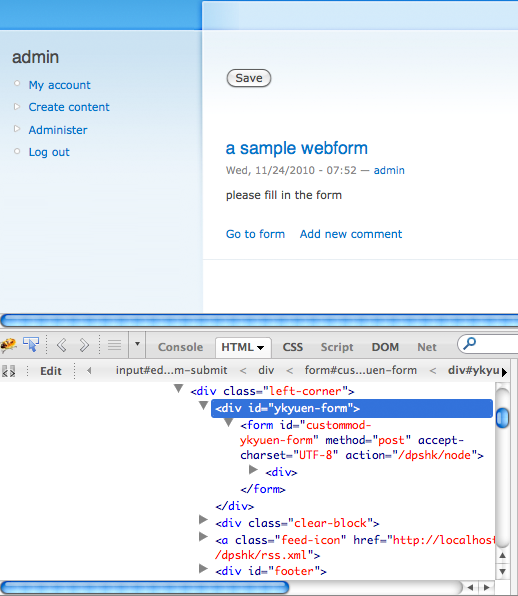
Click the button and you will find the log in the watchdog.

This is just a basic form generation in Drupal. There are much more functionality such as adding form input fields as well as form validation. For more information, please take a look at the Drupal – Form API Quickstart Guide.
Done =)
Reference: Drupal – Form API Quickstart Guide

 Eureka!
Thanks, great blog post. It saved the day.
LikeLike
you are welcome =)
LikeLike