
In previous posts, we created a custom module implement the hook_block() function.
- Drupal – Create a Block
- Drupal – Customize Block Template File
- Drupal – Show Database Data in Block by SQL
We haven’t implemented the block configurable values. Let’s do it now.
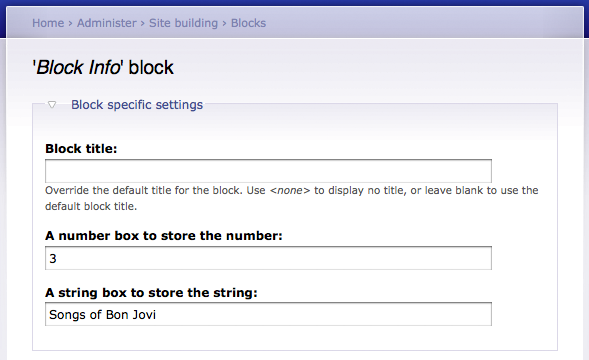
We want the block to store a number and a string. so we add these 2 fields in the block configuration page. Here is the new custom.module.
<?php
	/**
	 * Implementation of hook_block().
	 */
	function custom_block($op = 'list', $delta = 0, $edit = array()) {
		switch ($op) {
			//Define the block
			case 'list':
				$blocks[0]['info'] = t('Block Info');
				$blocks[0]['cache'] = BLOCK_NO_CACHE;
				return $blocks;

			//Add 2 configuratble values in block configuration page
			case 'configure':
				$form['number_box'] = array(
					'#type' => 'textfield',
					'#title' => t('A number box to store the number'),
					'#default_value' => variable_get('number_box', 0),
				);
				$form['string_box'] = array(
					'#type' => 'textfield',
					'#title' => t('A string box to store the string'),
					'#default_value' => variable_get('string_box', "default"),
				);
				return $form;

			//Save the configurable values when use press the Save block button
			case 'save':
				variable_set('number_box', (int)$edit['number_box']);
				variable_set('string_box', $edit['string_box']);
				break;

			//Display the block
			case 'view':
				$block['subject'] = t('Block Subject');
				$block['content'] = _show_node_titles_with_link('song');
				$block['number_box'] = variable_get('number_box', 0);
				$block['string_box'] = variable_get('string_box', "default");
				return $block;
		}
	}

	function _show_node_titles_with_link($node_type) {
		$sql = "SELECT node.nid, node.title FROM node WHERE type='$node_type' ORDER BY node.title ASC";
		$result = db_query($sql);
		$output = '<ui>';
		while ($anode = db_fetch_object($result)) {
			$output .= "<li>".l($anode->title, "node/$anode->nid")."</li>";
		}
		$output .= '</ui>';

		return $output;
	}
So now if you go to the block configuration page. you will find 2 more text fields.
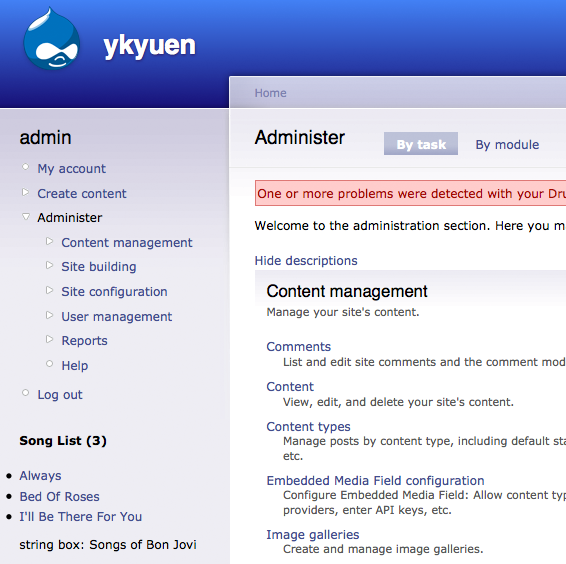
Modify the block-custom.tpl.php to show the 2 configurable values.
<strong>Song List (<?php print $block->number_box ?>)</strong>
<p><?php print $block->content ?></p>
<p>string box: <?php print $block->string_box ?></p>
See what you get now.
Done =)
Reference: Drupal API – block_example.module

 Eureka!
Nice tip. But is it possible to add custom fields to default blocks, not just self-defined?
LikeLike
The example in this post stored the values in Drupal Variables. If you want to have unlimited number of custom fields. I think you need to add a database table in your modules such that you can stored the values in database.
LikeLike