
You can create your own block and customized its content. Drupal provides the hook_block() function for block creation. We can implement this function in our customized module.
1. Create a customized module by creating the following files.
<drupal_root>/sites/all/modules/custom/custom.info
name = Custom module
description = A custom module which create a block
core = 6.x
<drupal_root>/sites/all/modules/custom/custom.module
<?php
        /**
         * Implementation of hook_block().
         */
        function custom_block($op = 'list', $delta = 0, $edit = array()) {
                switch ($op) {
                        //Define the block
                        case 'list':
                                $blocks[0]['info'] = t('Block Info');
                                $blocks[0]['cache'] = BLOCK_NO_CACHE;
                                return $blocks;

                        case 'configure':
                                //TODO: block configurable parameters
                                $form = array();
                                return $form;

                        case 'save':
                                //TODO: save new configuration
                                return;

                        //Display the block
                        case 'view':
                                $block['subject'] = t('Block Subject');
                                $block['content'] = 'Block Content';
                                return $block;
                }
        }
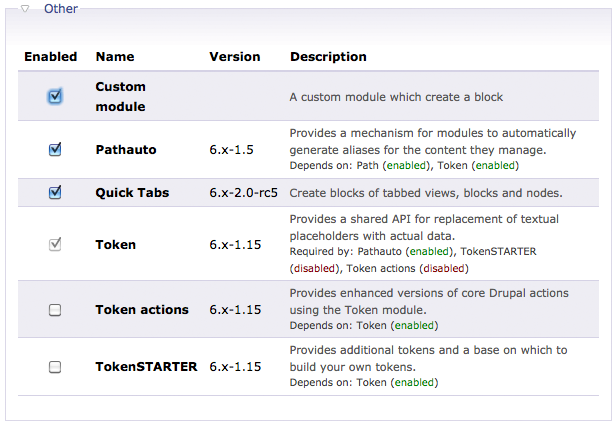
2. Enable the Custom module.
3. The new block could be found @ Adminster –> Site building –> Blocks
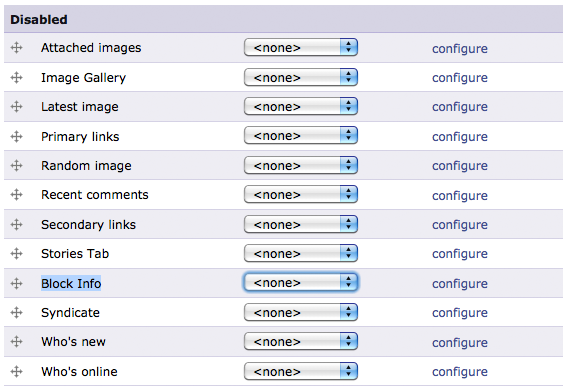
4. The block is added it to the left side bar.

The above example is a rather simple one. For more information about the hook_block() function. please refer to Drupal API – block_example.module
Next suggested article: Drupal – Customize Block Template File
Done =)

 Eureka!
Good guide! I would recommend dispatching your drupal hooks though. Or your block hook can quite easily get out of hand.
LikeLike
Thanks =)
LikeLike