
Ajax is very popular in websites nowadays. You can make a simple Ajax POST Request with only 2 files as shown as below.
First, create the post.html
<html>
  <head>
    <script type="text/javascript" src="js/simple_ajax_post.js"></script>
  </head>
  <body>
    <table>
      <tr>
        <td>First Name:</td>
        <td><textarea id="FirstName" cols="30" rows="1"></textarea></td>
      </tr>
      <tr>
        <td>Last Name:</td>
        <td><textarea id="LastName" cols="30" rows="1"></textarea></td>
      </tr>
      <tr>
        <td colspan=2><input type="button" name="button" value="Submit" onclick="get(this.parentNode);"></td>
      </tr>
    </table>

    <br><br>
    Server-Response:<br>
    <hr>
    <span name="myspan" id="myspan"></span>
    <hr>
  </body>
</html>
Create the js/simple_ajax_post.js to handle the XMLHttpRequest.
var http_request = false;

function makePOSTRequest(url, parameters) {
  http_request = false;
  if (window.XMLHttpRequest) { // Mozilla, Safari,...
    http_request = new XMLHttpRequest();
    if (http_request.overrideMimeType) {
      /* set type accordingly to anticipated content type */
      //http_request.overrideMimeType('text/xml');
      http_request.overrideMimeType('text/html');
    }
  } else if (window.ActiveXObject) { // IE
    try {
      http_request = new ActiveXObject("Msxml2.XMLHTTP");
    } catch (e) {
      try {
        http_request = new ActiveXObject("Microsoft.XMLHTTP");
      } catch (e) {}
    }
  }
  if (!http_request) {
    alert('Cannot create XMLHTTP instance');
    return false;
  }

  http_request.onreadystatechange = alertContents;
  http_request.open('POST', url, true);
  http_request.setRequestHeader("Content-type", "application/x-www-form-urlencoded");
  http_request.setRequestHeader("Content-length", parameters.length);
  http_request.setRequestHeader("Connection", "close");
  http_request.send(parameters);
}

function alertContents() {
  if (http_request.readyState == 4) {
    if (http_request.status == 200) {
      /* Return from post.php */
      //alert(http_request.responseText);
      result = http_request.responseText;
      document.getElementById('myspan').innerHTML = result;
    } else {
      alert('There was a problem with the request.');
    }
  }
}

function get(obj) {
  var poststr = "FirstName=" + encodeURI( document.getElementById("FirstName").value ) +
                "&LastName=" + encodeURI( document.getElementById("LastName").value );
  makePOSTRequest('post.php', poststr);
}
Also create the post.php in the same directory
<?php
  print_r($_POST);
  // your code ...
?>
Try your Ajax form now
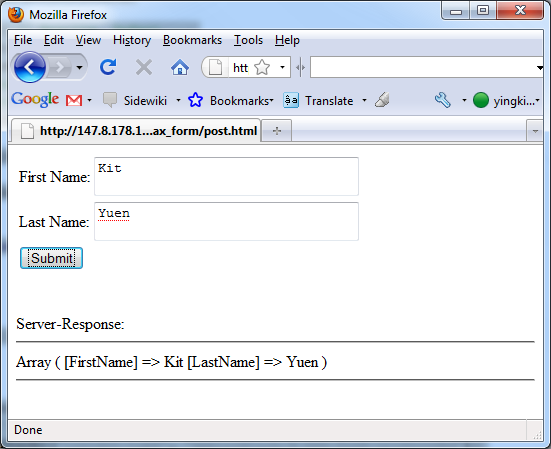
Reference: AJAX Form POST Request – HTML Form POST/Submit with AJAX/Javascript Example/Tutorial
Done =)js

 Eureka!
this is so simple and good 😀
LikeLike
You are welcome =)
LikeLike
can i display the result without the
Array ( [FirstName] => firstname [LastName] => lastname)
LikeLike
Sorry that i missed your comment. you can print the FirstName and LastName by
LikeLike
How do I do if I want to send more then two input variables from the form?
I tried (like is in the line 47) but did not work:
function get(obj) {
  var poststr = "FirstName=" + encodeURI( document.getElementById("FirstName").value ) +
    "&LastName=" + encodeURI( document.getElementById("LastName").value ) +
    "&Email=" + encodeURI( document.getElementById("Email").value );

  makePOSTRequest('post.php', poststr);
}
Please help me 😦
LikeLike
Did u add the Email input in the form? i think it should work. Or could you paste your code here? please follow the instructions in Syntax Highlight when posting code here.
LikeLike
Yeah. I did that. Yesterday I tried it one million times but did not work. But today when I was getting my code ready to post here, it just worked: It was possible to pass Email from the input to post.php file. 0_0′
Thanks alot Ykyuen 😉
LikeLike
Great. Good to know that you have solved the problem. =)
LikeLike