
Sometimes, the application performance on phone is different from emulator. Just like the WatchFootballApp, we found that it takes more time on refreshing the results on device.
Adding debug message and debug your phone in DDMS is useful for locating the bottleneck of the application performance. Please refer to Android – Capture Screenshot to enable the USB Debug on your Android phone.
First of all, we have to add the debug message on the Java class which we would like to look into. To add a debug message, simply use the android.util.Log.
import android.util.Log;

...
Log.v("tag", "message"); // Log level: Verbose
Log.d("tag", "message"); // Log level: Debug
Log.i("tag", "message"); // Log level: Info
Log.w("tag", "message"); // Log level: Warn
Log.e("tag", "message"); // Log level: Error
As shown in the above code snippet, the log is divided into 5 levels and the tag is for better readability of Logcat in DDMS.
For example, i add the following logs in a method and i monitor the application using the DDMS perspective in Eclipse.
Log.v("kit", "*** 1 ***");
...
Log.v("kit", "*** 2 ***");
...
Log.v("kit", "*** 3 ***");
...
...
Log.v("kit", "*** 7 ***");
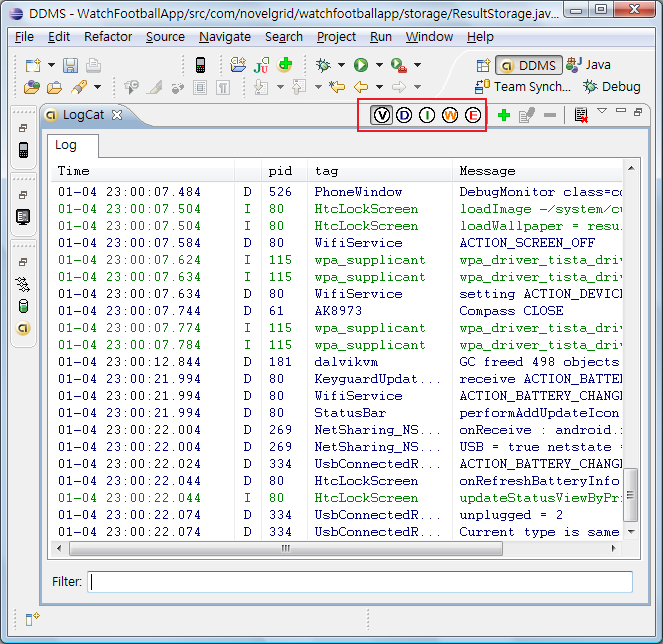
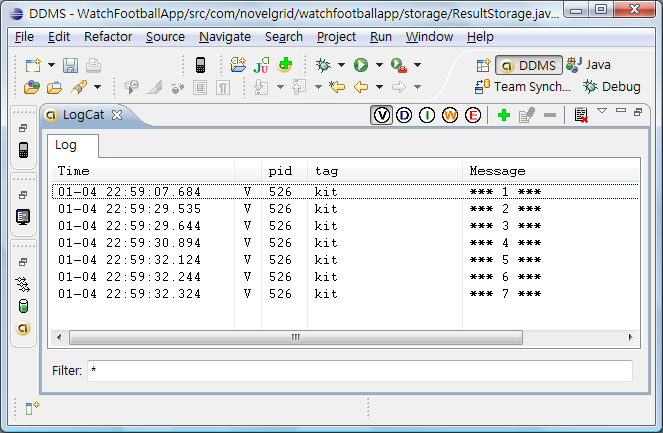
And this is what i got in the Logcat View. You can filter different log level by pressing the color button.
In addition, there is a filter field at the bottom such that i can display my log easily and now i know that the code between log 1 and 2 is the performance bottleneck.
Remember to turn off the debug mode of your phone and unmount the SD card before detached your phone from the computer. By the way, u can also capture the screenshot on your phone using the DDMS perspective in Eclipse.
Done =)

 Eureka!
Do you know how to enable java Logs on Zoom2 board..??
the normal sop/log.v,log.d will work only for emulator..!
How about taking the loggs on Zoom2 board
LikeLike
Hi Ramakrishna,
i have no experience about working on Zoom2. i hope the following article could help
Android Debugging
Regards,
Kit
LikeLike
what kind of debugging is this?
its just printing a predefined string on catlog.
is there any way I can see runtime values of the expressions?
LikeLike
Hi Usman,
u can run the application in the debug perspective in eclipse. but i guess this only works when running the application in the emulator.
Kit
LikeLike
How to do it for CPP files ? (Native code ?)
LikeLike
I never try it before but i think the following post could help.
Using Eclipse for Android C/C++ Debugging
LikeLike
what is the name of log used ?
LikeLike
If you want to output the logcat to a file, run the following command.
adb logcat -d > logcat.txt
Hope this help. =)
Reference: Android How-to’s – Save LogCat To A Text File
LikeLike