
Update @ 2016-01-25: The following sample code may be outdated. please try the new sample code from paypal as stated in this comment.
PayPal Payment Data Transfer (PDT) provides a simple way for gathering the PayPal transaction details after the payment. You can even make use of it to trigger any post-transaction action. This article guide you how to test your PDT flow in PayPal Sandbox
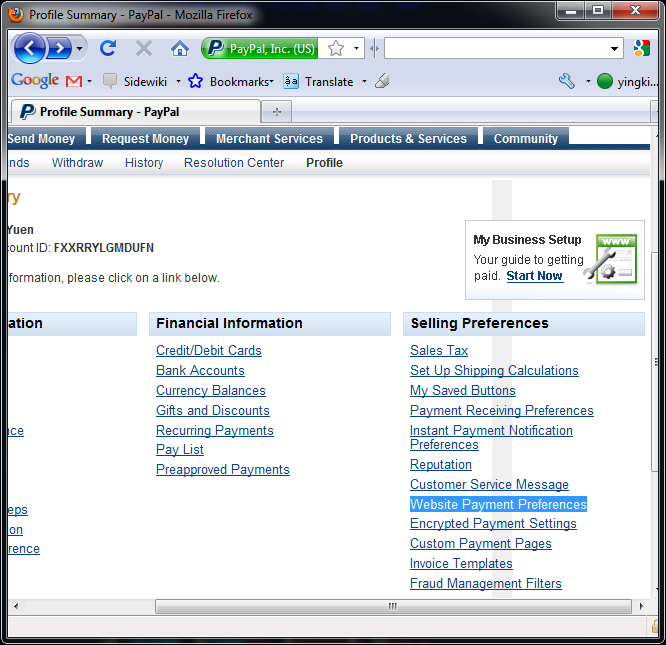
First of all you have to enable the PDT in your PayPal account. After you have logged in, go to Profile > More Options and the click Website Payment Preferences.
Turn on the Auto Return and Payment Data Transfer as depicted in the following picture. Fill in the Return URL with the .php which can talk with PayPal with PDT. Please note that you need to create the thank.php in your web folder before it can be validated by PayPal – Remarks by yousouf @ 2011-06-03.
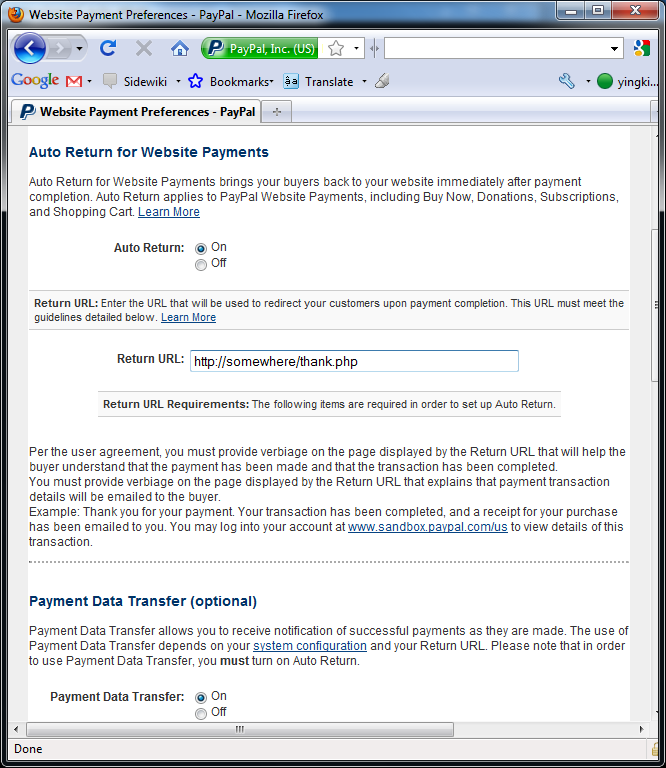
Copy the identity token for authorization in the thank.php
The next thing is to create the thank.php which is the destination of the Return URL.
thank.php
<?php
  // read the post from PayPal system and add 'cmd'
  $req = 'cmd=_notify-synch';

  $tx_token = $_GET['tx'];
  $auth_token = "<your identity token>";
  $req .= "&tx=$tx_token&at=$auth_token";

  // post back to PayPal system to validate
  $header = "POST /cgi-bin/webscr HTTP/1.0\r\n";
  $header .= "Host: http://www.sandbox.paypal.com\r\n";
  //$header .= "Host: http://www.paypal.com\r\n";
  $header .= "Content-Type: application/x-www-form-urlencoded\r\n";
  $header .= "Content-Length: " . strlen($req) . "\r\n\r\n";

  // url for paypal sandbox
  $fp = fsockopen ('ssl://www.sandbox.paypal.com', 443, $errno, $errstr, 30);

  // url for payal
  // $fp = fsockopen ('www.paypal.com', 80, $errno, $errstr, 30);
  // If possible, securely post back to paypal using HTTPS
  // Your PHP server will need to be SSL enabled
  // $fp = fsockopen ('ssl://www.paypal.com', 443, $errno, $errstr, 30);

  if (!$fp) {
    // HTTP ERROR
  } else {
    fputs ($fp, $header . $req);
    // read the body data
    $res = '';
    $headerdone = false;
    while (!feof($fp)) {
      $line = fgets ($fp, 1024);
      if (strcmp($line, "\r\n") == 0) {
        // read the header
        $headerdone = true;
      }
      else if ($headerdone) {
        // header has been read. now read the contents
        $res .= $line;
      }
    }

    // parse the data
    $lines = explode("\n", $res);
    $keyarray = array();
    if (strcmp ($lines[0], "SUCCESS") == 0) {
      for ($i=1; $i<count($lines);$i++){
        list($key,$val) = explode("=", $lines[$i]);
        $keyarray[urldecode($key)] = urldecode($val);
      }
      // check the payment_status is Completed
      // check that txn_id has not been previously processed
      // check that receiver_email is your Primary PayPal email
      // check that payment_amount/payment_currency are correct
      // process payment
      $firstname = $keyarray['first_name'];
      $lastname = $keyarray['last_name'];
      $itemname = $keyarray['item_name'];
      $amount = $keyarray['payment_gross'];

      echo ("<p><h3>Thank you for your purchase!</h3></p>");

      echo ("<b>Payment Details</b><br>\n");
      echo ("<li>Name: $firstname $lastname</li>\n");
      echo ("<li>Item: $itemname</li>\n");
      echo ("<li>Amount: $amount</li>\n");
      echo ("");
    }
    else if (strcmp ($lines[0], "FAIL") == 0) {
      // log for manual investigation
    }
  }
  fclose ($fp);
?>
Your transaction has been completed, and a receipt for your purchase has been emailed to you.<br>
You may log into your account at <a href='https://www.paypal.com'>www.paypal.com</a> to view details of this transaction.<br>
Replace the identity token in the above code and u can test the PayPal transaction flow with PDT.
Apart from PHP, u can work with PDT using
- ASP/VBScript
- PERL
- Cold Fusion
You can find the sample code in the reference page.
Reference: Payment Data Transfer Code Samples
Done =)


This just helped me a bunch. Thanks!
LikeLike
you are welcome =)
LikeLike
Hi the returning array is empty. please help me.
LikeLike
do you have any HTTP authentication settings in apache or .htaccess?
for paypal to feed back the data to you, you have to disable the HTTP authentication.
LikeLike
Where does the data for the $keydata array come from?
LikeLike
sorry the $keyarray
LikeLike
the $keyarray is return from paypal.com/sandbox.paypal.com which contains the payment details =)
LikeLike
ah sorry, for some reason i thought this script was to accept recurring payments from your site. would you happen to have a script for that?
LikeLike
Hi Jose,
Sorry for the late reply. i haven’t worked on the recurring payment before. so i have no idea about that.
are you using Express Checkout or Direct Payment (Website Payments Pro)? if yes, i guess the following API Documentation could help.
LikeLike
Thanks a ton! Helped me a lot.
LikeLike
hi,
how to get the values ‘tx’ and identity token in paypal sandbox after transaction completed.
is any possible to get url values in paypal sandbox?
plz anybody can help me.
LikeLike
you don’t need to have the value of tx, it is assigned from paypal/paypal sandbox. when user completed the transaction in the paypal/paypal sandbox page, it will redirect to the Return URL (thank.php in the above example) as you set in the paypal/paypal sandbox account.
you can get the identity token from the paypal/paypal sandbox. as i remember, it is shown after you have enabled the PDT feature.
LikeLike
Hi,
I just came across this and have been trying to figure it out but I keep getting this error:
Notice: Undefined variable: header in /home/user/public_html/domain/thank.php on line 12
Which refers to the following line:
$header .= “POST /cgi-bin/webscr HTTP/1.0\r\n”;
Going crazy trying to figure out what it could be. Any insight would be appreciated. Thanks for all the info so far!
LikeLike
oh, i think there is a typo there.
could you try replacing that by
LikeLike
I fixed it last night. The issue was that I was working on a scratch file and had not defined $header anywhere else yet. Your solution fixes it (would not have been a problem for folks who had already defined $header I don’t think) but I just added another line above it which also fixes it.
$header = “”;
Thanks for the reply!
LikeLike
Good to know that u have solved the problem. =)
LikeLike
Just what I needed, thanks!
Implemented it though and no matter what I try nothing shows next to price on the return url page, I want to use it with a multi item drop down, get shipping, name, item name but price is blank. Changed to a single product buy now button and still get a blank price, I’m guessing the payment_gross line is wrong for me, any ideas?
LikeLike
are u able to get the $keyarray from the paypal server?
LikeLike
Hi
Thanks for the tutorial. Works like a charm.
I had some difficulty at first. When I gave the return url I got an error message telling me that the url could not be validated. It was only after I posted the thank.php on my website that I could finish the configuration and got the token. But then, I am a newbie. I hope that my remarks help other newbies like me.
LikeLike
Thanks for ur remark. =)
LikeLike
Hi ! This is by far the best tutorial on how to use PDT ! Thank you very much mate !
LikeLike
Hi Pastro, thanks for your words and really glad to know it could help. =D
LikeLike
Thanks for this tutorial. This works perfectly in sandbox test site. Does this code need any changes when integrated with paypal site.
LikeLike
What you need to change are the $fp and $auth_token when you switch to live.
... $auth_token = "<your identity token>"; ... $fp = fsockopen ('ssl://www.paypal.com', 443, $errno, $errstr, 30); ...LikeLike
Hi! and thanks for this wonderful tutorial. I tried it and it worked perfectly with basic sample buttons, however I’m trying to get it to work with other information … like when you have a paypal pay now button with a form … like how paypal, when it generates the buttons it gives you certain options to add text fields, etc. How do you get information that is passed from those optional fields to display in thank.php? Otherwise it works just fine!
LikeLike
i guess other form data is stored in the $keyarray too, you can print_r($keyarray) and see if it contains those form data.
LikeLike
Hi! I have a question, hope you could help. Your PDT is displaying only one item name, what if I have to display a multiple Item name in my return url? thanks in advance.
LikeLike
i haven’t tried this before but according to IPN and PDT Variables
it should be item_name x. i.e. $keyarray[‘item_name1’], $keyarray[‘item_name2’]… etc.
LikeLike
yeah, your right, I figured it out by displaying the $keyarray. Thanks!
LikeLike
Good to know that you have solved the problem. =)
LikeLike
hi can I use it with Java?
LikeLike
There is no sample code of PDT in Java. Maybe you can find more information in the following link on how to implement paypal in Java.
Sample Code – IPN and APIs
LikeLike
after the script runs i only get:
“Your transaction has been completed, and a receipt for your purchase has been emailed to you.You may log into your account at http://www.paypal.com to view details of this transaction.”
without the transaction details..
any ideas?
LikeLike
the script doesnt output any data like firstname, lastname etc.
after inspecting the $res variable it is empty only the headers are there.
any idea?
LikeLike
I guess maybe paypal has made some changes on the implementation. I suggest you could follow the example from the official page.
Code Samples – Payment Data Transfer
Do you still get the same problem?
LikeLike
Hi,
Great tutorial, but I’m not able to get any response.
First off when I run the code the reply is “Invalid Host header” in the result. Adding
fixes that, but now I get no reply at all. Any thoughts would be greatly appreciated.
LikeLike
Not very sure what causes the problem. I have checked there is a new sample code provided by PayPal. Let me know if it could solve the problem.
<?php $pp_hostname = "www.paypal.com"; // Change to www.sandbox.paypal.com to test against sandbox // read the post from PayPal system and add 'cmd' $req = 'cmd=_notify-synch'; $tx_token = $_GET['tx']; $auth_token = "<your identity token>"; $req .= "&tx=$tx_token&at=$auth_token"; $ch = curl_init(); curl_setopt($ch, CURLOPT_URL, "https://$pp_hostname/cgi-bin/webscr"); curl_setopt($ch, CURLOPT_POST, 1); curl_setopt($ch, CURLOPT_RETURNTRANSFER,1); curl_setopt($ch, CURLOPT_POSTFIELDS, $req); curl_setopt($ch, CURLOPT_SSL_VERIFYPEER, 1); //set cacert.pem verisign certificate path in curl using 'CURLOPT_CAINFO' field here, //if your server does not bundled with default verisign certificates. curl_setopt($ch, CURLOPT_SSL_VERIFYHOST, 2); curl_setopt($ch, CURLOPT_HTTPHEADER, array("Host: $pp_hostname")); $res = curl_exec($ch); curl_close($ch); if(!$res){ //HTTP ERROR }else{ // parse the data $lines = explode("\n", $res); $keyarray = array(); if (strcmp ($lines[0], "SUCCESS") == 0) { for ($i=1; $i<count($lines);$i++){ list($key,$val) = explode("=", $lines[$i]); $keyarray[urldecode($key)] = urldecode($val); } // check the payment_status is Completed // check that txn_id has not been previously processed // check that receiver_email is your Primary PayPal email // check that payment_amount/payment_currency are correct // process payment $firstname = $keyarray['first_name']; $lastname = $keyarray['last_name']; $itemname = $keyarray['item_name']; $amount = $keyarray['payment_gross']; echo ("<p><h3>Thank you for your purchase!</h3></p>"); echo ("<b>Payment Details</b><br>\n"); echo ("<li>Name: $firstname $lastname</li>\n"); echo ("<li>Item: $itemname</li>\n"); echo ("<li>Amount: $amount</li>\n"); echo (""); } else if (strcmp ($lines[0], "FAIL") == 0) { // log for manual investigation } } ?> Your transaction has been completed, and a receipt for your purchase has been emailed to you.<br> You may log into your account at <a href='https://www.paypal.com'>www.paypal.com</a> to view details of this transaction.<br>LikeLike
it should be:
$header .= “Host: http://www.sandbox.paypal.com\r\n”;
or
$header .= “Host: http://www.paypal.com\r\n”;
LikeLike
I have updated the post. Thanks. =D
LikeLike
I’m running PHP 5.2 on my server, and can’t upgrade until I upgrade PHP code for everything on my site. Paypal’s code above is written on PHP 5.3. Would you know the specific changes I would need to make in the code for it to work with PHP 5.2. I get nothing back from Paypal using the above code — no errors, nothing.
LikeLike
The above comment is the latest source code from Paypal
And the code sample in my post was written long time ago and properly i was using PHP5.2.
It is hard to say what causes the problem. But i think you could check the following.
1. Make sure you are working on the correct server. PayPal or Sandbox?
2. Have you enabled PDT on your PayPal account and is your $auth_token correct?
3. Try to print some debug msgs in the code and check which part causes the problem.
Hope this help. =)
LikeLike
Great and Nice Job!! 🙂
I want to thankful to the writer of this blog, it is really helpful.
The most important thing is that even a new user can run this by just copy and paste.
You made back-end process after returning from Paypal much easier.
I would like to suggest the writer and user of this code , please edit QUOT in this line.
$header .= “Host: http://www.sandbox.paypal.com\r\n”;
actually by typo mistake these DOUBLE QUOTE are not supported in Programming so use below code instead.
$header .= "Host: http://www.sandbox.paypal.com\r\n";
PLEASE NOTE THE DIFFERENCE B/W “ ” and ” ” , first one is NOT supported in programming , while second one is supported.
Nice To Found your blog, It helped me a lot 🙂
Thanks & Regards,
Ranjit Singh
PHP Web Developer
LikeLike
Thanks for your comment and i have fixed the double quotes problem. =)
LikeLike
Hi ykyuen,
How about with Paypal API developement? I downloaded Paypal API to our computer but looking not simple as your code, I think we need extract the code and implement class then use or other way? Some people said use this package is high security for a site purchases?
Please let me know your ideas for this?
LikeLike
I haven’t tried that before, so can’t give comment on it. In general, the API provides u more flexibility and more powerful features which the PDT doesn’t have but the trade off is it requires more efforts to implement.
LikeLike
Hi, Your code in the comments box below worked. Please update the same on top. Thanks a lot for your help!
LikeLike
i have added a note at the top of the post. thanks for your comment. =D
LikeLike