
If you want to use Java Sun JDK instead of OpenJDK on CentOS, u have to install it manually.
1. Download the Java Sun JDK (.rpm.bin) at Sun Homepage
2. Login the CentOS as root and modify the privilege of the .bin to 755
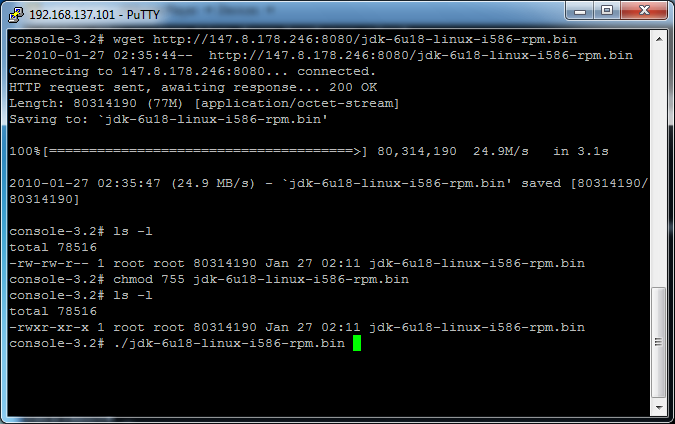
3. The installed java can be found at /usr/java

4. Add this new java to the alternatives configuration
- alternatives --install /usr/bin/java java /usr/java/jdk1.6.0_18/bin/java 2

5. Update the java alternatives and verify the java version

Reference: Installing Sun Java JDK in CentOS 5.2
Done =)

 Eureka!
I’m happy that it helped you 🙂
LikeLike
CentOS is really not easy to use =P.
Your article saves me a lot of time.
Thanks.
LikeLike
Thanks your instructions were useful and got me moving along.
LikeLike
you are welcome =)
LikeLike
very informative..thanks a lot..james
javajobs.net
LikeLike
Good to know that it can help you =)
LikeLike
did you have any probs with this install?
the centos wiki suggests a far more complicated method of installation and hints at issues id you just execute the bin
http://wiki.centos.org/HowTos/JavaOnCentOS
LikeLike
This post was written a year ago and i am not very sure if it works on the latest CentOS.
What will you do with your CentOS? if you just want to run some java program in console, i do think that this approach should work.
LikeLike
proprietary server app i don’t really know anything about.
we should be testing early next week, will let you know if anything explodes.
happy friday 🙂
LikeLike
i hope nothing will be exploded~~
but you’d better find a testing CentOS to test the installation and see if that is what you want.
good luck =P
LikeLike
just installed jdk1.6.0_24 on CentOS 5.5. No problem. Good and clear instructions. Follow to the dot and it works fine.
LikeLike
Congrats~ =)
LikeLike
Thanks a lot for the detailed information. Keep up the good work!
LikeLike
good to know that it helps =)
LikeLike
Great, simple to follow guide, thanks for this!
LikeLike
not at all. good to know that it works for u. =)
LikeLike
Hi
It’s really helpful. Thank you.
LikeLike
You are welcome =D
LikeLike
THanks man, I followed this and it works really well and saved me time!
LikeLike
Great =D
LikeLike
My VPS Configuration
OS: centos-5-x86_64
VPS Platform: OpenVZ
HDD : 50 GB
Ram : 1 GB
I am trying to install 1 software on my VPS. But java is giving me some problem
[property] java.io.IOException: Cannot run program “/bin/env”: java.io.IOException: error=12, Cannot allocate memory
So then I am tried to allocate heap memory to JVM by using command
# java -Xms128m -Xmx128m DoRunTime
It will give such type of error
Exception in thread “DoRunTime” java.lang.NoClassDefFoundError: DoRunTime
Caused by: java.lang.ClassNotFoundException: DoRunTime
I am install JAVA using Command # yum install java-1.6.0-openjdk-devel
I have set my JAVA_PATH=/usr/lib/jvm/java-1.6.0-openjdk-1.6.0.0.x86_64
Also I have set my CLASSPATH=/usr/lib/jvm/java-1.6.0-openjdk-1.6.0.0.x86_64/jre/lib/ext/
Also is there need to set PATH???
I Don’t know what is going wrong……… 😦
LikeLike
you need to set the PATH variable, edit your ~/.bashrc and add
Then enter source .bashrc
Try the java command again.
LikeLike
I have set the PATH using this command # vi ~/.bash_profile
JAVA_HOME=/usr/lib/jvm/java-1.6.0-openjdk-1.6.0.0.x86_64
PATH=$PATH:/usr/lib/jvm/java-1.6.0-openjdk-1.6.0.0.x86_64/bin
& I am also tried simple program of JAVA. Its working properly.
I think the problem is in JVM heap memory.
Is there any need of creating partition???
# free -m
total used free shared buffers cached
Mem: 1024 23 1000 0 0 0
-/+ buffers/cache: 23 1000
Swap: 0 0 0
reply
LikeLike
how about adding the JAVA_OPTIONS env variable?
export JAVA_OPTIONS=”-Xms512m -Xmx512m”
LikeLike
I have set this path also
export JAVA_OPTIONS=”-Xms512m -Xmx512m”
But it giving the same error. What you think it is Compile error or something diff.?
Should i install latest JDK ???
LikeLike
I just found a post which may help
StackOverflow – How to solve “java.io.IOException: error=12, Cannot allocate memory” calling Runtime#exec()?
Seems it is a bug in OpenJDK, try
echo 1 > /proc/sys/vm/overcommit_memory
and run ur java application again.
If still fails, I think you need to use the Sun JDK.
Hope this help =)
LikeLike
Thanks ykyuen
I have updated my Sun JDK to latest version & now it is working fine. Also there is a problem in my Ant which is also due to old version.
Now all my errors are fixed. As I am beginner I have waste my 5 days to fix this bug. I am using yum command to install the software which are installed already.
So Moral of the story with Centos 5.5 is it required latest version of software. So when you try to install any software in Centos 5.5 Upadte your system 🙂
LikeLike
Good to know that finally u have solved the problem =D
LikeLike
Wonderful! works great so far, thank you.
LikeLike
You are welcome~ kudos to Christian López Espínola
LikeLike
This is by far the clearest most concise instruction on how to install Java, and if there are multiple versions, how to set which version the system is using by default. Bravo ykyuen, you have simplified an otherwise complicated install. Thank you very much.
LikeLike
Thanks for your comment. Kudos to Christian López Espínola as i learnt from his blog. =D
LikeLike
Thanks a lot! Worked really well in Centos 6.
LikeLike
Thanks for letting us know it also works in Centos 6. I haven’t tried that before. =P
LikeLike
Thank you so very very much. I am a beginner to boot in CentOS. I had trouble installing and swapping sun-jdk but now thanks to you everything works perfect 🙂 Thanks again!
LikeLike
Good to know that the post could help. =)
LikeLike
Well explanation, thank you
LikeLike
Thanks for your comment~ =D
LikeLike
Thank you very much, accurate response, quick and just what I needed.
Greetings.
LikeLike
Thanks very much your comment. =D
LikeLike
it is need to install java jre ?
LikeLike
No need. The jdk already included the jre.
LikeLike
I just burned a lot of time trying to figure this out. This is very poorly documented. THANK YOU!
LikeLike
You are welcome~
Kudos to Christian López Espínola
LikeLike