
In Android Applications, ListView helps you to display the contents of an array with flexible size. The following example shows you how to create a simple ListView.
1. First create a new Android project
2. Create the following Java class
import java.util.ArrayList;
import java.util.HashMap;
import java.util.List;

import android.app.Activity;
import android.os.Bundle;
import android.widget.ListView;
import android.widget.SimpleAdapter;

public class ListViewA extends Activity {
    /** Called when the activity is first created. */
    @Override
    public void onCreate(Bundle savedInstanceState) {
        super.onCreate(savedInstanceState);
        setContentView(R.layout.main);
        ListView lv= (ListView)findViewById(R.id.listview);

        // create the grid item mapping
        String[] from = new String[] {"rowid", "col_1", "col_2", "col_3"};
        int[] to = new int[] { R.id.item1, R.id.item2, R.id.item3, R.id.item4 };

        // prepare the list of all records
        List<HashMap<String, String>> fillMaps = new ArrayList<HashMap<String, String>>();
        for(int i = 0; i < 10; i++){
        	HashMap<String, String> map = new HashMap<String, String>();
        	map.put("rowid", "" + i);
        	map.put("col_1", "col_1_item_" + i);
        	map.put("col_2", "col_2_item_" + i);
        	map.put("col_3", "col_3_item_" + i);
        	fillMaps.add(map);
        }

        // fill in the grid_item layout
        SimpleAdapter adapter = new SimpleAdapter(this, fillMaps, R.layout.grid_item, from, to);
        lv.setAdapter(adapter);
    }
}
3. Create the following 2 layouts
main.xml
<?xml version="1.0" encoding="utf-8"?>
<LinearLayout android:id="@+id/main"
	xmlns:android="http://schemas.android.com/apk/res/android"
	android:orientation="vertical"
	android:layout_height="fill_parent"
	android:layout_width="fill_parent">
	<!-- Header -->
	<LinearLayout android:id="@+id/header"
		android:background="#ff347c12"
		android:layout_height="wrap_content"
		android:layout_width="fill_parent"
		>
		<TextView android:id="@+id/item1"
			android:layout_height="fill_parent"
			android:layout_width="wrap_content"
			android:width="20dip"
			android:height="30dip"
		/>
		<TextView android:id="@+id/item2"
			android:layout_height="fill_parent"
			android:layout_width="wrap_content"
			android:text="col_1_h"
			android:width="100dip"
			android:height="30dip"
		/>
		<TextView android:id="@+id/item3"
			android:layout_height="fill_parent"
			android:layout_width="wrap_content"
			android:text="col_2_h"
			android:width="100dip"
			android:height="30dip"
		/>
		<TextView android:id="@+id/item4"
			android:layout_height="fill_parent"
			android:layout_width="wrap_content"
			android:text="col_3_h"
			android:width="100dip"
			android:height="30dip"
		/>
	</LinearLayout>

	<!-- List Divider -->
	<View android:layout_width="fill_parent"
		android:layout_height="1dip"
		android:background="?android:attr/listDivider" />

	<!-- ListView (grid_items) -->
	<LinearLayout android:id="@+id/layout"
		android:layout_width="wrap_content"
		android:layout_height="fill_parent">
		<ListView android:id="@+id/listview"
			android:layout_height="fill_parent"
			android:layout_width="fill_parent">
		</ListView>
	</LinearLayout>
</LinearLayout>
grid_item.xml
<?xml version="1.0" encoding="utf-8"?>
<LinearLayout xmlns:android="http://schemas.android.com/apk/res/android"
    android:orientation="horizontal"
    android:layout_width="fill_parent"
    android:layout_height="fill_parent">
        <TextView android:id="@+id/item1"
        	android:text="row_id"
        	android:layout_height="fill_parent"
        	android:layout_width="wrap_content"
        	android:width="20dip"
        />
        <TextView android:id="@+id/item2"
	        android:text="col_1"
	        android:layout_height="fill_parent"
	        android:layout_width="wrap_content"
	        android:width="100dip"
	    />
	    <TextView android:id="@+id/item3"
	        android:text="col_2"
	        android:layout_height="fill_parent"
	        android:layout_width="wrap_content"
	        android:width="100dip"
	    />
	    <TextView android:id="@+id/item4"
	        android:text="col_3"
	        android:layout_height="fill_parent"
	        android:layout_width="wrap_content"
	        android:width="100dip"
	    />
</LinearLayout>
4. Try it!
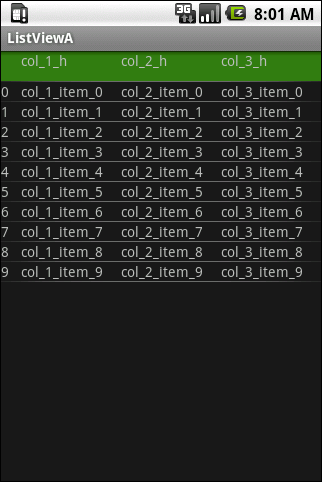
Done =)
Update 2010-03-15 (Suggested by Mike)
If you want change the background color of the rows in the ListView. Take a look at Android – Applying Alternate Row Color in ListView with SimpleAdapter.

 Eureka!
Hi,
This works beautifully! Thanks!
However, I haven’t been able to make these list items clickable. I want to be able to launch a new activity with some params when a user clicks on one of the items.
The code that I’ve added is as below:
lv.setOnItemClickListener(new OnItemClickListener() {

  public void onItemClick(AdapterView adapterView, View view, int position, long id) {
    SimpleAdapter adapter = (SimpleAdapter) adapterView.getAdapter();
    ListView currentLv = (ListView) view;

    Object item = adapter.getItem(position);
    //Do some more stuff here and launch new activity


  }
});
However, the items remain unclickable – I can select them using my the navigation keys but again there is no action that leads it to go to this piece of code.
Please help me here! I need to get this Click Event working…
Thanks,
Varun
LikeLike
Hi Varun,
Try to run your program in debug mode and add a break point within the public void onItemClick. The program should pause at the break point if u click the list view item.
Regards,
Kit
LikeLike
This Blog will definitely help you and fulfill your requirement.
LikeLike
lv.setOnItemClickListener(new OnItemClickListener() { public void onItemClick(AdapterView parent, View view, int position, long id) { String U_id = ((TextView)view.findViewById(R.id.ID)).getText().toString(); } });LikeLike
Thanks for your code. =)
LikeLike
please help me
how to change the content of of SimpleAdapter after clicking the search button.
Means i want to show data through SimpleAdapter but data depends upon the search result.
LikeLike
EXCELLENT…WORKS LIKE CHARM 🙂
LikeLike
Good to know that it helps and thanks for your comment~ =D
LikeLike
i dun have a search button in the example of this post. but if u have a search button, just create a new simpleAdapter and set it to the listview.
Reference: StackOverflow – update listview from simpleAdapter with new data
LikeLike
Is there a nice way to alternate colors for the odd/even rows?
LikeLike
Hi Mike,
You can apply alternate colors or even more colors on each row. Take a look at Android – Applying Alternate Row Color in ListView with SimpleAdapter
Hope this help =)
Regards,
Kit
LikeLike
In “Splash.java” add following lines before
“view.setOnClickListener(new OnClickListener() { ”
you will get your required result
if(position%2==0){
view.findViewById(R.id.rlt_main).
setBackgroundColor(Color.Black);
}else{
view.findViewById(R.id.rlt_main).
setBackgroundColor(Color.Gray);
}
LikeLike
Hi can you help me out with this?
This is the example from the android developer website, HelloListView.
I’m having some problems over here ->
lv.setOnItemClickListener(new OnItemClickListener() {
  public void onItemClick(AdapterView parent, View view, int position, long id)
  {
    // When clicked, show a toast with the TextView text
    Toast.makeText(getApplicationContext(), ((TextView) view).getText(),
    Toast.LENGTH_SHORT).show();
  }
});
The onItemClickListener and View view having problems. Can you help me out? Thanks!
LikeLike
Hi Noelle,
i am not sure the exact problem but i suggest you could try public void onItemClick(AdapterView adapterView, View view, int position, long id) instead of public void onItemClick(AdapterView parent, View view, int position, long id).
have u ever tried running it in debug mode?
Kit
LikeLike
Thanks…..
LikeLike
You are welcome. =D
LikeLike
Hi there, I have stored data in my sqldatabase and i want to show it out in listview, but i’m not able to.
Do you have a sample of that? Both are textviews.
LikeLike
Hi Wei Ting,
If you want to know how to create a database for android app, you could take a look at this.
Working with the SQLite-Database – Cursors
hope this help.
Regards,
Kit
LikeLike
Hi there, im still not able to show my listview after 3 weeks and i really need an expert’s help. Can you email me and take a look at my codes? 🙂
chuaisarocker@hotmail.com
LikeLike
You can also download the complete source code from here
LikeLike
Hello there,
I would like to use this example code, but the items of the list to be a list after an XML Parsing..
In otherwords, i want to parse an XML and after that to make a list like this one you’ve already made.. :S
LikeLike
I hv never done xml parsing in android. see if the following tutorial helps.
Android XML Parsing Tutorial – Using SAXParser
LikeLike
Hey ykyuen,
You can look at this example: http://www.technotalkative.com/android-sax-parsing-example/
LikeLike
Thanks for your example. =)
LikeLike
hi folks, can we add button as well as listview on same layout? m trying but my app stops
LikeLike
Hi Aditya,
i think the following 2 examples could help.
Kit
LikeLike
Hi!
I am trying to add a ScrollView to your example, but this makes the list use only a fraction of the screen… Do you know how to make this work?
Screenshot:
My changes to the XML:
LikeLike
(Forgot to mention: Thanks a lot for a good example!)
Seems that the comment system ate my XML… Basically I replaced the LinearLayout in main.xml line 48 with a ScrollView. Also tried to add the ScrollView above the LinearLayout so that the SV contains the LL — same output.
LikeLike
My bad, rookie-mistake: I didn’t have the android:fillViewport=”true” -tag on the scroll view… That took care of it and now it works nicely, scrolling the dynamic list.
Sorry to spam your comments too soon before studying the problem enough. 🙂
LikeLike
haha~ no problem Asmo. Good to know that u have make yours code work =)
LikeLike
HI,
nice tutorial! it helped me a lot, thanks!
i have just 1 question … how can i change settings of textviews in grid_item.xml programmatically? like
it throws me NullPointerException if i do that =/
LikeLike
Did u forget to import the android.graphics.Color
try
or you can define your own color in the resource file. Create the res/values/color.xml
Then you should be able to set the color by
Reference: Stack Overflow – Android color xml resource file
LikeLike
i solved problem by makeing my own adapter like you did in one other tutorial. problem is, that anything i want to do with TextViews in grid_item.xml, it throws me an NullPointerException,
LikeLike
I didn’t meet your problem. i added the setTextColor() function in the in OnItemClickListener as follow.
OnItemClickListener itemClickedListener = new OnItemClickListener() {
  public void onItemClick(AdapterView<?> parent, View view, int position, long id) {
    // TODO Auto-generated method stub
    TextView item2 = (TextView)view.findViewById(R.id.item2);
    item2.setTextColor(android.graphics.Color.YELLOW);
	}
};
I guess you have missed sth, are u sure u have imported all the required class?
LikeLike
which sdk are u using?
LikeLike
Hi there,
I’ve created one calendar, on clicking any day of the calendar it will show the list of audio recordings for the day, but now on clicking any one of these recordings it must play it, i’m unable to implement this part. please help me out..
Thanx..
LikeLike
could you tell me more about the problems you met?
LikeLike
Nice example, to get through with the listview, like this if we need to check with custom listview of need to go through with multiple listview in a activity means we can go with this link http://android-codes-examples.blogspot.com/2011/03/multiple-listview-and-custom-listview.html
LikeLike
Thanks for your example =)
LikeLike
Hi,
thanks for your code and the explantions. However, I cannot get it to work: it always throws a null-pointer exception in line 35: lv.setAdapter(adapter);
I have copied your code 1:1, and I am not able to find the error… Do I miss something obvious perhaps?
BTW, I am developing on Android 2.2…
LikeLike
Awww… I am not sure what happened, but suddenly it works … strange… 🙂
Thanks for the great tutorial! 🙂
LikeLike
Great =)
LikeLike
Hey, thank you for making this blog entry. I always need to come back an copy your example whenever I need to build a list. This is truly helpful! Thank you!
LikeLike
Hi Juhani,
Good to know that it could help u. As Douglas Merrill said…
Knowledge is not power. The SHARING of knowledge is power..
By the way, ur blog looks great!
Regards,
Kit
LikeLike
great example.. one thing I wuld like to add, say to the last column is a url link. so when I user clicks it it opens the browser…now I’m able to create the link OK with linkify but when I try to apply to the listview it only shows the text of the link but is not an actual link.
Any idea how to apply the link to the 3rd column.
LikeLike
See if the following post help. StackOverflow – Android: How can I add HTML links inside a ListView?
LikeLike
i used hashmap for customized listview but only 5 random items are displaying what is the problem?
public class MyCustomListView extends ListActivity { /** Called when the activity is first created. */ @Override public void onCreate(Bundle savedInstanceState) { super.onCreate(savedInstanceState); setContentView(R.layout.custom_list_view); SimpleAdapter adapter = new SimpleAdapter(this,list,R.layout.custom_row_view, new String[] {"name","height"}, new int[] {R.id.text1,R.id.text2} ); populateList(); setListAdapter(adapter); } static final ArrayList<HashMap> list = new ArrayList<HashMap>(); private void populateList() { HashMap temp = new HashMap(); temp.put("name","Chavand"); temp.put("height", "3400ft"); list.add(temp); HashMap temp1 = new HashMap(); temp1.put("name","Durg-Dhakoba"); temp1.put("height", "3900ft & 4100ft"); list.add(temp1); HashMap temp2 = new HashMap(); temp2.put("name","Hadsar"); temp2.put("height", "3200ft"); list.add(temp2); HashMap temp3 = new HashMap(); temp3.put("name","Jivdhan"); temp3.put("height", "3754ft"); list.add(temp3); HashMap temp4 = new HashMap(); temp4.put("name","Korigad"); temp4.put("height", "3000ft"); list.add(temp4); HashMap temp5 = new HashMap(); temp.put("name","Lohgad"); temp.put("height", "3400ft"); list.add(temp5); HashMap temp6 = new HashMap(); temp.put("name","Malhargad"); temp.put("height", "3100ft"); list.add(temp6); HashMap temp7 = new HashMap(); temp.put("name","Shivneri"); temp.put("height", "3500ft"); list.add(temp7); HashMap temp8 = new HashMap(); temp.put("name","Visapur"); temp.put("height", "3038ft"); list.add(temp8); }LikeLike
you need to add more textview in main.xml and grid_item.xml.
LikeLike
do you know how to do a listview showing multiple imageviews in it??
LikeLike
I think the following examples should help
LikeLike
Hey ykyuen,
Thanx for providing this helpful example. You just need to refer whole android ListView category: http://pareshnmayani.wordpress.com/category/android/listview/
I am really glad that this information is helpful to someone 🙂
LikeLike
Hi Paresh,
Thanks for your link and i am sure it would be useful for others. =)
Regards,
Kit
LikeLike
Hi, I have a question regarding the handling of the listview, I have a project where I show a set of objects (images, text, buttons) but from what I suppose I have a set of 3 buttons in the listview and I want to click on any buttons and these give me back an event, but I see the contents of the listview methods do not work, when clicking on them fails. I used simpleadapter and I tried to take the focus listview below shows the code.
public class Framemain extends ListActivity {
    /** Called when the activity is first created. */
    @Override
    public void onCreate(Bundle savedInstanceState) {
        super.onCreate(savedInstanceState);
        setContentView(R.layout.main);

        int n=6;
        String []titulo = new String[n];
        String []genero = new String[n];
        String []descripcion = new String[n];
        String []paisorigen = new String[n];
        String []lenguaje = new String[n];
        String []director = new String[n];
        String []actores = new String[n];
        String []clasificacion = new String[n];
        String []duracion = new String[n];
        String []paginaweb = new String[n];
        String []cine = new String[n];
       int[]imagenes= new int[n];
        String[]valoraciones= new String [n];

    imagenes[0]=R.drawable.p1;
    imagenes[1]=R.drawable.p2;
    imagenes[2]=R.drawable.p3;
    imagenes[3]=R.drawable.p4;
    imagenes[4]=R.drawable.p5;
    imagenes[5]=R.drawable.p6;
    try {
InputStream is = getResources().openRawResource(R.raw.peliculas);
BufferedReader bf= new BufferedReader(new InputStreamReader(is));
    while(bf.ready()){
    	for(int i=0;i<n;i++){
    		titulo[i]=bf.readLine();
    		genero[i]=bf.readLine();
    		descripcion[i]=bf.readLine();
    		paisorigen[i]=bf.readLine();
    		lenguaje[i]=bf.readLine();
    		director[i]=bf.readLine();
    		actores[i]=bf.readLine();
    		clasificacion[i]=bf.readLine();
    		duracion[i]=bf.readLine();
    		paginaweb[i]=bf.readLine();
    		cine[i]=bf.readLine();
    		valoraciones[i]=bf.readLine();
    	}//fin del for
    	}//fin del while
    }//fin del try

    catch (Exception e) {
       Log.v("Error de Exception", "no funco");
      }
    ArrayList<HashMap> arreglo=new ArrayList<HashMap>();

    for(int i=0;i<n;i++){
    HashMap map=new HashMap();
    map.put("titulo", titulo[i]);
    map.put("imagen", imagenes[i]);
    map.put("descripcion", descripcion[i]);
    arreglo.add(map);
}//map

    String[] from={"titulo","imagen","descripcion"};
    int[] to={R.id.titulo,R.id.imagenpelicula,R.id.descripcion};

    SimpleAdapter adapter=new SimpleAdapter(
                    this.getApplicationContext(),
                    arreglo,
                    R.layout.content,
                    from,
                    to);
    //cambiarimagen();

    final ListView l = (ListView)findViewById(R.id.ListView);
    l.setAdapter(adapter);

    }
and this is the main.xml
and there is the content.xml:
can you help me ?
LikeLike
the main.xml
LikeLike
If you want to use button in listview, you can follow the example below.
Handling Button clicks in a ListView Row
LikeLike
hi..i m sachin . how to set custom font in above code..
LikeLike
StackOverflow – Set font for ListView, Android
LikeLike
Hi.
I am geting a erroer ” Cannot cast from View to ListView” for this line of code
ListView lv= (ListView)findViewById(R.id.listview);
Plz….can u help me
LikeLike
try to clean the project an build again. if still does not work, can u give me the exception stack trace? and what android sdk are u using?
LikeLike
Thanks…….It works… 🙂
LikeLike
Great =D
LikeLike
This is nice post. Its help me lot and this link
http://mindstick.com/Articles/802aac4e-b9ef-499e-a20b-f0d0fd56ae11/?Using%20ListView%20in%20Android%20Application
also helped me to complete my task.
Thanks!!
LikeLike
Thanks for your link. =)
LikeLike
Hello! I hope you can help me.
I have two activities, first is main (with ListView and HashMap) and second is an activity with EditText in it.
My task is to get string from EditText in second activity and put it on ListView in the first one.
I know how to use Intents and all that stuff, but I have a little problem. It’s only possible to add one unique item into ListView. For example, when I’m adding second item, I get two identical items. When I’m adding third item, ListView has three same items. All items contain the data of last added item. Here’s some code:
@Override public void onActivityResult(int requestCode, int resultCode, Intent data) { super.onActivityResult(requestCode, resultCode, data); switch(requestCode) { case (STATIC_INTEGER_VALUE) : { if (resultCode == Activity.RESULT_OK) { String Route = data.getStringExtra("route"); String Destination = data.getStringExtra("destination"); String Time = data.getStringExtra("time"); map.put("time", Time); map.put("route", Route); map.put("destination", Destination); fillMaps.add(map); SpecialAdapter adapter = new SpecialAdapter(this, fillMaps, R.layout.grid_item, from, to); list.setAdapter(adapter); } else if (resultCode == Activity.RESULT_CANCELED){ //Do nothing } break; } } }LikeLike
how about this
@Override public void onActivityResult(int requestCode, int resultCode, Intent data) { super.onActivityResult(requestCode, resultCode, data); switch(requestCode) { case (STATIC_INTEGER_VALUE) : { if (resultCode == Activity.RESULT_OK) { String Route = data.getStringExtra("route"); String Destination = data.getStringExtra("destination"); String Time = data.getStringExtra("time"); // create a new map object for every new record HashMap<String, String> map = new HashMap<String, String>(); map.put("time", Time); map.put("route", Route); map.put("destination", Destination); fillMaps.add(map); SpecialAdapter adapter = new SpecialAdapter(this, fillMaps, R.layout.grid_item, from, to); list.setAdapter(adapter); } else if (resultCode == Activity.RESULT_CANCELED){ //Do nothing } break; } } }LikeLike
This seems helpful, thanks a bunch!
LikeLike
good to know that it could help. =)
LikeLike
try this one http://sanathnandasiri.blogspot.com/2011/11/how-to-work-with-android-listview.html
also include working source code
LikeLike
Hi Sanath, Thanks for your code. =)
LikeLike
if it has problems or any optimization please inform me…
LikeLike
sure. =)
LikeLike
Once the list is loaded,is it possible to fill the remaining space of parent layout with empty list row elements ?
LikeLike
In my example, i used a for loop to fill in the listview
...
for(int i = 0; i < 10; i++){
  HashMap<String, String> map = new HashMap<String, String>();
  map.put("rowid", "" + i);
  map.put("col_1", "col_1_item_" + i);
  map.put("col_2", "col_2_item_" + i);
  map.put("col_3", "col_3_item_" + i);
  fillMaps.add(map);
}
...
if you want to fill in the remaining space of the parent layout, you could add more items in the fillMaps object. but it is difficult to get the exact number of rows to fill in the remaining space becoz android phones has varied screen size.
LikeLike
Yep its really difficult as we have to calculate the height of the listview and list_element height, then we should try filling the list i guess.
Will post soon if i got solution. Thanks for ur good blog!!!!.
LikeLike
You are welcome. hope you can find a solution soon. =)
LikeLike
Hi,
As your example how you can fill with data getting from edittexts using add button with increment rows?
I can show UI like this,
TextView1 EditText1
TextView2 EditText2
Button1
ListView with two columns
Please help me…
LikeLike
Hi Gaya,
In my example, i only show some static data in the listview. If you want to allow user to add the listview item, probably you need a sqlite db to store the input data and need a form for getting the user input. The following example should be a nice reference for you.
Android developers – Notepad Tutorial
Hope this help.
Kit
LikeLike
Hi ykyuen,
I am using a special adapter which extends simpleadapter. In my code I am looping through my collection which is in an ArrayList object. I get the desired items and put them into an hashmap object. Finally I add that hashmap into another arraylist and provide it to the specialadapter, similar to what you have done..Now my PROBLEM is I am getting an “ArrayIndexOutOfBound” error when the code reaches the getView() in the simpleadapter, due to which there is a force close. Now I am not able to figure out which array gets out of bounds…Please clear my confusion..
Thanking you,
Gautam.
LikeLike
Maybe you could add some watchers and break points in debug mode and see which variable causes the ArrayIndexOutOfBound error.
LikeLike
public class SpecialAdapter extends SimpleAdapter
{

  private int[] colors = new int[] { 0x30F0F8FF, 0x60C6E2FF, 0x80B9D3EE, 0x909FB6CD };
  public SpecialAdapter(Context context, List<HashMap> items, int resource, String[] from, int[] to)
  {
    super(context, items, resource, from, to);
  }
  @Override
  public View getView(int position, View convertView, ViewGroup parent)
  {
    HashMap hm=(HashMap) super.getItem(position);
    View view = super.getView(position, convertView, parent);  //<==== This the line where I get Arrayindexoutofbounds......


    return view;
  }
Now I dont understand why it happens…
LikeLike
Will it throw the Arrayindexoutofbounds error if you comment the
LikeLike
Yes it throws the same even on comment…See I am using the CalendarView and on a particular DAY click I fetch corresponding data from DB, loop it, put it in hashmap and populate it in listview… listview.setAdapter(adapter) also works fine..But when it comes to getView() I dont understand what index postion in the listview goes outOfBounds…..
LikeLike
I think the problem is now(TYPO: should be NOT) on your SpecialAdapater class.
does your IDE supports debug perspective which allows you to adding break points and watches on the code and vaiables?
check the whole error dump, you should be able to find which line of code cause the error.
LikeLike
Yes after doing all that Ive came to the conclusion that the line
” View view = super.getView(position, convertView, parent); ”
gives the error… Have you had any hands on using a CalendarView in your app any time…I mean what I am doing might be a very basic thing to do in calendars…Do you have any experience as to how it can be done…???
LikeLike
O Sorry, i think i have a typo in my previous comment. i mean the problem is NOT on your SpecialAdapater class.
And i haven’t worked with CalendarView before. Actually i created this example 2 years ago with SDK 1.6. Sorry that i can’t help much.
LikeLike
Ok thanks for your time…
LikeLike
You are welcome. hope you can solve the problem soon. =)
LikeLike
Hi Kit
I have successfully adapted your code for my project, thanks.
Now I want to programatically change font size of the text views but I am unable to figure out how to reference them.
Any suggestions?
LikeLike
you can set the font size by the setTextSize() function.
or edit the xml as follow.
LikeLike
Thanks Kit, I understand the setTextSize() function call, I just can’t work out how to reference the TextView at run time. Everything I have tried returns a null pointer.
LikeLike
how did you called the setTextSize()? could you post that line of code?
LikeLike
Hi! Kit
The autoCompleteView can put values to ListView?
if can do it. How can i do
Thanks
LikeLike
Do you mean AutoCompleteTextView?
I didn’t quite get what you mean, the list view is for displaying a list of items and the AutoCompleteTextView is for user to enter a value.
Do you mean letting the user enter a value in the AutoCompleteTextView and then save it to the listview?
LikeLike
Hi
Yes I mean to AutoCompleteTextView.
Now i have a value in the AutoCompleteTextView(ArrayList Type) and then save it to the listview?
Thanks
(Sorry my language very weakness)
LikeLike
In that case, you need to collect the user input and save this to a sqlite database.
i think the following tutorial is useful for you
Android developers – Notepad Tutorial
and you could use AutoCompleteTextView when collecting user input.
The listview shown in this blog post only displays static data. after you could save the user input into database. you should be able to retrieve the data from it and show them in listview.
hope the above info could help. =)
LikeLike
Big Thanks for your info.
I’ ll try to follow the Notepad Tutorial before
^_^
LikeLike
You are welcome. =)
LikeLike
I tried all the suggest method here to capture the click event to get the row content and display them in a toast but still no success :(.
Please help.
LikeLike
Thank for you sample , I corrected my code mistake your example is prefect.
LikeLike
good to know you have solved the problem. =)
LikeLike
One thing that is unclear to me: Does Android environment look for a file named grid_item.xml or does it simply use the TextView objects from this file based upon the TextView id’s as they are populated in the Java code?
LikeLike
Those xml files are specified in the code which are R.layout.main and R.layout.grid_item.
LikeLike
Thanks for the post, simple and clear worth much to my project. looked much like this for example. Thank you strength.
LikeLike
Thanks for your comment. =D
LikeLike
I was trying to set percentage by layout width and weight but in grid all is going to append 😦 please help
LikeLike
could the following solution solve your problem?
StackOverflow – Percentage width in a RelativeLayout
LikeLike
Hi, I have managed to put Strings across to the list view xml but how do I get images across? SimpleAdapter adapter = new SimpleAdapter(this, fillMaps, R.layout.grid_item, from, to); – in this bit instead of from and to I have my Strings, but don’t know what type an image should be. Thanks in advance for any help 🙂
LikeLike
This example should help.
Android Custom ListView with Image and Text
LikeLike
Thanks 🙂
LikeLike
you are welcome. =D
LikeLike
hi,
i need to display the multiples colors in list view. like stock market app is coming when ever it is increase it is showing green symbol & red color will come under decrease, how we can do ??please help me out…
LikeLike
The following example should help.
StackOverflow – Android ListView Text Color
LikeLike
i prepared a list ,every item of list also carried one one list,and in second list’s item when i click
is connect to different activity. how can connect different activity in second list’s item
LikeLike
Does this post help?
StackOverflow – ListView and Buttons inside ListView
LikeLike
thanks a lot for these example!!!!!!!!!!!!!!!!!! 😉
LikeLike
You are welcome. =)
LikeLike
I have this code, In the following code i stored all the list data in an array called words[] and attached to listview using simple ArrayAdapter. So how to bring the database instead for the array to display the Search Functionality to ListView:
public class LookupActivity extends Activity { // List view private ListView lv; // Listview Adapter ArrayAdapter adapter; // Search EditText EditText inputSearch; // ArrayList for Listview ArrayList<HashMap> productList; DatabaseHandler mDB; @Override public void onCreate(Bundle savedInstanceState) { super.onCreate(savedInstanceState); setContentView(R.layout.maintim); // Listview Data String words[] ={"Kungfu","Long"}; lv = (ListView) findViewById(R.id.list_view); inputSearch = (EditText) findViewById(R.id.inputSearch); // Adding items to listview adapter = new ArrayAdapter(this, R.layout.list_item, R.id.word, words); lv.setAdapter(adapter); /** * Enabling Search Filter * */ inputSearch.addTextChangedListener(new TextWatcher() { public void onTextChanged(CharSequence cs, int arg1, int arg2, int arg3) { // When user changed the Text LookupActivity.this.adapter.getFilter().filter(cs); } public void beforeTextChanged(CharSequence arg0, int arg1, int arg2, int arg3) { // TODO Auto-generated method stub } public void afterTextChanged(Editable arg0) { // TODO Auto-generated method stub } }); } }LikeLike
You could take a look on the following tutorials about working with database in android.
LikeLike
thanks a lot 🙂 if i have problem, can’t i ask you ???
LikeLike
sure you can~ but i haven’t done any android development for a long time. i am still on the sdk 1.6 level. =P
LikeLike
i’m just on the sdk 1.5 LOL :)))
LikeLike
haha~ i would try my best to help if i could~
LikeLike
thanks so much ^^ now i have a problem…i had bring the database to display to ListView, but i wanna search it. Example: when you type “a” will show…
Apply
Cat
(…)
i do it but have a problem that i don’t know what it is :)), can you help me???
This is code:
import android.app.Activity; import android.database.Cursor; import android.os.Bundle; import android.text.Editable; import android.text.TextWatcher; import android.widget.ArrayAdapter; import android.widget.EditText; import android.widget.ListView; import android.widget.SimpleCursorAdapter; public class AndroidSQLite extends Activity { private SQLiteAdapter mySQLiteAdapter; //Search EditText EditText inputSearch; //Listview Adapter ArrayAdapter adapter; /** Called when the activity is first created. */ @Override public void onCreate(Bundle savedInstanceState) { super.onCreate(savedInstanceState); setContentView(R.layout.main); ListView listContent = (ListView)findViewById(R.id.contentlist); inputSearch = (EditText) findViewById(R.id.inputSearch); /* * Create/Open a SQLite database * and fill with dummy content * and close it */ mySQLiteAdapter = new SQLiteAdapter(this); mySQLiteAdapter.openToWrite(); mySQLiteAdapter.deleteAll(); mySQLiteAdapter.insert("Apply"); mySQLiteAdapter.insert("Boy"); mySQLiteAdapter.insert("Cat"); mySQLiteAdapter.insert("Dog"); mySQLiteAdapter.insert("Egg"); mySQLiteAdapter.insert("Fish"); mySQLiteAdapter.insert("Girl"); mySQLiteAdapter.insert("Hand"); mySQLiteAdapter.insert("Ice-scream"); mySQLiteAdapter.insert("Jet"); mySQLiteAdapter.insert("Kite"); mySQLiteAdapter.insert("Lamp"); mySQLiteAdapter.insert("Man"); mySQLiteAdapter.insert("Nose"); mySQLiteAdapter.insert("Orange"); mySQLiteAdapter.insert("Pen"); mySQLiteAdapter.insert("Queen"); mySQLiteAdapter.insert("Rain"); mySQLiteAdapter.insert("Sugar"); mySQLiteAdapter.insert("Tree"); mySQLiteAdapter.insert("Umbrella"); mySQLiteAdapter.insert("Van"); mySQLiteAdapter.insert("Water"); mySQLiteAdapter.insert("X'mas"); mySQLiteAdapter.insert("Yellow"); mySQLiteAdapter.insert("Zoo"); mySQLiteAdapter.close(); /* * Open the same SQLite database * and read all it's content. */ mySQLiteAdapter = new SQLiteAdapter(this); mySQLiteAdapter.openToRead(); Cursor cursor = mySQLiteAdapter.queueAll(); startManagingCursor(cursor); String[] from = new String[]{SQLiteAdapter.KEY_CONTENT}; int[] to = new int[]{R.id.text}; SimpleCursorAdapter cursorAdapter = new SimpleCursorAdapter(this, R.layout.row, cursor, from, to); listContent.setAdapter(cursorAdapter); mySQLiteAdapter.close(); /** * Enabling Search Filter * */ inputSearch.addTextChangedListener(new TextWatcher() { public void onTextChanged(CharSequence cs, int arg1, int arg2, int arg3) { // When user changed the Text AndroidSQLite.this.adapter.getFilter().filter(cs); } public void beforeTextChanged(CharSequence arg0, int arg1, int arg2, int arg3) { // TODO Auto-generated method stub } public void afterTextChanged(Editable arg0) { // TODO Auto-generated method stub } }); } }LikeLike
Android Adding Search Functionality to ListView
LikeLike
Oops!!! Page not found.
LikeLike
updated
LikeLike
i did this tutorial but it don’t use database to display to ListView, it uses string. I don’t know how to use database in this code :((
LikeLike
that is for the search function
LikeLike
This link will help you to solve the prob u have
http://learnandroidfree.blogspot.in/2012/11/listview-in-android-with-text-and-image.html
http://learnandroidfree.blogspot.in/2012/11/custom-android-listviews-table-view-in.html
LikeLike
Thanks for the links. =)
LikeLike
Its Rohi, I have added searchView on the same bt when i am trying to give input it will shows duplicate entry after i entering text as i have ” rc1 rohit1 ” when i put search for “r” then it will show me duplicate entry at that time …
Please help me out
LikeLike
As u provide link for search , it is applicable for only one textView , bt when number of textView increases it will check in all textView thats why , above problem occurs…..
LikeLike
This post is quite out dated as it is a sample code in sdk 1.6. If you are looking for a search function in listview, this post maybe not fit for you to move on.
Maybe you could find more reference on google. here is one article which may help.
StackOverflow – android – search listview?
LikeLike
superb way.. thank u.
LikeLike
Thanks for your comment and good to know i could help. =)
LikeLike
Thank u so much… It helped me a lot
LikeLike
Not at all, but this post is a bit old and not sure if there is any better way to do that. Anyway, good to know that it helps~ =D
LikeLike
I tryed code looks nice
LikeLike
thanks for your comment. =)
LikeLike
I am novice in android programming and making an app, plz check my code attached and help me I want to Display only the names of the VEHICLES in LISTVIEW.
How can I do that and can you contribute your coding in my code give me a sample.
my activities are Using SOAP web services and getting SOAP method data in a Json Array ,I am storing JSon array in SQLite Database , but now i Want to Display only the names of the VEHICLES in LISTVIEW.
My activities hierarchy is :
Main Activity which shows two buttons one button shows Server Date Time. other button is clicked that goes to an other activity which is getting server Vehicles from Soap web services it get response as a JSON array and show it in TextVew also Inserting/Saving that data in Database TAble Vehicle.
package com.jogidroid.testingcabsproject; import java.io.IOException; import java.sql.Date; import org.apache.http.client.HttpResponseException; import org.json.JSONArray; import org.json.JSONException; import org.json.JSONObject; import org.ksoap2.SoapEnvelope; import org.ksoap2.SoapFault; import org.ksoap2.serialization.PropertyInfo; import org.ksoap2.serialization.SoapObject; import org.ksoap2.serialization.SoapPrimitive; import org.ksoap2.serialization.SoapSerializationEnvelope; import org.ksoap2.transport.HttpTransportSE; import org.xmlpull.v1.XmlPullParserException; import com.sqlitedatabase.DatabaseHandler; import android.app.Activity; import android.content.ContentValues; import android.content.Intent; import android.os.AsyncTask; import android.os.Bundle; import android.util.Log; import android.view.View; import android.widget.TextView; import android.widget.Toast; public class GetVehiclesActivity extends Activity { private static String SOAP_ACTION = "http://tempuri.org/GetServerVehicles"; private static String NAMESPACE = "http://tempuri.org/"; private static String METHOD_NAME = "GetServerVehicles"; private static String URL = "http://favouritehatfield.co.uk/Service1.asmx?"; // "http://www.favouritehatfield.co.uk/Service1.asmx"; private TextView txtV_vehicles; private long clientid=46; private String response; private DatabaseHandler Objdbhandler; @Override protected void onCreate(Bundle savedInstanceState) { // TODO Auto-generated method stub super.onCreate(savedInstanceState); setContentView(R.layout.getvehicles); /** Show Toast at the Start of Activity... **/ Toast.makeText(this, "WELCOME to GET VEHICLES ACTIVITY..", 1).show(); txtV_vehicles = (TextView) findViewById(R.id.txtV_lbl_vehicles); Objdbhandler = new DatabaseHandler(this); }//End onCreate() private class vehiclesAsyncTask extends AsyncTask{ @Override protected void onPostExecute(Void result) { // TODO Auto-generated method stub super.onPostExecute(result); txtV_vehicles.setText(response); }//End onPostExecute() @Override protected void onPreExecute() { // TODO Auto-generated method stub super.onPreExecute(); }//End onPreExecute() @Override protected Void doInBackground(Void... params) { // TODO Auto-generated method stub SoapObject getVehiclesRequest = new SoapObject(NAMESPACE, METHOD_NAME); // add paramaters and values PropertyInfo pi = new PropertyInfo(); pi.setName("defaultclientId"); // pi.setValue(clientid); pi.type= PropertyInfo.LONG_CLASS; getVehiclesRequest.addProperty(pi,46); PropertyInfo pi2 = new PropertyInfo(); pi2.setName("hashKey"); // pi.setValue(clientid); pi2.type= PropertyInfo.STRING_CLASS; getVehiclesRequest.addProperty(pi2,"464321orue"); // getVehiclesRequest.addProperty("defaultclientId", 46); // getVehiclesRequest.addProperty("hashKey", "464321orue"); SoapSerializationEnvelope envelope = new SoapSerializationEnvelope(SoapEnvelope.VER12); envelope.setOutputSoapObject(getVehiclesRequest); envelope.dotNet = true; HttpTransportSE httpTransport = new HttpTransportSE(URL); //httpTransport.debug = true; try { httpTransport.call(SOAP_ACTION, envelope); } catch (HttpResponseException e) { // TODO Auto-generated catch block e.printStackTrace(); } catch (IOException e) { // TODO Auto-generated catch block e.printStackTrace(); } catch (XmlPullParserException e) { // TODO Auto-generated catch block e.printStackTrace(); } try { SoapPrimitive result = (SoapPrimitive) envelope.getResponse(); response = result.toString(); Log.i("response", response + ""); JSONObject jsonObject; try { // jsonObject = new JSONObject(response); // Log.i("jsonObject", jsonObject + ""); // Getting JSON Array from response JSONArray jsonArray = new JSONArray(response); for (int i = 0; i < jsonArray.length(); i++) { JSONObject res = jsonArray.getJSONObject(i); // Storing JSON item in a Variable String Id=res.getString("Id"); String Name=res.getString("Name"); String TotalPassengers=res.getString("TotalPassengers"); String TotalHandLuggages=res.getString("TotalHandLuggages"); String TotalLuggages=res.getString("TotalLuggages"); String SortOrderNo=res.getString("SortOrderNo"); Log.i("Id", Id); Log.i("Name", Name); Log.i("TotalPassengers", TotalPassengers); Log.i("TotalHandLuggages", TotalHandLuggages); Log.i("TotalLuggages", TotalLuggages); Log.i("SortOrderNo", SortOrderNo); Objdbhandler.saveVehicles(Name, TotalPassengers, TotalHandLuggages, TotalLuggages, SortOrderNo); }//End for loop } catch (JSONException e) { // TODO Auto-generated catch block e.printStackTrace(); } } catch (SoapFault e) { // TODO Auto-generated catch block e.printStackTrace(); } return null; }//End doInBackground }// End vehiclesAsyncTask /** Called when the user clicks the GetVehicles button */ public void getVehicle(View v) { String str = "You have clicked GetVehicles ..."; Toast.makeText(this, str, 0).show(); vehiclesAsyncTask vehiclesRequest = new vehiclesAsyncTask(); vehiclesRequest.execute(); }//End getVehicle() public void listViewBtnClick(View v) { Intent i = new Intent(this,ListVehicleActivity.class); startActivity(i); } //End listViewBtnClick }//End class GetVehiclesActivityLikeLike
Do not set the
...
String TotalPassengers=res.getString("TotalPassengers");
String TotalHandLuggages=res.getString("TotalHandLuggages");
String TotalLuggages=res.getString("TotalLuggages");
String SortOrderNo=res.getString("SortOrderNo");
...
and update the R.layout.getvehicles to remove the unwanted columns.
LikeLike
Hello sir!
I have stored my datas in the postgresql andi have to fetch the datas from that table and should list that in eclipse in listview can u suggest me some website pls sir.
LikeLike
This post may help.
StackOverflow – Android cannot connect directly with a Postgres database, and cannot use JDBC connections.
LikeLike
how to add horizontal line in this code,,, ?
LikeLike
Do u mean the divider line between each rows?
StackOverflow – Draw lines between ListView rows
LikeLike
how do i assign name from one activity to next activity which contain ListView…
please help me to do tihs…
LikeLike
you can use Intent.
LikeLike
thanks your code is very great full and i changed the list view into autocomplete text view i added a button into dropdawn box element of auto complete how can i handle element value after i clicked the button i know that adding android:onclick=”buttonClicked” then i added in the activity
public void buttonClicked(View v){ //pls help me here how can i get each element in the row (that are aranged in hash map) }LikeLike
Sorry, i don’t quite get what you mean. But if you are using autocomplete textview instead of listview, i think this example could not help. Maybe you could search some references thru google about the autocomplete textview.
I haven’t done Android app for a long time so i am not familiar with the latest coding pattern.
LikeLike