
Google Forms is a very common way to collect user data nowadays. After you have created the form, you could insert it to your web site and present it with your own style.
Other than that, we could integrate Google Forms with the backend job since we could submit the form through command line. Let’s take a look on the following example.
1. Create a new form on your Google drive. The edit page url should be in the following format.
- https://docs.google.com/forms/d/<form-id>/edit
2. View the live form and inspect your field elements to get all the field name.
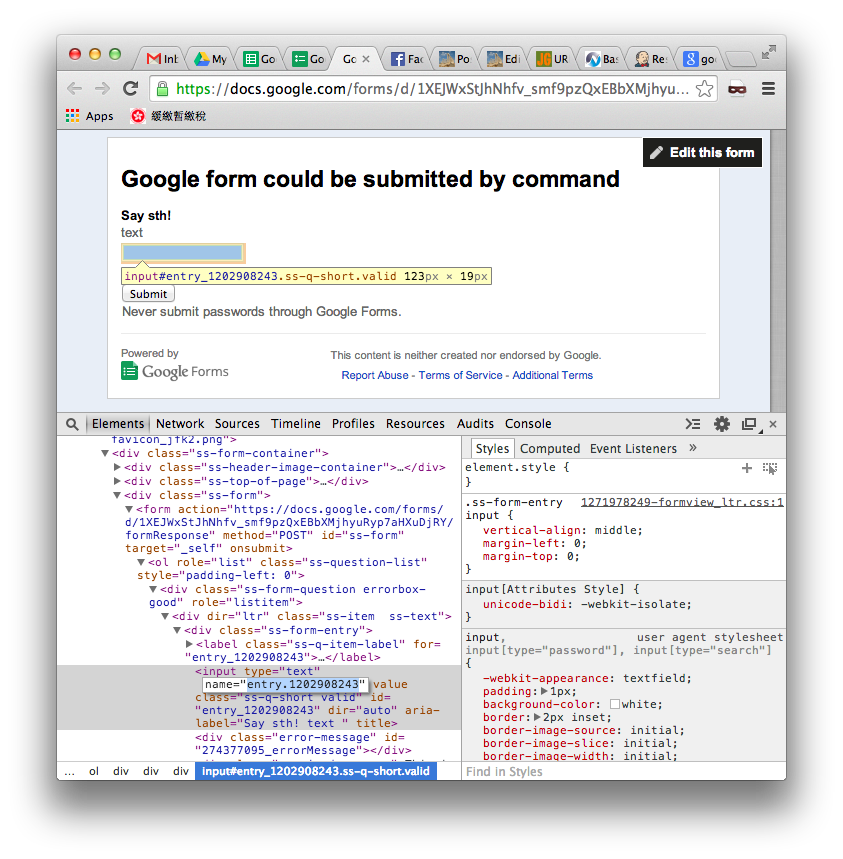
3. Construct the curl command as follow:
- curl https://docs.google.com/forms/d/<form-id>/formResponse -d ifq -d <field-name>=<field-value> -d submit=Submit
In my case the curl command is
- curl https://docs.google.com/forms/d/1XEJWxStJhNhfv_smf9pzQxEBbXMjhyuRyp7aHXuDjRY/formResponse -d ifq -d entry.1202908243=Eureka -d submit=Submit
4. Execute it in shell and that return your the submitted successfully html.

5. If your <field-value> contains special characters like whitespace, wrap the key value pair with double quote.
- curl https://docs.google.com/forms/d/1XEJWxStJhNhfv_smf9pzQxEBbXMjhyuRyp7aHXuDjRY/formResponse -d ifq -d "entry.1202908243=Hello World" -d submit=Submit
- curl "https://docs.google.com/forms/d/1XEJWxStJhNhfv_smf9pzQxEBbXMjhyuRyp7aHXuDjRY/formResponse?ifq&entry.1202908243=Hello%20World&submit=Submit"
6. You could also submit the whole url without breaking down the parameters. in that case you need to encode the special characters like whitespace. For example if the text contains a whitespace, replace it with %20.
6. Check the response spreadsheet.

Done =)
Reference: URL Tricks for Google Forms: Pre-populate, and Automatically Submitting Responses
Update @ 2014-07-31: Thanks Philip for suggesting using the -d parameter in the curl command. =D

 Eureka!
Try -d for passing parameters, I think it will take care encoding for you. 🙂
curl https://docs.google.com/forms/d/1XEJWxStJhNhfv_smf9pzQxEBbXMjhyuRyp7aHXuDjRY/formResponse -d ifq -d “entry.1202908243=Hello World (philip)” -d submit=Submit
LikeLike
wow~ great! works like a charm~~
let me update the post later~~ =D
LikeLike
What if I tell you there is a copy as cURL command in network tab.
LikeLike
I didn’t realize that. Thanks. =)
LikeLike
Can you also update a form?
LikeLike
No need to inspect the form’s elements to get the id of each element. In the “more” menu of the form editor, you can “get a prefilled link”.
LikeLike
What about Cross-Origin? In my case, I have get an error
LikeLike