
Sometimes we want to build a executable jar which contains all the dependencies. In this case we could make use of the maven-assembly-plugin which help us to package a jar-with-dependencies artifact during the Maven package phase. Let’s refer to the simple Maven project we did before.
- Maven – A simple Maven project
- Maven – Specify the default main class in the built jar using Manifest
1. First let’s introduce a dependency to our project. Say, we want to make use of the Apache Commons – Commons Lang to check the empty string. Edit the src/main/java/info/ykyuen/eureka/Addition.java as follow.
package info.ykyuen.eureka;

import org.apache.commons.lang3.StringUtils;

public class Addition {
  public static void main(String[] args) {
    if (null == args || args.length != 2) {
      printUsage();
    } else {
      try {
        // This is dummy.
        // Just want to make this program hv a dependency
        StringUtils.isEmpty(args[0]);

        int num1 = Integer.parseInt(args[0]);
        int num2 = Integer.parseInt(args[1]);
        int sum = num1 + num2;
        System.out.println("Sum = " + sum);
      } catch (NumberFormatException nfe) {
        printUsage();
      }
    }
  }

  public static void printUsage() {
    System.out.println("*********");
    System.out.println("* Usage *");
    System.out.println("*********");
    System.out.println("Please input 2 integers as arguments.");
    System.out.println("ex. java -cp testng-example-1.0.jar info.ykyuen.eureka.Addition <num1> <num2>");
    System.out.println("");
    System.out.println("Program exited.");
    System.out.println("");
  }
}
2. Then we need to add the maven-assembly-plugin and the Apache Commons – Commons Lang in the pom.xml.
<project
  xmlns="http://maven.apache.org/POM/4.0.0"
  xmlns:xsi="http://www.w3.org/2001/XMLSchema-instance"
  xsi:schemaLocation="http://maven.apache.org/POM/4.0.0 http://maven.apache.org/maven-v4_0_0.xsd"
>
  <modelVersion>4.0.0</modelVersion>
  <groupId>info.ykyuen.eureka</groupId>
  <artifactId>testng-example</artifactId>
  <packaging>jar</packaging>
  <version>1.0</version>
  <name>testng-example</name>

  <build>
    <plugins>
      <plugin>
        <groupId>org.apache.maven.plugins</groupId>
        <artifactId>maven-assembly-plugin</artifactId>
        <executions>
          <execution>
            <goals>
              <goal>attached</goal>
            </goals>
            <phase>package</phase>
            <configuration>
              <descriptorRefs>
                <descriptorRef>jar-with-dependencies</descriptorRef>
              </descriptorRefs>
              <archive>
                <manifest>
                  <mainClass>info.ykyuen.eureka.Addition</mainClass>
                </manifest>
              </archive>
            </configuration>
          </execution>
        </executions>
      </plugin>
      <plugin>
        <groupId>org.apache.maven.plugins</groupId>
        <artifactId>maven-jar-plugin</artifactId>
        <configuration>
          <archive>
            <manifest>
              <mainClass>info.ykyuen.eureka.Addition</mainClass>
            </manifest>
          </archive>
        </configuration>
      </plugin>
    </plugins>
  </build>

  <dependencies>
    <dependency>
      <groupId>org.apache.commons</groupId>
      <artifactId>commons-lang3</artifactId>
      <version>3.1</version>
    </dependency>
  </dependencies>
</project>
3. Please note that in the maven-assembly-plugin configured above, we also set the main class in the manifest just like what we did for the maven-jar-plugin.
...
<plugin>
  <groupId>org.apache.maven.plugins</groupId>
  <artifactId>maven-assembly-plugin</artifactId>
  <executions>
    <execution>
      <goals>
        <goal>attached</goal>
      </goals>
      <phase>package</phase>
      <configuration>
        <descriptorRefs>
          <descriptorRef>jar-with-dependencies</descriptorRef>
        </descriptorRefs>
        <archive>
          <manifest>
            <mainClass>info.ykyuen.eureka.Addition</mainClass>
          </manifest>
        </archive>
      </configuration>
    </execution>
  </executions>
</plugin>
...
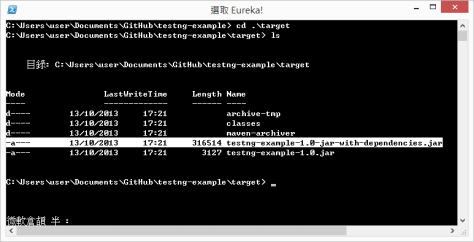
4. Build the project again with mvn clean package. You will find a new .jar file in addition to the original one. You can see the new .jar file is much bigger since it contains the dependencies.
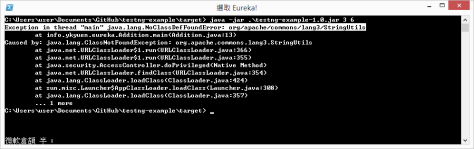
5. Now if u try to run the original .jar file, you will get the java.lang.NoClassDefFoundError: org/apache/commons/lang3/StringUtils.
6. Another .jar file should work without any problem.

Done =)
Reference: How to make an executable jar in Maven

 Eureka!
One thought on “Maven – Package the jar file with dependencies”