
I would like to setup the TestNG in Maven so i take this chance to revise the Maven basics.
1. The project should have the following folder structure.
- testng-example (project root folder)
  - src
    - main
      - java
        - info/ykyuen/eureka <folders for package name>
          - Addition.java
      - resources
        - <any resource files like .properties>
  - pom.xml
2. Create the pom.xml.
<project
  xmlns="http://maven.apache.org/POM/4.0.0"
  xmlns:xsi="http://www.w3.org/2001/XMLSchema-instance"
  xsi:schemaLocation="http://maven.apache.org/POM/4.0.0 http://maven.apache.org/maven-v4_0_0.xsd"
>
  <modelVersion>4.0.0</modelVersion>
  <groupId>info.ykyuen.eureka</groupId>
  <artifactId>testng-example</artifactId>
  <packaging>jar</packaging>
  <version>1.0</version>
  <name>testng-example</name>
</project>
3. Create the src/main/java/info/ykyuen/eureka/Addition.java.
package info.ykyuen.eureka;

public class Addition {
  public static void main(String[] args) {
    if (null == args || args.length != 2) {
      printUsage();
    } else {
      try {
        int num1 = Integer.parseInt(args[0]);
        int num2 = Integer.parseInt(args[1]);
        int sum = num1 + num2;
        System.out.println("Sum = " + sum);
      } catch (NumberFormatException nfe) {
        printUsage();
      }
    }
  }

  public static void printUsage() {
    System.out.println("*********");
    System.out.println("* Usage *");
    System.out.println("*********");
    System.out.println("Please input 2 integers as arguments.");
    System.out.println("ex. java -cp testng-example-1.0.jar info.ykyuen.eureka.Addition <num1> <num2>");
    System.out.println("");
    System.out.println("Program exited.");
    System.out.println("");
  }
}
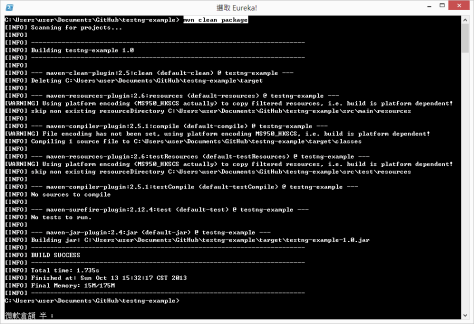
4. Build your project by the following command.
- mvn clean package
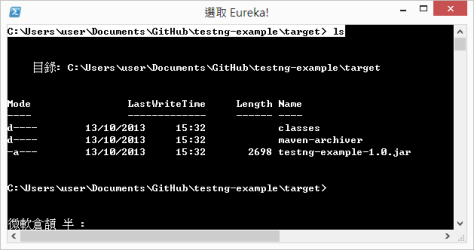
5. After the build, you could find a new folder called target where you .jar file is saved.
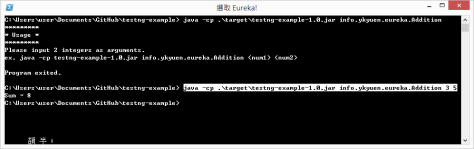
6. Try doing the addition.
- java -cp .\target\testng-example-1.0.jar info.ykyuen.eureka.Addition 3 5
Done =)
Reference: Introduction to the Standard Directory Layout

 Eureka!