
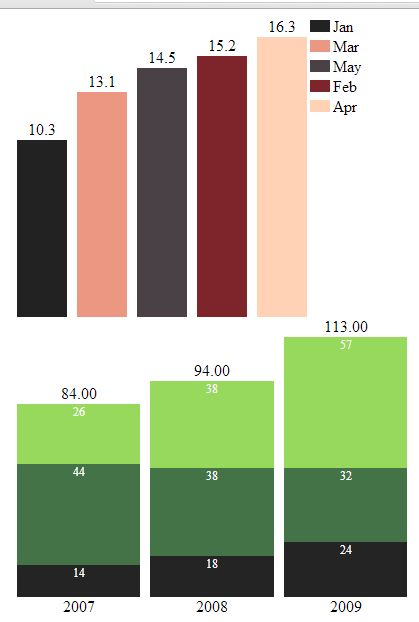
Using graph is a very good way to present numeric data. Here is a jQuery plugin called jqBarGraph which help you creating bar charts in a painless way.
1. Download the jqBarGraph in the js folder under webroot.
2. Create the following index.html.
<!DOCTYPE html>
<html>
<head>
  <title>jqbargraph</title>
  <script src="//ajax.googleapis.com/ajax/libs/jquery/2.0.0/jquery.min.js"></script>
  <script type="text/javascript" src="js/jqBarGraph.1.1.min.js"></script>
  <script type="text/javascript">
    $(document).ready(function(){
      // Simple bar chart
      arrayOfData = new Array(
        [10.3,'Jan','#222222'],
        [15.2,'Feb','#7D252B'],
        [13.1,'Mar','#EB9781'],
        [16.3,'Apr','#FFD2B5'],
        [14.5,'May','#4A4147']
      );
      $('#simple-bar-chart').jqBarGraph({
        data: arrayOfData, // Initialize the data
        sort: 'asc', // Sorting
        legend: true // Show legend
      });

      // Multi bar chart
      arrayOfDataMulti = new Array(
        [[14,44,26],'2007'],
        [[18,38,38],'2008'],
        [[24,32,57],'2009']
      );

      $('#multi-bar-chart').jqBarGraph({
        data: arrayOfDataMulti,
        colors: ['#242424','#437346','#97D95C']
      });
    });
  </script>
</head>
<body>
  <div id="simple-bar-chart"></div>
  <div id="multi-bar-chart"></div>
</body>
</html>
Check it out.
Visit the jqBarGraph homepage and find out more features.
Done =)
Reference: jqBarGraph- graph your data easily

 Eureka!
One thought on “jqBarGraph – jQuery Bar Chart Plugin”