
More than a year ago, we have talked about some basic theming in Drupal 6.
- Drupal – Introduction to Drupal Theming @ 1
- Drupal – Introduction to Drupal Theming @ 2
- Drupal – Introduction to Drupal Theming @ 3
In Drupal 7, there are some changes on the theming functions as well as the block hooks. So here is a slightly modified versions from the example of Drupal – Introduction to Drupal Theming @ 3. The logic behind is exactly the same.
ykyuen.info
; $Id$
name = Theme customized block
description = Theme the customized block. Ref: http://eureka.ykyuen.info
package = "Eureka"
core = 7.x
version = 7.x-1.0
ykyuen.module
<?php

/**
 * Implementation of hook_block_info().
 */
function ykyuen_block_info() {
  $blocks = array();

  $blocks['eureka_block'] = array(
    'info' => t('Eureka block')
  );

  return $blocks;
}

/**
 * Implements hook_block_view().
 */
function ykyuen_block_view($delta = '') {
  $block = array();

  switch ($delta) {
    case 'eureka_block':
      $variables = array(
        'name' => 'Welcome to Eureka!',
        'link' => 'http://eureka.ykyuen.info',
      );
      $block = array('content' => theme('eureka', $variables));
      break;
  }

  return $block;
}

/**
 * Implementation of hook_theme().
 */
function ykyuen_theme() {
  return array(
    'eureka' => array(
      'template' => 'eureka',
      'variables' => array(
        'name' => NULL,
        'link' => NULL,
      ),
    )
  );
}

/**
 * Preprocess function for eureka.tpl.php.
 */
function ykyuen_preprocess_eureka(&$variables) {
  $variables['extra'] = "Hello World!";
}
eureka.tpl.php
<h2>Theme .tpl.php example</h2>
<p><a href="<?php print $link; ?>"><?php print $name; ?></a></p>
<p><?php print $extra; ?></p>
Enable the module and turn on Eureka block. Remember to clear the cache before viewing you first themed block.
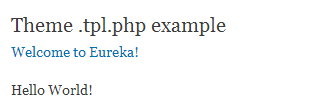
Done =)

 Eureka!
One thought on “Drupal 7 – Create your own theme function on your custom block”