
Nice Menus is a must have module for all my Drupal 7 projects. It helps creating horizontal menu in just a few minutes.
The horizontal menu is aligned to the left by default. Here is a small CSS trick for you to align the menu in center and it also works for Superfish menu.
/* The <div> wrapping the nice menu ul */
#block-nice-menus-1 div.content {
  position: relative;
  float: left;
  left: 50%;
}

/* The nice menu ul */
#block-nice-menus-1 #nice-menu-1 {
  position: relative;
  float: left;
  left: -50%;
}
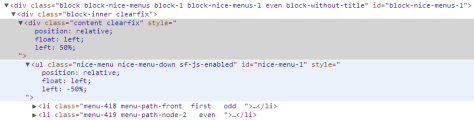
The following picture help illustrating the CSS styles.
Done =)
Reference:

 Eureka!
Thank you!
I’ve been trying to figure this out for days, nothing worked and then I found this.. Genius!
LikeLike
You are welcome and thx for your comment~ =)
LikeLike
Thank you very much for this! Like Rabid I’ve been working on this for days! HOwever, I have several nice menus in one website, and two nice menus in one page. How can I make this applicable to all nice menus. Help with script would be greatly appreciated. Thanks!
LikeLike
@Cecilia, have you tried targeting the other id’s?
#block-nice-menus-1 div.content {} / Try changing the “1” to what ever your other menu is using. I only have one menu running on my sites so I can’t test it right now but give it a try 🙂
LikeLike
Yes, they do work, except that I was hoping you have a catch-all script for all IDs. But thank you! You made my day!
LikeLike
You’re welcome 🙂
I just had a thought, you could try something like #block-nice-menus-* as the * is a wild card selector.. That could work in place of a number and target all nice menus 🙂
LikeLike
Thanks for your comment Cecilia and thanks Rapid for replying. =D
LikeLike