
Let’s create the admin settings page base on the example module we used in
Drupal – Introduction to Drupal Theming @ 3
In order to add the settings page, we need to add a new menu in in hook_menu() and the corresponding callback function which is ykyuen_admin() in this example.
ykyuen.info
; $Id$
name = Theme customized block
description = Theme the customized block. Ref: https://ykyuen.wordpress.com
package = "YKYUEN"
core = 6.x
version = 6.x-1.0
ykyuen.module
<?php

/**
 * Form builder for ykyuen_admin form.
 *
 * @see system_settings_form()
 */
function ykyuen_admin() {
  $form = array();

  $form['eureka_greeting'] = array(
    '#type' => 'textfield',
    '#title' => 'Greeting message',
    '#default_value' => variable_get('eureka_greeting', 'Hello World!'),
    '#size' => 60,
    '#maxlength' => 255,
    '#description' => 'Please input the greeting message.',
    '#required' => TRUE,
  );

  return system_settings_form($form);
}

/**
 * Implements hook_menu()
 */
function ykyuen_menu() {
  $items = array();

  $items['admin/settings/ykyuen'] = array(
    'title' => 'Eureka Settings',
    'description' => 'The eureka settings page.',
    'page callback' => 'drupal_get_form',
    'page arguments' => array('ykyuen_admin'),
    'access arguments' => array('access administration pages'),
    'type' => MENU_NORMAL_ITEM,
  );

  return $items;
}

/**
 * Implementation of hook_block().
 */
function ykyuen_block($op = 'list', $delta = 0, $edit = array()) {
  switch ($op) {
    case 'list':
      $blocks[0]['info'] = t('Eureka');
      $blocks[0]['cache'] = BLOCK_NO_CACHE;
      return $blocks;
    case 'view':
      switch ($delta) {
        case 0:
          $block['content'] = theme('eureka', 'Welcome to Eureka!', 'https://ykyuen.wordpress.com');
          break;
      }
      return $block;
  }
}

/**
 * Implementation of hook_theme().
 */
function ykyuen_theme() {
  return array(
    'eureka' => array(
      'arguments' => array(
        'name' => NULL,
        'link' => NULL
      ),
      'template' => 'eureka',
    )
  );
}

/**
 * Implementation of theme_eureka().
 */
function ykyuen_preprocess_eureka($variables) {
  $variables['extra'] = variable_get('eureka_greeting', 'Hello World!');
}
Clear the Drupal cache and you could access our module settings page now.
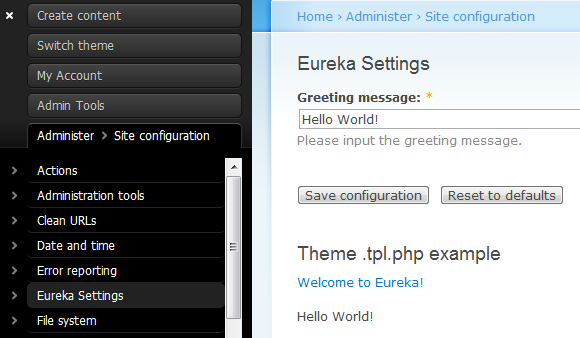
Change the greeting message and save the form.
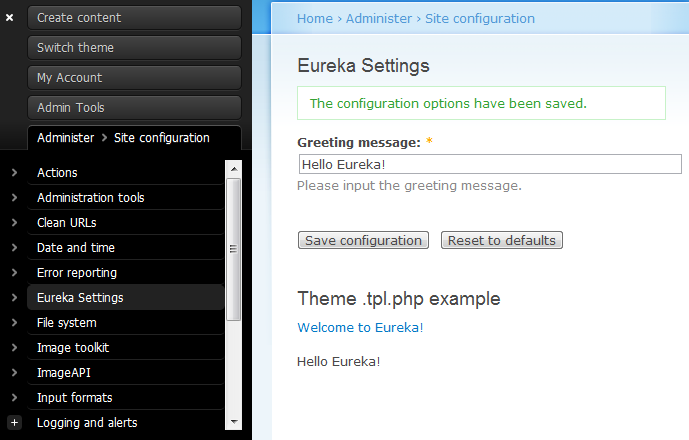
Done =)
Reference: Drupal Docs – Creating a module configuration (settings) page

 Eureka!