
I have a previous post which is about a Swing Date Picker in Java.
Java – Swing DatePicker @ 1
But that Date Picker can only navigate in month level, so i would like to add previous year and next year also. I made the following changes on the Date Picker class.
DatePicker.java
import java.awt.*;
import java.awt.event.*;
import javax.swing.*;

class DatePicker {
  int month = java.util.Calendar.getInstance().get(java.util.Calendar.MONTH);
  int year = java.util.Calendar.getInstance().get(java.util.Calendar.YEAR);;
  JLabel l = new JLabel("", JLabel.CENTER);
  String day = "";
  JDialog d;
  JButton[] button = new JButton[49];

  public DatePicker(JFrame parent) {
    d = new JDialog();
    d.setModal(true);
    String[] header = { "Sun", "Mon", "Tue", "Wed", "Thur", "Fri", "Sat" };
    JPanel p1 = new JPanel(new GridLayout(7, 7));
    p1.setPreferredSize(new Dimension(430, 120));

    for (int x = 0; x < button.length; x++) {
      final int selection = x;
      button[x] = new JButton();
      button[x].setFocusPainted(false);
      button[x].setBackground(Color.white);
      if (x > 6) {
        button[x].addActionListener(new ActionListener() {
          public void actionPerformed(ActionEvent ae) {
            day = button[selection].getActionCommand();
            d.dispose();
          }
        });
      }
      if (x < 7) {
        button[x].setText(header[x]);
        button[x].setForeground(Color.red);
      }
      p1.add(button[x]);
    }
    JPanel p2 = new JPanel(new GridLayout(1, 3));

    // Last year button
    JButton lastYear = new JButton("<< Last Year");
    lastYear.addActionListener(new ActionListener() {
      public void actionPerformed(ActionEvent ae) {
        year--;
        displayDate();
      }
    });
    p2.add(lastYear);

    // Previous month button
    JButton previous = new JButton("<< Previous");
    previous.addActionListener(new ActionListener() {
      public void actionPerformed(ActionEvent ae) {
        month--;
        displayDate();
      }
    });
    p2.add(previous);

    // Selected Date @ popup
    p2.add(l);

    // Next month button
    JButton next = new JButton("Next >>");
    next.addActionListener(new ActionListener() {
      public void actionPerformed(ActionEvent ae) {
        month++;
        displayDate();
      }
    });
    p2.add(next);

    // Next year button
    JButton nextYear = new JButton("Next Year >>");
    nextYear.addActionListener(new ActionListener() {
      public void actionPerformed(ActionEvent ae) {
        year++;
        displayDate();
      }
    });
    p2.add(nextYear);

    d.add(p1, BorderLayout.CENTER);
    d.add(p2, BorderLayout.SOUTH);
    d.pack();
    d.setLocationRelativeTo(parent);
    displayDate();
    d.setVisible(true);
  }

  public void displayDate() {
    for (int x = 7; x < button.length; x++) {
      button[x].setText("");
    }

    java.text.SimpleDateFormat sdf = new java.text.SimpleDateFormat("MMMM yyyy");
    java.util.Calendar cal = java.util.Calendar.getInstance();
    cal.set(year, month, 1);
    int dayOfWeek = cal.get(java.util.Calendar.DAY_OF_WEEK);
    int daysInMonth = cal.getActualMaximum(java.util.Calendar.DAY_OF_MONTH);

    for (int x = 6 + dayOfWeek, day = 1; day <= daysInMonth; x++, day++) {
      button[x].setText("" + day);
    }

    l.setText(sdf.format(cal.getTime()));
    d.setTitle("Date Picker");
  }

  public String setPickedDate() {
    if (day.equals("")) {
      return day;
    }

    // Set the return date format
    java.text.SimpleDateFormat sdf = new java.text.SimpleDateFormat("dd-MM-yyyy");

    java.util.Calendar cal = java.util.Calendar.getInstance();
    cal.set(year, month, Integer.parseInt(day));
    return sdf.format(cal.getTime());
  }
}
Now you can navigate on year too.
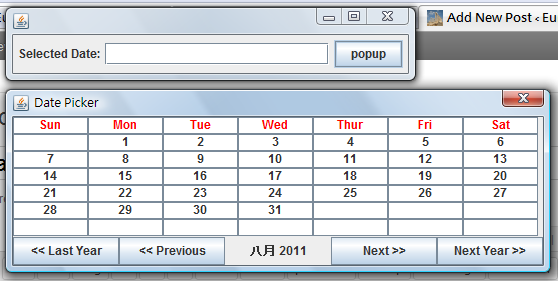
Done =)
Reference:

 Eureka!
2 thoughts on “Java – Swing DatePicker @ 2”