
This post will show you how to add sorting in Views 2.
1. Add a sorting selection list in the views header.
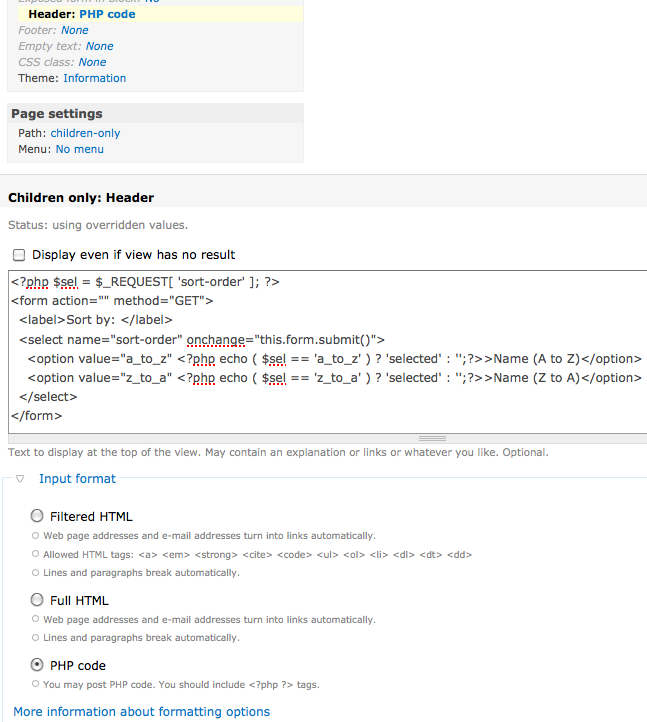
<?php $sel = $_REQUEST['sort-order']; ?>
<form action="" method="GET">
  <label>Sort by: </label>
  <select name="sort-order" onchange="this.form.submit()">
    <option value="a_to_z" <?php echo ( $sel == 'a_to_z' ) ? 'selected' : '';?>>Name (A to Z)</option>
    <option value="z_to_a" <?php echo ( $sel == 'z_to_a' ) ? 'selected' : '';?>>Name (Z to A)</option>
  </select>
</form>
2. Create a custom module and implement the hook_views_query_alter().
function [module]_views_query_alter(&$view, &$query) {
  if ( $view->name == '[your_view_name]' ) {
    $sort = $_REQUEST['sort-order'];
    switch ($sort) {
      case "a_to_z":
        // modify the sorting criteria according to your view query shown in Views UI
        $query->orderby[0]='term_data.name ASC';
        break;
      case "z_to_a":
        // modify the sorting criteria according to your view query shown in Views UI
        $query->orderby[0]='term_data.name DESC';
        break;
    }
  }
}
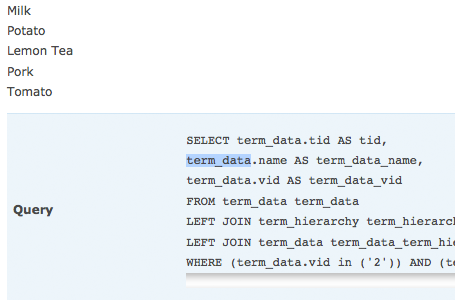
3. You can find out the sorting criteria in the Views UI. In my case, i want to sort the taxonomy term name.
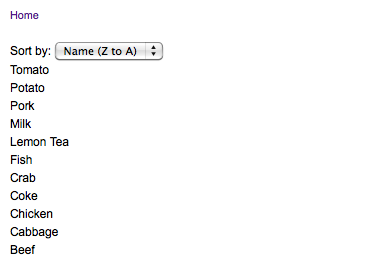
4. Try the new sorting filter now and you will find a form element called sort-order is added to the url. For example, http://<site-domain>/<your-view>?sort-order=z_to_a.
Please note that the above example is for views without exposed filter. In case you want to add the sorting filter to views with exposed filter, you have to remove the form element of the sorting selection list and add it to the views .tpl.php instead of the header in Views UI such that the sorting filter is inside the exposed form.
Done =)
Reference:
- Views: exposed sort options
- StackOverflow – Adding sorting to a view on Drupal?
- Drupal Module – Views
- Lullabot Drupal API – hook_views_query_alter

 Eureka!
Thanks so much — this was incredibly helpful!!
LikeLike
Good to know that it could help. =)
LikeLike