
For the Drupal registration form, there is no .tpl.php template file for editing the registration form layout. So if you want to add more HTML code around the form, you have to do it on code level.
I found a useful post about modifying the registration form. It make use of the template.php in the theme folder to theme the form. For more information. Please visit Drupal – Custom registration page theme.
In this post, i will modify the registration form by creating a custom module.
1. First create a module called eureka_reg_form
eureka_reg_form.info
name = Eureka Registration Form
description = Theme the user registration form
package = Eureka!
core = 6.x
2. Implement the hook_theme() and the template preprocess methods.
eureka_reg_form.module
<?php

/**
 * Implementaion of hook_theme().
 */
function eureka_reg_form_theme() {
  return array(
    'user_register' => array(
      'template' => 'user-register',
      'arguments' => array('form' => NULL),
    )
  );
}

function eureka_reg_form_preprocess_user_register(&$vars) {
  $vars['myform'] = drupal_render($vars['form']);
}
3. Create the user-register.tpl.php inside the new module folder
<a href="https://ykyuen.wordpress.com">Eureka!</a>
<?php print $myform; ?>
4. Enable the module and take a look at the new user registration form
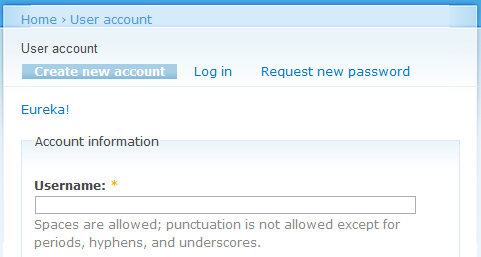
A HTTP link is added just as defined in the user-register.tpl.php.
Done =)
Reference: Drupal – Custom registration page theme

 Eureka!