
The Auto Assign Role module serves 4 purposes:
- Automatic role assignment for user registration
- Automatic role assignment for admin created accounts
- Assign role by path for user registration
- Allow user to choose the roles in the user registration form
After the module installation, you could configure the Auto Assign Role setting @ Administer –> User management –> Auto assign role. Now, i would show you how to assign the role to user by the registration path. i am not going to demonstrate the others as they are quite straight forward.
I have 2 manually created roles which is manager and developer. Let’s create the a registration path which the registration submitted at this path will be assigned with the developer role automatically.
Configure the Auto Assign Role setting for developer as follow.
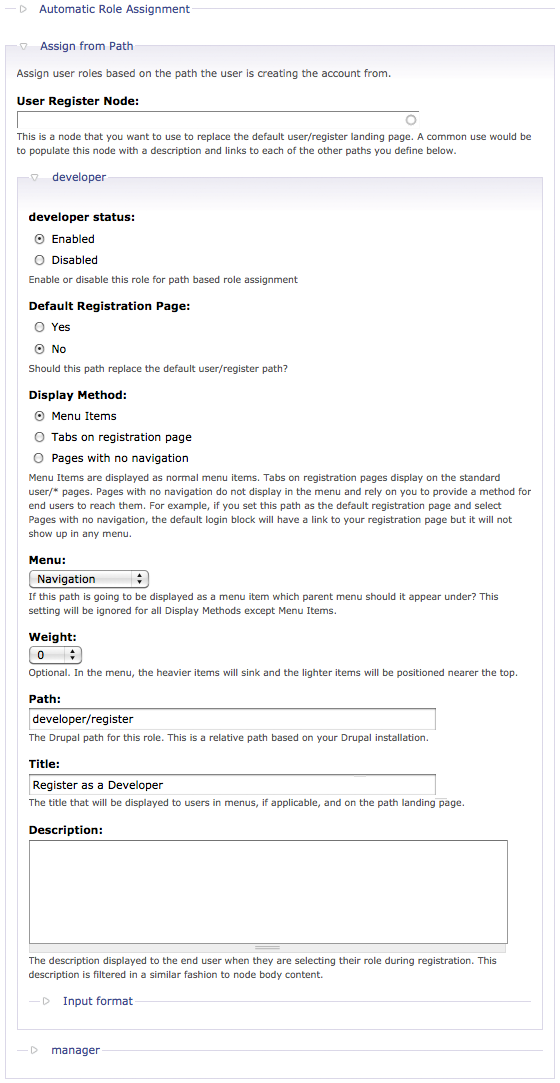
Log out the admin account and go to http://<drupal_root>/developer register or click the link @ the Navigation menu. Any registration from this path will auto assign the developer role to the new user.

Check it out @ Administer –> User management –> Users.

Done =)
Reference: Drupal Module – Auto Assign Role

 Eureka!