
Previous related posts:
The above posts show you how to create and customized the content of a block. Sometimes, we may need to show some database data in the block. So we need to write a SQL. For example, i want to show a list of node titles and the corresponding url links of the Song content type.
1. Modify the custom.module
<?php
	/**
	 * Implementation of hook_block().
	 */
	function custom_block($op = 'list', $delta = 0, $edit = array()) {
		switch ($op) {
			//Define the block
			case 'list':
				$blocks[0]['info'] = t('Block Info');
				$blocks[0]['cache'] = BLOCK_NO_CACHE;
				return $blocks;

			case 'configure':
				//TODO: block configurable parameters
				$form = array();
				return $form;

			case 'save':
				//TODO: save new configuration
				return;

			//Display the block
			case 'view':
				$block['subject'] = t('Block Subject');
				$block['content'] = _show_node_titles_with_link('song');
				return $block;
		}
	}

	function _show_node_titles_with_link($node_type) {
		$sql = "SELECT node.nid, node.title FROM node WHERE type='$node_type' ORDER BY node.title ASC";
		$result = db_query($sql);
		$output = '<ui>';
		while ($anode = db_fetch_object($result)) {
			$output .= "<li>".l($anode->title, "node/$anode->nid")."</li>";
		}
		$output .= '</ui>';

		return $output;
	}
Let’s also modify the block-custom.tpl.php
<strong>Song List</strong>
<p><?php print $block->content ?></p>
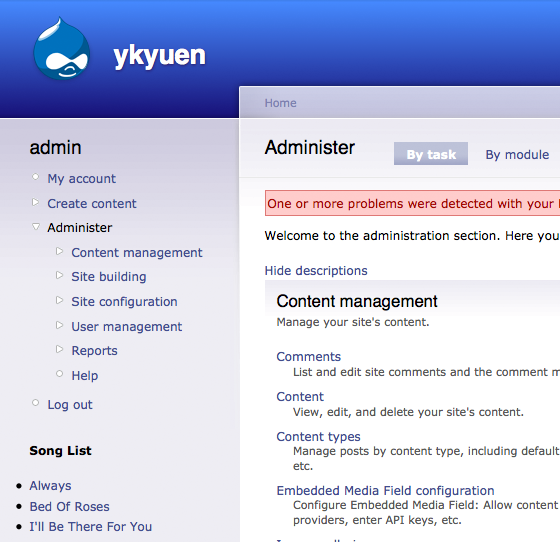
See what you get now.
Next suggested article: Drupal – Add Configurable Values to Block
Done =)
Reference: Drupal tip #1: Inserting blocks into content (pages, blog entries, etc.)

 Eureka!