
In Maven, you can build a OSGi bundle using maven-bundle-plugin.
I find a very useful tutorial which shows you how to create a HelloWorld OSGi bundle.
Actually there are many OSGi tutorials at the Apache Felix Website. But those examples did not make use of Maven. So i make the first two examples into Maven projects.
- Apache Felix Tutorial Example 1: A bundle that listens for OSGi service events.
- Apache Felix Tutorial Example 2: A bundle that implements a dictionary service.
1. Create a Maven project with the following pom.xml
<project xmlns="http://maven.apache.org/POM/4.0.0" xmlns:xsi="http://www.w3.org/2001/XMLSchema-instance" xsi:schemaLocation="http://maven.apache.org/POM/4.0.0 http://maven.apache.org/maven-v4_0_0.xsd">
	<modelVersion>4.0.0</modelVersion>
	<groupId>felix-tutorial</groupId>
	<artifactId>example-1</artifactId>
	<version>1.0</version>
	<packaging>bundle</packaging>
	<name>Apache Felix Tutorial Example 1</name>
	<description>Apache Felix Tutorial Example 1</description>

	<!-- Build Configuration -->
	<build>
		<plugins>
			<plugin>
				<groupId>org.apache.felix</groupId>
				<artifactId>maven-bundle-plugin</artifactId>
				<extensions>true</extensions>
				<configuration>
					<instructions>
						<Bundle-SymbolicName>${pom.groupId}.${pom.artifactId}</Bundle-SymbolicName>
						<Bundle-Name>Service listener example</Bundle-Name>
						<Bundle-Description>A bundle that displays messages at startup and when service events occur</Bundle-Description>
						<Bundle-Vendor>Apache Felix</Bundle-Vendor>
						<Bundle-Version>1.0.0</Bundle-Version>
						<Bundle-Activator>tutorial.example1.Activator</Bundle-Activator>
						<Import-Package>org.osgi.framework</Import-Package>
					</instructions>
				</configuration>
			</plugin>
		</plugins>
	</build>

	<!-- Dependecies Management -->
	<dependencies>
		<dependency>
			<groupId>org.apache.felix</groupId>
			<artifactId>org.apache.felix.framework</artifactId>
			<version>2.0.4</version>
		</dependency>
	</dependencies>
</project>
2. Create src/main/java/tutorial/example1/Activator.java
/**
* Apache Felix OSGi tutorial.
**/
package tutorial.example1;
import org.osgi.framework.BundleActivator;
import org.osgi.framework.BundleContext;
import org.osgi.framework.ServiceListener;
import org.osgi.framework.ServiceEvent;
/**
* This class implements a simple bundle that utilizes the OSGi
* framework's event mechanism to listen for service events. Upon
* receiving a service event, it prints out the event's details.
**/
public class Activator implements BundleActivator, ServiceListener
{
/**
* Implements BundleActivator.start(). Prints
* a message and adds itself to the bundle context as a service
* listener.
* @param context the framework context for the bundle.
**/
public void start(BundleContext context)
{
System.out.println(&quot;Starting to listen for service events.&quot;);
context.addServiceListener(this);
}
/**
* Implements BundleActivator.stop(). Prints
* a message and removes itself from the bundle context as a
* service listener.
* @param context the framework context for the bundle.
**/
public void stop(BundleContext context)
{
context.removeServiceListener(this);
System.out.println(&quot;Stopped listening for service events.&quot;);
// Note: It is not required that we remove the listener here,
// since the framework will do it automatically anyway.
}
/**
* Implements ServiceListener.serviceChanged().
* Prints the details of any service event from the framework.
* @param event the fired service event.
**/
public void serviceChanged(ServiceEvent event)
{
String[] objectClass = (String[])
event.getServiceReference().getProperty(&quot;objectClass&quot;);
if (event.getType() == ServiceEvent.REGISTERED)
{
System.out.println(
&quot;Ex1: Service of type &quot; + objectClass[0] + &quot; registered.&quot;);
}
else if (event.getType() == ServiceEvent.UNREGISTERING)
{
System.out.println(
&quot;Ex1: Service of type &quot; + objectClass[0] + &quot; unregistered.&quot;);
}
else if (event.getType() == ServiceEvent.MODIFIED)
{
System.out.println(
&quot;Ex1: Service of type &quot; + objectClass[0] + &quot; modified.&quot;);
}
}
}
3. Run mvn install to build the bundle
4. The build file example-1-1.0.jar can be found at the target folder
5. Create another Maven project with the following pom.xml
<project xmlns="http://maven.apache.org/POM/4.0.0" xmlns:xsi="http://www.w3.org/2001/XMLSchema-instance" xsi:schemaLocation="http://maven.apache.org/POM/4.0.0 http://maven.apache.org/maven-v4_0_0.xsd">
	<modelVersion>4.0.0</modelVersion>
	<groupId>felix-tutorial</groupId>
	<artifactId>example-2</artifactId>
	<version>1.0</version>
	<packaging>bundle</packaging>
	<name>Apache Felix Tutorial Example 2</name>
	<description>Apache Felix Tutorial Example 2</description>

	<!-- Build Configuration -->
	<build>
		<plugins>
			<plugin>
				<groupId>org.apache.felix</groupId>
				<artifactId>maven-bundle-plugin</artifactId>
				<extensions>true</extensions>
				<configuration>
					<instructions>
						<Bundle-SymbolicName>${pom.groupId}.${pom.artifactId}</Bundle-SymbolicName>
						<Bundle-Name>English dictionary</Bundle-Name>
						<Bundle-Description>A bundle that registers an English dictionary service</Bundle-Description>
						<Bundle-Vendor>Apache-Felix</Bundle-Vendor>
						<Bundle-Version>1.0.0</Bundle-Version>
						<Bundle-Activator>tutorial.example2.Activator</Bundle-Activator>
						<Export-Package>tutorial.example2.service</Export-Package>
						<Import-Package>org.osgi.framework</Import-Package>
					</instructions>
				</configuration>
			</plugin>
		</plugins>
	</build>

	<dependencies>
		<dependency>
			<groupId>org.apache.felix</groupId>
			<artifactId>org.apache.felix.framework</artifactId>
			<version>2.0.4</version>
		</dependency>
	</dependencies>
</project>
6. Create src/main/java/tutorial2/service/DictionaryService.java
/**
 * Apache Felix OSGi tutorial.
**/

package tutorial.example2.service;

/**
 * A simple service interface that defines a dictionary service.
 * A dictionary service simply verifies the existence of a word.
**/
public interface DictionaryService
{
    /**
     * Check for the existence of a word.
     * @param word the word to be checked.
     * @return true if the word is in the dictionary,
     *         false otherwise.
    **/
    public boolean checkWord(String word);
}
7. Create src/main/java/tutorial/example2/Activator.java
/**
* Apache Felix OSGi tutorial.
**/
package tutorial.example2;
import java.util.Properties;
import org.osgi.framework.BundleActivator;
import org.osgi.framework.BundleContext;
import tutorial.example2.service.DictionaryService;
/**
* This class implements a simple bundle that uses the bundle
* context to register an English language dictionary service
* with the OSGi framework. The dictionary service interface is
* defined in a separate class file and is implemented by an
* inner class.
**/
public class Activator implements BundleActivator
{
/**
* Implements BundleActivator.start(). Registers an
* instance of a dictionary service using the bundle context;
* attaches properties to the service that can be queried
* when performing a service look-up.
* @param context the framework context for the bundle.
**/
public void start(BundleContext context)
{
Properties props = new Properties();
props.put(&quot;Language&quot;, &quot;English&quot;);
context.registerService(
DictionaryService.class.getName(), new DictionaryImpl(), props);
}
/**
* Implements BundleActivator.stop(). Does nothing since
* the framework will automatically unregister any registered services.
* @param context the framework context for the bundle.
**/
public void stop(BundleContext context)
{
// NOTE: The service is automatically unregistered.
}
/**
* A private inner class that implements a dictionary service;
* see DictionaryService for details of the service.
**/
private static class DictionaryImpl implements DictionaryService
{
// The set of words contained in the dictionary.
String[] m_dictionary =
{ &quot;welcome&quot;, &quot;to&quot;, &quot;the&quot;, &quot;osgi&quot;, &quot;tutorial&quot; };
/**
* Implements DictionaryService.checkWord(). Determines
* if the passed in word is contained in the dictionary.
* @param word the word to be checked.
* @return true if the word is in the dictionary,
* false otherwise.
**/
public boolean checkWord(String word)
{
word = word.toLowerCase();
// This is very inefficient
for (int i = 0; i &lt; m_dictionary.length; i++)
{
if (m_dictionary[i].equals(word))
{
return true;
}
}
return false;
}
}
}
8. Run mvn install to build the second project
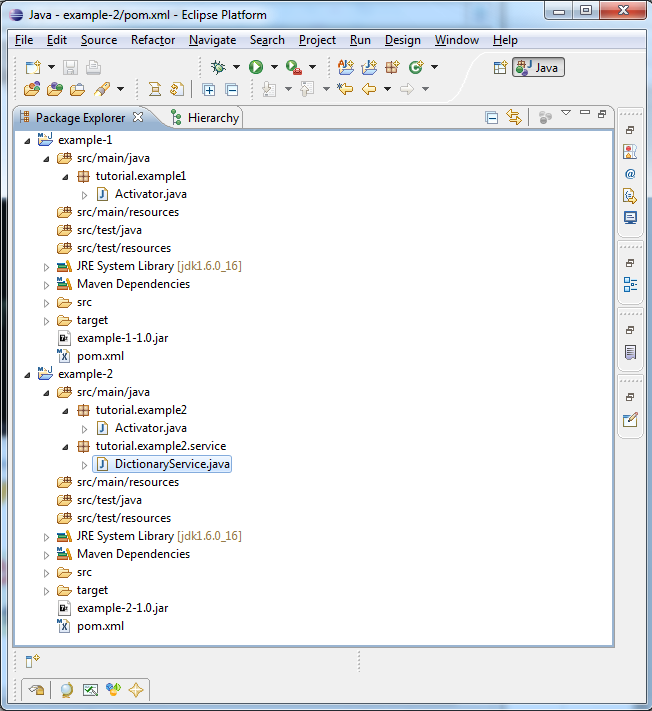
9. The final projects structure should look like this
10. You can found the MANIFEST.MF inside the built .jar file
example-1-1.0.jar/META-INF/MANIFEST.MF
Manifest-Version: 1.0 Export-Package: tutorial.example1;uses:=&quot;org.osgi.framework&quot; Built-By: ykyuen Tool: Bnd-0.0.357 Bundle-Name: Service listener example Created-By: Apache Maven Bundle Plugin Bundle-Vendor: Apache Felix Build-Jdk: 1.6.0_16 Bundle-Version: 1.0.0 Bnd-LastModified: 1267592207481 Bundle-ManifestVersion: 2 Bundle-Activator: tutorial.example1.Activator Bundle-Description: A bundle that displays messages at startup and when service events occur Bundle-SymbolicName: felix-tutorial.example-1 Import-Package: org.osgi.framework;version=&quot;1.5&quot;
Done =)
Next: Apache Felix – Register OSGi Service

 Eureka!