
pdmenu is based on dialog. It provides an even simpler configuration for creating a menu in Unix-based system. It is convenient for system administrators to create a simple login shell for users with limited privileges.
You can get the pdmenu by apt-get if you are an Ubuntu user or download the tar ball at packages.debian.org.
After the installation, just type pdmenu to start the sample pdmenu.
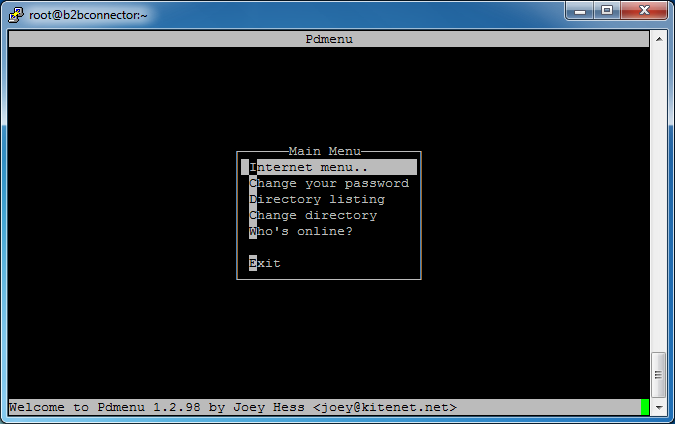
The configuration file of the above menu can be found in /etc/pdmenurc.
To create your own pdmenu, just create a .pdmenurc in your home directory and it will override /etc/pdmenurc.
I have created menu for a user called pdmenu_user and i have granted the ifconfig and route commands to him by editing the /etc/sudoers.
/etc/sudoers
...
# User privilege specification
root          ALL=(ALL) ALL
pdmenu_user   ALL=(ALL) NOPASSWD: /sbin/ifconfig,/sbin/route
...
/home/pdmenu/.pdmenurc
menu:home:Home Menu:Welcome to pdmenu
        show:<This is pdmenu>
        nop
        nop:Main Menu
        nop:--------------------------------------
        show:   Network Configuration::network_conf

        nop
        nop:Miscellaneous
        nop:--------------------------------------
        exec:   Reboot::clear;reboot
        exec:   Change Password:pause:clear;passwd
        nop
        exit:Exit

menu:network_conf:Network Configuration:Network Configuration
        show:<Network Configuration>::
        nop
        nop:Network Information
        nop:--------------------------------------
        exec:   Show IP Address and Subnet:display:/sbin/ifconfig eth0
        exec:   Show Routes:display:/sbin/route -n
        nop

        nop:Configuration
        nop:--------------------------------------
        exec:   Change IP Address and Subnet:edit,pause:clear;sudo /sbin/ifconfig eth0 ~New IP Address:~ netmask ~New Subnet$
        exec:   Add Default Gateway:edit,pause:clear;sudo /sbin/route add default gw ~Default Gateway:~
        exec:   Add Route:edit,pause:clear;sudo /sbin/route add -net ~Destination:~ netmask ~Subnet:~ gw ~Gateway:~
        exec:   Remove Default Gateway:edit,pause:clear;sudo /sbin/route del default gw ~Default Gateway:~
        exec:   Remove Route:edit,pause:clear;sudo /sbin/route del -net ~Destination:~ netmask ~Subnet:~ gw ~Gateway:~
        nop

        nop:Diagnosis
        nop:--------------------------------------
        exec:   Ping:edit,pause:clear;ping ~Address:~
        exec:   Show netstat:display:netstat -tuna
        nop
        exit:Return to Main Menu
Please refer to the pdmenu man page for more information about the the syntax of the pdmenu configuration file.
The next step is setting /usr/bin/pdmenu as the login shell for pdmenu_user. Edit the /etc/passwd.
pdmenu_user:x:1003:0::/home/pdmenu_user:/usr/bin/pdmenu
Don’t forget to add the /usr/bin/pdmenu as a valid login shell in /etc/shells.
# /etc/shells: valid login shells
/bin/csh
/bin/sh
/usr/bin/es
/usr/bin/ksh
/bin/ksh
/usr/bin/rc
/usr/bin/tcsh
/bin/tcsh
/usr/bin/esh
/bin/dash
/usr/bin/screen
/bin/bash
/bin/rbash
/usr/bin/pdmenu
Done =)

 Eureka!
Great!
LikeLike
Thanks for your comment. =D
LikeLike