
Clean URLs makes the HTTP links easier to read. Without clean URLs, the links would be like this
http://host_domain/drupal/?q=admin/settings/clean-urls
which is hard to read, rite?
In addition, some Drupal modules required clean URLs. Therefore, enabling clean URLs is a key feature to make your Drupal application better.
here are the steps to enable the clean URLs feature
1. Check if the Apache mod_rewrite module is enabled
– apache2ctl -M
2. Enable it if no mod_rewrite is found
– a2enmod rewrite
3. Create /etc/apache2/conf.d/drupal.conf for the Drupal to work on Apache
<Directory /var/www/drupal>
        RewriteEngine on
        # Replace <drupal> with your drupal directory name
        RewriteBase /<drupal>
        RewriteCond %{REQUEST_FILENAME} !-f
        RewriteCond %{REQUEST_FILENAME} !-d
        RewriteRule ^(.*)$ index.php?q=$1 [L,QSA]
</Directory>
4. Restart apache
– /etc/init.d/apache2 restart
5. Now you can enable the clean URLs on the Drupal administration panel
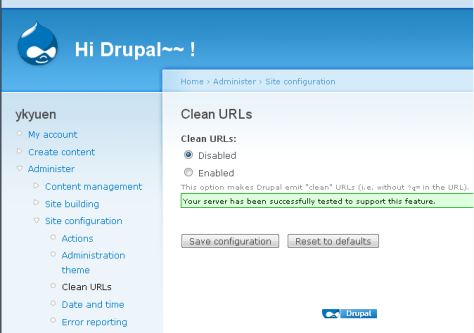
Done =)
Reference:

 Eureka!
Guys,
I have gone through this problem and you know what..it takes couple of days to configure I mean to understand and solve..
All the above instruction is just fine..only the confusion part is..@ the line
RewriteBase /drupal
in the place of drupal..just replace your folder name.Thats it..
Cheer!!
Mith
LikeLike
can you make me an email harvest software for a couple of sites?
LikeLike
Hi Delvin,
what do you mean?
Kit
LikeLike
Thank you! Worked fine with me.
(same feedback that mith495, you should write to change ‘drupal’ by the site directory name)
LikeLike
i have added a comment in the drupal.conf.
Thanks for the suggestion from u and mith495.
=)
LikeLike
Works like a charm!
Thanks a lot
LikeLike
you are welcome~ =)
LikeLike
Thank you.
LikeLike
Thanks for your comment~~ =D
LikeLike